 JustLearn
Lesson 1: The Three Modes of AI Coding
Course: AI-Powered Development (Dev Track) | Duration: 2 hours | Level: Beginner
Learning Objectives
By the end of this lesson, you will be able to:
- Name and clearly describe the three distinct modes of AI-assisted coding
- Explain the architectural difference between IDE Agents, Terminal Agents, and Autobots
- Choose the right tool for a given task using a decision framework
- Recognize the strengths and limitations of each mode
- Write effective prompts for each tool category
- Configure an IDE Agent with project-level conventions via rules files
- Identify when to combine modes for maximum productivity
Prerequisites
- Basic familiarity with a code editor (VS Code, any IDE)
- Ability to run commands in a terminal
- Some experience writing code in Python or JavaScript
- A conceptual understanding of what a large language model (LLM) is
Lesson Outline
- Part 1: Cold Open — Same Bug, Three Tools (20 min)
- Part 2: Mode 1 — IDE Agent (Cursor, Windsurf) (30 min)
- Part 3: Mode 2 — Terminal Agent (Claude Code, Gemini CLI, Codex CLI) (30 min)
- Part 4: Mode 3 — Autobot / Cloud Agent (GitHub Copilot Coding Agent, Devin) (30 min)
- Part 5: Comparison and Decision Framework (10 min)
- Part 6: Hands-on Exercise (20 min)
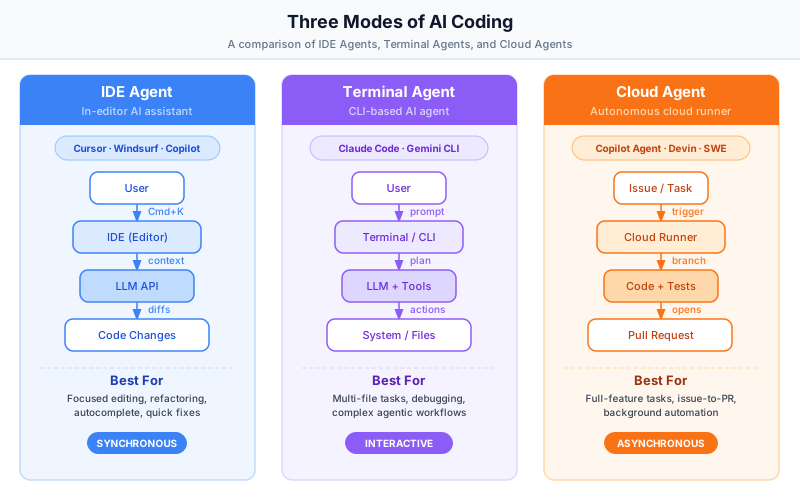
Part 1: Cold Open — Same Bug, Three Tools (20 min)
Explanation
Before categorizing tools, it helps to feel the difference between them. Let's start with a concrete bug and watch how three different modes of AI coding handle it — so you can develop an intuition for what each mode is good at.
The Scenario
You have a REST API built with FastAPI (Python). Users are reporting 500 errors. After investigation, you find the culprit: your API endpoint does not validate incoming payloads, so when a client sends a field with an empty string (e.g., "" for username), the endpoint tries to process it and crashes. Here is the broken code:
# app/routes/users.py
from fastapi import APIRouter, HTTPException
from pydantic import BaseModel
from app.db import create_user

router = APIRouter()

class UserCreateRequest(BaseModel):
    username: str
    email: str
    full_name: str

@router.post("/users")
async def create_user_endpoint(payload: UserCreateRequest):
    # BUG: no validation — empty strings crash create_user()
    user = await create_user(
        username=payload.username,
        email=payload.email,
        full_name=payload.full_name
    )
return {"id": user.id, "username": user.username}The equivalent JavaScript/Express version looks like this:
// routes/users.js
const express = require('express');
const { createUser } = require('../db');
const router = express.Router();

router.post('/users', async (req, res) => {
  // BUG: no validation — empty strings crash createUser()
  const { username, email, fullName } = req.body;
  try {
    const user = await createUser({ username, email, fullName });
    res.json({ id: user.id, username: user.username });
  } catch (err) {
    res.status(500).json({ error: 'Internal server error' });
  }
});

module.exports = router;
Now let's watch this same bug get fixed by each of the three modes.
Examples
Fix 1: Using an IDE Agent (Cursor)
You open app/routes/users.py in Cursor. You press Cmd+K and type:
"Add validation to reject empty string fields in this endpoint. Raise a 422 with a clear message for each invalid field."
The IDE Agent reads the file in context and rewrites it inline:
# app/routes/users.py  — FIXED by IDE Agent
from fastapi import APIRouter, HTTPException
from pydantic import BaseModel, field_validator
from app.db import create_user

router = APIRouter()

class UserCreateRequest(BaseModel):
    username: str
    email: str
    full_name: str

    @field_validator("username", "email", "full_name")
    @classmethod
    def must_not_be_empty(cls, v: str, info) -> str:
        if not v or not v.strip():
            raise ValueError(f"{info.field_name} must not be empty or whitespace")
        return v.strip()

@router.post("/users", status_code=201)
async def create_user_endpoint(payload: UserCreateRequest):
    user = await create_user(
        username=payload.username,
        email=payload.email,
        full_name=payload.full_name
    )
return {"id": user.id, "username": user.username}The fix happened in one file, inline, in under five seconds. You reviewed the diff in the editor and accepted it.
Fix 2: Using a Terminal Agent (Claude Code)
You open your terminal at the project root and type:
claude "The POST /users endpoint returns 500 errors when fields are empty strings.
Find the endpoint, add proper validation, and also check if any other POST
endpoints in app/routes/ have the same problem. Fix them all and run the tests."
Claude Code:
- Reads
app/routes/users.py,app/routes/products.py,app/routes/orders.py - Identifies that
users.pyandorders.pyboth lack empty-string validation - Patches both files
- Runs
pytest tests/— discovers one test was already testing the 500 case and now it fails (expected 500, got 422) - Updates that test to expect 422
- Runs
pytest tests/again — all pass - Reports: "Fixed empty-string validation in 2 routes. Updated 1 test. All 47 tests pass."
The terminal agent did not just fix one file — it searched the codebase, found related issues, fixed them, and validated the fix by running tests.
Fix 3: Using a Cloud Agent (GitHub Copilot Coding Agent)
You open GitHub, find the issue titled "POST /users returns 500 on empty fields", and assign it to Copilot. You go get coffee. Twenty minutes later, Copilot has:
- Created a branch
copilot/fix-empty-string-validation - Added
field_validatortoUserCreateRequest - Added a new test
test_create_user_rejects_empty_fields - Opened a PR with a description explaining the change
You review the PR, request one change (the error message wording), Copilot updates the branch, and you merge.
Practice
Take 5 minutes to answer these before moving on:
- Which mode required the most explicit guidance about where the bug was?
- Which mode could find additional related bugs without being told where to look?
- Which mode let you work on something else while the fix was being made?
Part 2: Mode 1 — IDE Agent (Cursor, Windsurf) (30 min)
Explanation
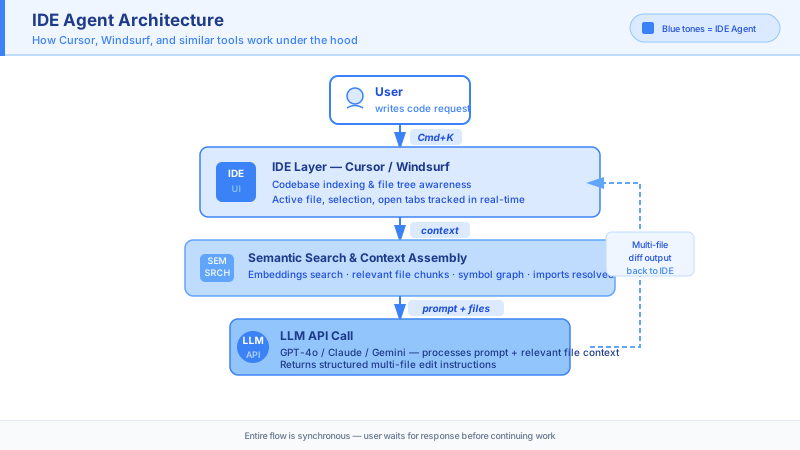
What Is an IDE Agent?
An IDE Agent is an AI-powered code editor — a full replacement for VS Code, JetBrains, or similar tools — where the AI is deeply integrated into the editing experience itself. Unlike a plugin bolted onto an existing editor, IDE Agents are built from the ground up with AI as a first-class citizen.
The two leading IDE Agents as of 2026 are:
-
Cursor — Built on VS Code's codebase (it uses the same extension ecosystem), so it feels immediately familiar. Cursor added its own AI layer on top: Tab completion, Cmd+K inline edits, a Chat panel, and a full Agent mode that can plan and execute multi-file changes autonomously.
-
Windsurf — Built by Codeium. Its signature feature is Cascade, a fully agentic AI that can reason across an entire repository. Windsurf Wave 13 (early 2026) introduced multi-agent sessions, Git worktrees, and SWE-grep for fast codebase search. Windsurf also integrates GPT-5.2-Codex, designed for long agentic coding sessions in large codebases.
How It Works: The Architecture
When you open a project in Cursor or Windsurf, the IDE does something VS Code does not: it indexes your entire codebase into a vector embedding database. This means every file, function, and class is embedded as a mathematical vector that encodes its meaning. When you ask the AI a question, the IDE performs a semantic search over those embeddings to find the most relevant files and code snippets, then sends those — along with your question — to the LLM as context.
                        IDE AGENT ARCHITECTURE
  ┌─────────────────────────────────────────────────────────────────┐
  │                         Your Project                            │
  │  app/routes/  app/models/  tests/  config/  requirements.txt   │
  └──────────────────────────┬──────────────────────────────────────┘
                             │  Index / Embed
                             ▼
  ┌──────────────────────────────────────────────────────────────────┐
  │               Codebase Embedding Database                        │
  │   [routes.py → vec]  [models.py → vec]  [tests/ → vec]  ...    │
  └──────────────────────────┬───────────────────────────────────────┘
                             │  Semantic Search (retrieve relevant files)
                             ▼
  ┌──────────────────────────────────────────────────────────────────┐
  │                    Context Assembly                              │
  │   Your prompt + relevant file snippets + open file + rules      │
  └──────────────────────────┬───────────────────────────────────────┘
                             │  Send to LLM
                             ▼
  ┌──────────────────────────────────────────────────────────────────┐
  │                  LLM (Claude, GPT-5, Gemini...)                  │
  │   Generates:  edits / new code / explanation / plan             │
  └──────────────────────────┬───────────────────────────────────────┘
                             │  Apply diffs
                             ▼
  ┌──────────────────────────────────────────────────────────────────┐
  │                    Code Changes in Editor                        │
  │   Inline diffs shown → You accept / reject / modify             │
  └──────────────────────────────────────────────────────────────────┘

  User ──► [prompt] ──► IDE ──► LLM ──► Code Changes ──► User review
Interaction Modes in Cursor
Cursor offers three levels of AI interaction:
| Interaction | Trigger | What It Does |
|---|---|---|
| Tab Completion | Start typing | Predicts the next line or block |
| Cmd+K (inline edit) | Cmd+K on selected code | Rewrites selected code per instruction |
| Agent Mode | Chat panel with Agent toggle | Plans + executes multi-file changes |
Cursor's Automations platform (launched March 2026) extends this further — you can configure always-on agents triggered by schedules or external events from Slack, Linear, GitHub, and PagerDuty. These agents can run for 25–52+ hours without supervision.
Teaching the IDE Your Conventions: .cursorrules and Rules Files
One of the most powerful features of IDE Agents is the ability to encode your team's conventions into a rules file. The IDE sends this file along with every prompt, so the AI always respects your standards.
In Cursor, create a .cursorrules file at the project root:
# .cursorrules — Project conventions for Cursor AI

## Stack
- Backend: Python 3.11+, FastAPI, SQLAlchemy 2.0, Pydantic v2
- Database: PostgreSQL via asyncpg
- Testing: pytest with pytest-asyncio

## Code Style
- Use type annotations on all function signatures
- Prefer async/await over synchronous I/O
- Use Pydantic field_validator for input validation, not manual if-statements
- Error responses must follow the format: {"detail": "...", "field": "..."}
- Never use print() for logging — use structlog

## File Organization
- Route handlers live in app/routes/<resource>.py
- Database queries live in app/repositories/<resource>.py
- Business logic lives in app/services/<resource>.py
- Never put SQL directly in route handlers

## Testing
- Every new endpoint must have at least one happy-path test and one error-path test
- Use factory_boy for test data, never hardcoded fixtures
- Test files mirror the app structure: tests/routes/, tests/services/

## Git
- Commit messages follow Conventional Commits: feat(), fix(), chore()
- Never commit directly to main
With this file in place, every AI suggestion in Cursor will automatically follow your project structure, use the right libraries, and match your error format. You never have to re-explain your stack on every prompt.
Windsurf has an equivalent: windsurfrules or the project rules panel in its Settings UI.
Examples
Example: "Add error handling to all API routes"
You have a FastAPI project where some routes have try/except blocks and some do not. You open Cursor's Agent mode and type:
"Add consistent error handling to all route files in app/routes/. Every endpoint should catch exceptions, log them with structlog, and return a 500 response in our standard error format. Don't change the existing business logic."
Before (app/routes/orders.py):
@router.post("/orders")
async def create_order(payload: OrderCreateRequest):
    order = await order_service.create(payload)
return {"id": order.id}After (generated by Cursor Agent):
import structlog

logger = structlog.get_logger(__name__)

@router.post("/orders", status_code=201)
async def create_order(payload: OrderCreateRequest):
    try:
        order = await order_service.create(payload)
        return {"id": order.id}
    except ValueError as e:
        logger.warning("order_create_validation_error", error=str(e))
        raise HTTPException(status_code=422, detail={"detail": str(e), "field": "payload"})
    except Exception as e:
        logger.error("order_create_unexpected_error", error=str(e), exc_info=True)
raise HTTPException(status_code=500, detail={"detail": "Internal server error", "field": None})Cursor applied this same transformation to all six route files, respecting the .cursorrules convention for error format and the structlog requirement. You reviewed each diff in the editor and accepted all of them in one click.
Practice
- Create a
.cursorrulesfile for a project you are currently working on. Include your stack, code style preferences, and one team convention that AI tools often get wrong. - In Cursor (or VS Code with Copilot), open a function that lacks error handling and use
Cmd+Kto add it. Notice how the AI follows or ignores your conventions. - Try Agent mode: ask the AI to "add docstrings to every public function in this file." Review the diff and note what it gets right and what it misses.
Discussion Questions
- When is it better to use
Cmd+K(targeted edit) vs. Agent mode (multi-step plan)? - What information would you put in
.cursorrulesto prevent the AI from making changes you would always reject?
Part 3: Mode 2 — Terminal Agent (Claude Code, Gemini CLI, Codex CLI) (30 min)
Explanation
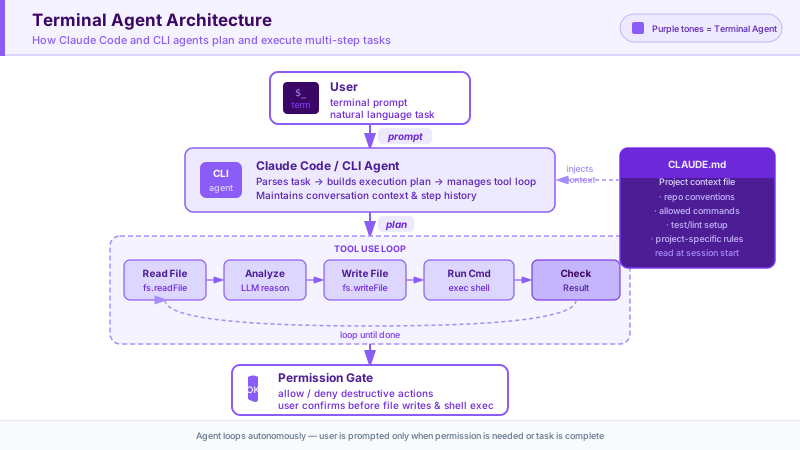
What Is a Terminal Agent?
A Terminal Agent is an AI assistant that lives in your terminal and has the ability to take real actions on your system. Unlike an IDE Agent, which operates inside a visual editor and focuses on code edits, a Terminal Agent can:
- Read and write any file on your filesystem
- Execute shell commands (
grep,find,curl,make,docker) - Run your test suite and read the results
- Commit code to Git
- Call external APIs
- Chain all of these operations together in a single autonomous session
Terminal agents turn your natural language instructions into a sequence of tool calls that operate on your actual system. They are the most powerful mode for complex, multi-step, cross-project operations.
The leading terminal agents as of 2026:
-
Claude Code (Anthropic) — The most capable terminal agent for software development. Uses Claude claude-sonnet-4-6 by default (as of this writing). Supports MCP (Model Context Protocol) for extending its tools, hooks for lifecycle management, plan mode for reviewing changes before execution, and Agent Teams for parallel sub-agent coordination. Available as a terminal command, VS Code extension, Cursor extension, Windsurf extension, and JetBrains plugin.
-
Codex CLI (OpenAI) — Open-source, built in Rust, backed by the GPT-5.x model family. Fast and lightweight. The macOS Codex App (February 2026) can run multiple agents in parallel, each in its own sandbox, with diff-view review on completion.
-
Gemini CLI (Google) — Google's terminal agent, leveraging Gemini's 1M+ token context window for ingesting large codebases in a single session.
How It Works: The Architecture
Terminal agents operate through a tool-use loop. The agent receives your instruction, decides which tools to call, calls them, observes the results, and iterates until the task is complete.
                      TERMINAL AGENT ARCHITECTURE
  ┌───────────────────────────────────────────────────────────────────┐
  │  You                                                              │
  │  $ claude "Find all TODO comments, create GitHub issues for each" │
  └──────────────────────┬────────────────────────────────────────────┘
                         │
                         ▼
  ┌───────────────────────────────────────────────────────────────────┐
  │  Terminal Agent (Claude Code)                                     │
  │  ┌─────────────────────────────────────────────────────────────┐ │
  │  │  LLM Reasoning Layer                                        │ │
  │  │  "I need to: 1) find all TODO comments  2) for each one,   │ │
  │  │   extract context  3) call gh to create an issue"           │ │
  │  └───────────────────────┬─────────────────────────────────────┘ │
  │                          │  decides to call tools                │
  │  ┌───────────────────────▼─────────────────────────────────────┐ │
  │  │  Tool Dispatcher                                            │ │
  │  │  • read_file(path)       • write_file(path, content)        │ │
  │  │  • bash(command)         • list_directory(path)             │ │
  │  │  • search_files(pattern) • mcp_tool(name, args)             │ │
  │  └───────────────────────┬─────────────────────────────────────┘ │
  └──────────────────────────┼────────────────────────────────────────┘
                             │  executes against
                             ▼
  ┌───────────────────────────────────────────────────────────────────┐
  │  Your System                                                      │
  │  ┌──────────────┐  ┌──────────────┐  ┌──────────────────────┐   │
  │  │  Filesystem  │  │  Shell / CLI │  │  Git / GitHub API    │   │
  │  │  (read/write)│  │  (run tests) │  │  (issues, PRs, etc.) │   │
  │  └──────────────┘  └──────────────┘  └──────────────────────┘   │
  └───────────────────────────────────────────────────────────────────┘

  User ──► Terminal ──► LLM ──► Tools ──► System ──► Results ──► LLM (loop)
The key difference from an IDE Agent is the Tools → System step: the terminal agent is actually running commands on your machine, not just suggesting text edits in an editor.
CLAUDE.md: Teaching Claude Code About Your Project
Just as Cursor has .cursorrules, Claude Code reads a file called CLAUDE.md at the root of your project. This file is automatically injected into every Claude Code session as context.
# CLAUDE.md — Project context for Claude Code

## What This Project Is
A FastAPI REST API for an e-commerce platform. Serves the mobile app and web frontend.

## Key Commands
- Run tests: `pytest tests/ -v`
- Start dev server: `uvicorn app.main:app --reload`
- Run linter: `ruff check . && mypy app/`
- Apply migrations: `alembic upgrade head`

## Architecture
- app/routes/ — FastAPI route handlers (thin layer, no business logic)
- app/services/ — Business logic
- app/repositories/ — Database queries (SQLAlchemy async)
- app/models/ — Pydantic models and SQLAlchemy ORM models

## Important Rules
- Never modify alembic/versions/ migration files directly
- All database changes must go through alembic migrations
- Integration tests in tests/integration/ require a running PostgreSQL instance
- Do not add synchronous database calls — use async everywhere

## Current Work in Progress
- Migrating from SQLAlchemy 1.4 to 2.0 — use new Session.execute() style, not Query API
This file means you never have to re-explain your project structure, test commands, or migration workflow to Claude Code.
Permission Gates
Terminal agents have real power, so they have safety controls. Claude Code uses a permission system:
- Read-only operations (reading files, grepping code) — allowed by default, no prompt
- Write operations (editing files, creating files) — Claude shows you a diff and asks for confirmation
- Shell commands (running tests, git operations) — Claude shows you the exact command and asks before running it
- Dangerous commands (rm -rf, network calls) — requires explicit approval
You can also run Claude Code with --dangerously-skip-permissions in trusted automated environments (like CI), but in interactive use the permission gates are there so you stay in control.
Examples
Example: "Find all TODO comments, create GitHub issues for each"
Here is what actually happens when you run this command:
$ claude "Find all TODO comments in the codebase, create a GitHub issue for each
one with: the file path, line number, the TODO text, and relevant surrounding
code as context. Label them all 'tech-debt'."
Claude Code executes the following steps (you can watch each one in the terminal):
Step 1: Search for TODOs
  Tool: bash("grep -rn 'TODO' app/ tests/ --include='*.py'")
  Result: Found 8 TODOs across 5 files

Step 2: Read each file for context
  Tool: read_file("app/services/payment.py")
  Tool: read_file("app/routes/checkout.py")
  ... (reads all 5 files)

Step 3: For each TODO, create a GitHub issue
  Tool: bash("gh issue create --title 'TODO: Implement refund webhook handler'
              --body '**File:** app/services/payment.py\n**Line:** 142\n\n
              **TODO text:** TODO: implement refund webhook handler\n\n
              **Context:**\n```python\n# TODO: implement refund webhook handler\n
              # Currently webhooks from Stripe are logged but not processed\ndef handle_webhook(event):\n    logger.info(event)\n```'
              --label 'tech-debt'")
  Created: Issue #47

  Tool: bash("gh issue create ...")
  Created: Issue #48

  ... (creates 8 issues total)

Step 4: Summary
  "Created 8 GitHub issues (# 47–54) for TODO comments found across 5 files.
   All labeled 'tech-debt'. See: https://github.com/org/repo/issues?label=tech-debt"
This task would have taken a developer 20–30 minutes manually. Claude Code completed it in under 2 minutes.
Example: Generating Tests for a New Module
$ claude "I just added app/services/inventory.py. Generate a comprehensive test
file for it in tests/services/test_inventory.py. Cover happy paths, edge cases,
and error conditions. Use our existing test patterns from tests/services/test_orders.py
as a style reference."
Claude Code:
- Reads
app/services/inventory.pyto understand all functions and their signatures - Reads
tests/services/test_orders.pyto understand your test patterns, fixtures, and naming conventions - Writes
tests/services/test_inventory.pymatching your conventions - Runs
pytest tests/services/test_inventory.py -vto verify all generated tests actually pass - Fixes any tests that fail due to incorrect assumptions
- Reports: "Generated 23 tests. All pass."
Practice
- Navigate to a project on your machine. Run
claude "Give me an overview of this codebase — what it does, the main components, and any obvious issues you notice."Observe how it reads files and synthesizes information. - Create a
CLAUDE.mdin a project root. Run a task and notice how Claude uses the context from that file. - Try a multi-step task:
claude "Find all functions in this project that have no docstring, add a one-sentence docstring to each one, then run the tests to make sure nothing broke."Watch the tool-use loop in action.
Discussion Questions
- What types of tasks would you NOT want to give a terminal agent? (Think about irreversible operations.)
- How does the CLAUDE.md file change the quality of Claude Code's output?
Part 4: Mode 3 — Autobot / Cloud Agent (GitHub Copilot Coding Agent, Devin) (30 min)
Explanation
What Is an Autobot / Cloud Agent?
The third mode is fundamentally different from the first two. IDE Agents and Terminal Agents are both synchronous: you give them a task, you watch them work, and you interact with them in real time. Autobots are asynchronous and cloud-based — you assign them a task and they work in the background, completely independently, while you do other things.
An Autobot is a cloud-hosted AI agent that:
- Receives a task via a GitHub issue, a Jira ticket, or a chat prompt
- Spins up a cloud environment (a container with your code checked out)
- Writes code, runs tests, fixes failing tests, iterates
- Commits the result to a new branch
- Opens a pull request for human review
The model is closer to assigning work to a junior developer than to using a coding tool. You describe what you want, assign it, and come back later to review the output.
The leading Autobots as of 2026:
-
GitHub Copilot Coding Agent — The most widely accessible Autobot, available on GitHub Pro, Pro+, Business, and Enterprise plans. Assign a GitHub issue to Copilot and it opens a PR. As of March 2026, the coding agent is generally available. Agentic code review (also March 2026) allows Copilot to review a PR, generate fix suggestions, and pass those directly to the coding agent to create fix PRs automatically.
-
Devin (Cognition AI) — The first fully autonomous AI software engineer. Devin can handle complex engineering tasks including setting up development environments, building features from scratch, debugging production issues, and navigating unfamiliar codebases. Cognition has announced plans to merge Windsurf IDE capabilities with Devin for fully autonomous workflows.
How It Works: The Architecture
                       AUTOBOT / CLOUD AGENT ARCHITECTURE
  ┌────────────────────────────────────────────────────────────────────┐
  │  GitHub                                                            │
  │  Issue #88: "Add dark mode support to the settings page"          │
  │  Assigned to: @Copilot                                             │
  └──────────────────────────┬─────────────────────────────────────────┘
                             │  triggers
                             ▼
  ┌────────────────────────────────────────────────────────────────────┐
  │  Cloud Agent Environment (GitHub Actions runner)                   │
  │                                                                    │
  │  ┌──────────────────────────────────────────────────────────────┐ │
  │  │  1. Clone repo → copilot/dark-mode-settings (#88)            │ │
  │  │  2. Read issue + linked files + codebase                     │ │
  │  │  3. Plan: which files to change, what changes to make        │ │
  │  │  4. Write code changes                                       │ │
  │  │  5. Run test suite                                           │ │
  │  │  6. Fix failing tests                                        │ │
  │  │  7. Repeat until tests pass                                  │ │
  │  └──────────────────────────────────────────────────────────────┘ │
  └──────────────────────────┬─────────────────────────────────────────┘
                             │  opens
                             ▼
  ┌────────────────────────────────────────────────────────────────────┐
  │  Pull Request #89                                                   │
  │  Branch: copilot/dark-mode-settings                                │
  │  Title: "Add dark mode support to settings page (resolves #88)"    │
  │  Description: [auto-generated explanation of changes]              │
  │  Status: All 94 tests pass                                         │
  └──────────────────────────┬─────────────────────────────────────────┘
                             │  you review
                             ▼
  ┌────────────────────────────────────────────────────────────────────┐
  │  You                                                               │
  │  Review PR → Request changes → Copilot updates branch → Merge      │
  └────────────────────────────────────────────────────────────────────┘

  Issue ──► Cloud Agent ──► Branch ──► Code + Tests ──► PR ──► Review ──► Merge
Writing Issues That Autobots Can Execute
Since you are not there to answer clarifying questions in real time, the quality of the issue description determines the quality of the output. A vague issue produces a vague PR.
Bad issue (too vague):
Title: Fix the login bug
Description: Users are having problems logging in.
Good issue (actionable for an Autobot):
Title: Fix 401 error when login payload contains uppercase email

Description:
## Problem
When a user registers with "User@Example.com" and then tries to log in with
"user@example.com", they receive a 401 Unauthorized response.

## Root Cause (suspected)
The login endpoint in app/routes/auth.py compares emails case-sensitively.
The registration endpoint stores the email exactly as provided.

## Expected Behavior
Email comparison during login should be case-insensitive.
The stored email should be normalized to lowercase at registration time.

## Affected Files
- app/routes/auth.py (login endpoint)
- app/routes/users.py (registration endpoint)
- app/repositories/user_repo.py (get_user_by_email query)

## Acceptance Criteria
- [ ] POST /auth/login succeeds with any case variation of the registered email
- [ ] New registrations store emails in lowercase
- [ ] Existing test test_login_success still passes
- [ ] New test covers case-insensitive login
With a well-written issue, GitHub Copilot Coding Agent can produce a PR that requires minimal revision.
Examples
Example: "Add dark mode support"
Issue #72: Add dark mode support to the settings page

The settings page at /settings needs a dark mode toggle.

Technical context:
- Frontend: React 18, Tailwind CSS 3.4
- The theme is controlled by a `data-theme` attribute on <html>
- We use localStorage to persist the preference (key: "theme")
- The toggle should be in the "Appearance" section of settings (Settings.jsx, line 134)
- Use our existing Toggle component from src/components/ui/Toggle.jsx
- Follow the pattern in src/features/notifications/NotificationToggle.jsx for the
  hook + localStorage pattern

Acceptance criteria:
- Toggle switches between light/dark mode
- Preference persists across page refreshes
- Dark mode applies system-wide (data-theme on html element)
- Existing tests still pass
- New test covers the toggle behavior
Twenty minutes after assigning this to Copilot Coding Agent, a PR appears with:
// src/features/settings/DarkModeToggle.jsx  (new file)
import { useState, useEffect } from 'react';
import Toggle from '../ui/Toggle';

export function DarkModeToggle() {
  const [isDark, setIsDark] = useState(
    () => localStorage.getItem('theme') === 'dark'
  );

  useEffect(() => {
    document.documentElement.setAttribute('data-theme', isDark ? 'dark' : 'light');
    localStorage.setItem('theme', isDark ? 'dark' : 'light');
  }, [isDark]);

  return (
    <Toggle
      label="Dark mode"
      checked={isDark}
      onChange={setIsDark}
    />
  );
}
And a test:
// src/features/settings/__tests__/DarkModeToggle.test.jsx
import { render, screen, fireEvent } from '@testing-library/react';
import { DarkModeToggle } from '../DarkModeToggle';

beforeEach(() => {
  localStorage.clear();
  document.documentElement.removeAttribute('data-theme');
});

test('defaults to light mode when no preference is stored', () => {
  render(<DarkModeToggle />);
  expect(document.documentElement.getAttribute('data-theme')).toBe('light');
});

test('toggles to dark mode and persists the preference', () => {
  render(<DarkModeToggle />);
  fireEvent.click(screen.getByRole('checkbox'));
  expect(document.documentElement.getAttribute('data-theme')).toBe('dark');
  expect(localStorage.getItem('theme')).toBe('dark');
});

test('reads dark mode preference from localStorage on mount', () => {
  localStorage.setItem('theme', 'dark');
  render(<DarkModeToggle />);
  expect(document.documentElement.getAttribute('data-theme')).toBe('dark');
});
Limitations to Know
Autobots are powerful but have real constraints you need to understand:
-
Less control during execution — You cannot steer them mid-task the way you can in an IDE Agent or Terminal Agent. If they go in the wrong direction, you find out at PR review time.
-
Need clear issue descriptions — The more ambiguous the issue, the more likely the PR needs heavy revision.
-
PR review iteration — Expect 1–3 rounds of review comments before merging. The first PR is rarely perfect.
-
Limited access to runtime context — Cloud agents work from the code alone. They cannot observe your running application, read production logs, or interact with a browser. Tasks that require observing runtime behavior are not a good fit.
-
Test suite dependency — Autobots rely heavily on your test suite to know if their changes work. A project with poor test coverage will produce PRs that pass CI but have subtle bugs.
Practice
- Write a well-structured GitHub issue for a small feature or bug in one of your projects. Include root cause, affected files, and acceptance criteria as if an Autobot will execute it.
- If you have GitHub Copilot (Pro+), assign the issue to Copilot and observe the PR it produces.
- Compare the PR quality with a vague version of the same issue.
Discussion Questions
- What kinds of tasks are ideal for Autobots? What kinds should you never give them?
- How does your test suite quality affect the reliability of Autobot output?
Part 5: Comparison and Decision Framework (10 min)
Explanation
Now that you understand each mode in depth, here is how to think about choosing between them.
Comprehensive Comparison Table
| Dimension | IDE Agent (Cursor / Windsurf) | Terminal Agent (Claude Code / Codex) | Autobot (Copilot Agent / Devin) |
|---|---|---|---|
| Examples | Cursor, Windsurf | Claude Code, Codex CLI, Gemini CLI | GitHub Copilot Coding Agent, Devin |
| Where it runs | Inside your editor | Your terminal | Cloud (GitHub Actions / cloud VM) |
| Interaction style | Synchronous, inline, visual | Synchronous, conversational | Asynchronous, fire-and-forget |
| Sees your codebase | Yes (indexed embeddings) | Yes (reads files on demand) | Yes (clones repo) |
| Can run commands | Limited (some agents can) | Yes (full shell access) | Yes (in sandboxed environment) |
| Can run your tests | Limited | Yes | Yes |
| Multi-file edits | Yes | Yes | Yes |
| Control level | High (review each diff) | High (permission gates) | Lower (review at PR time) |
| Best for | Daily coding, refactoring, in-context feature work | Multi-step tasks, codebase-wide ops, automation | Routine tasks, parallelizable work, async execution |
| Granularity | Single file to multi-file | Single command to full workflow | Full feature / full bug fix |
| Key context file | .cursorrules / windsurfrules | CLAUDE.md | GitHub issue description |
| Typical latency | Seconds | Seconds to minutes | Minutes to hours |
Decision Flowchart
What kind of task do you have?
│
├── "I'm actively writing or editing code right now, in one or a few files"
│    └── IDE Agent (Cursor / Windsurf)
│         Use Cmd+K for targeted edits, Agent mode for multi-file refactors
│
├── "I need to do something that spans the whole codebase or requires running commands"
│    ├── "I need to be present and guide it" ──► Terminal Agent (Claude Code)
│    │    Examples: fix a tricky bug, explore an unfamiliar codebase,
│    │    run and fix failing tests, generate test files, search + modify
│    │
│    └── "I want to set it loose and check the result later" ──► Autobot
│         Examples: implement a well-scoped issue, migrate a config format,
│         add logging across all handlers
│
├── "I have a clearly described feature or bug that can work asynchronously"
│    └── Autobot (GitHub Copilot Coding Agent / Devin)
│         Write a detailed issue → Assign → Review the PR
│
└── "I'm not sure where the bug is yet — I need to explore"
     └── Terminal Agent (Claude Code)
          Let it read your codebase, hypothesize, run tests, investigate
Quick Reference Card
┌────────────────────────────────────────────────────────────────────┐
│  AI CODING MODE — QUICK REFERENCE                                  │
├───────────────┬────────────────────────────────────────────────────┤
│  IDE Agent    │  You are in your editor and need a code change now │
│               │  → Open Cursor / Windsurf                          │
│               │  → Cmd+K for one change, Agent for multi-file      │
│               │  → Put conventions in .cursorrules                 │
├───────────────┼────────────────────────────────────────────────────┤
│  Terminal     │  You need to run, search, test, or chain operations │
│  Agent        │  → Run: claude "..."                               │
│               │  → Set up CLAUDE.md first                          │
│               │  → Review each tool call before it executes        │
├───────────────┼────────────────────────────────────────────────────┤
│  Autobot      │  You have a well-scoped task and don't need to     │
│               │  watch it work                                     │
│               │  → Write a detailed GitHub issue                   │
│               │  → Assign to Copilot / Devin                       │
│               │  → Review the PR (expect 1-2 revision rounds)      │
└───────────────┴────────────────────────────────────────────────────┘
Part 6: Hands-on Exercise (20 min)
Explanation
The goal of this exercise is to get hands-on time with each mode and build intuition for which tool feels right for which task.
You have three tasks. Each task has an "ideal" tool, but try them all and compare the experience.
Task 1: Fix a Simple Bug (Best Tool: IDE Agent)
Setup
Create a file called validator.py:
# validator.py
def validate_user_input(data: dict) -> dict:
    """Validate user registration input. Returns cleaned data or raises ValueError."""
    # BUG 1: does not check for empty strings
    # BUG 2: does not validate email format
    # BUG 3: does not enforce minimum password length

    username = data.get("username")
    email = data.get("email")
    password = data.get("password")

    if not username:
        raise ValueError("Username is required")
    if not email:
        raise ValueError("Email is required")
    if not password:
        raise ValueError("Password is required")

    return {
        "username": username,
        "email": email,
        "password": password
}Your Task
Using an IDE Agent (Cursor or VS Code with Copilot):
- Use
Cmd+Kto fix Bug 1: reject empty strings (not just missing keys) - Use
Cmd+Kagain to fix Bug 2: validate thatemailcontains@and a. - Use
Cmd+Kagain to fix Bug 3: enforce minimum 8-character password
Expected Result
import re

def validate_user_input(data: dict) -> dict:
    """Validate user registration input. Returns cleaned data or raises ValueError."""
    username = data.get("username", "").strip()
    email = data.get("email", "").strip().lower()
    password = data.get("password", "")

    if not username:
        raise ValueError("Username is required and must not be empty")

    if not email:
        raise ValueError("Email is required and must not be empty")
    if not re.match(r"^[^@]+@[^@]+\.[^@]+$", email):
        raise ValueError("Email must be a valid email address")

    if not password:
        raise ValueError("Password is required and must not be empty")
    if len(password) < 8:
        raise ValueError("Password must be at least 8 characters")

    return {
        "username": username,
        "email": email,
        "password": password,
}Discussion Questions
- How many keystrokes did each fix take?
- Did the IDE Agent understand each change in isolation, or did it see the full context of all three bugs?
Task 2: Generate Test Files for 5 Modules (Best Tool: Terminal Agent)
Setup
Imagine you have five service modules in app/services/:
user_service.py— user CRUDorder_service.py— order managementpayment_service.py— payment processinginventory_service.py— stock trackingnotification_service.py— email/SMS dispatch
None of them have test files yet.
Your Task
Using a Terminal Agent (Claude Code):
claude "Look at all the files in app/services/. For each service module,
generate a corresponding test file in tests/services/ following the naming
convention test_<module_name>.py. Each test file should:
1. Import the service module
2. Have at least one test for each public function
3. Use pytest and standard mocking patterns
4. Follow the structure of any existing test files you find in tests/

After generating the files, run pytest tests/services/ to see how many pass."
What to Observe
Watch Claude Code:
- Read each service file to understand the functions
- Look for existing test patterns in your project
- Generate each test file
- Run the tests
- Fix any import errors or obvious test mistakes
Discussion Questions
- Would you have done this task differently with an IDE Agent? Why?
- How much manual correction did the generated tests need?
Task 3: Add Logging to All Error Handlers (Best Tool: Terminal Agent or IDE Agent)
Setup
Create a small FastAPI application with multiple routes that catch exceptions but do not log them:
# app/routes/checkout.py
from fastapi import APIRouter, HTTPException
from app.services.order_service import create_order, calculate_total

router = APIRouter()

@router.post("/checkout")
async def checkout(cart_id: str, user_id: str):
    try:
        total = await calculate_total(cart_id)
        order = await create_order(cart_id=cart_id, user_id=user_id, total=total)
        return {"order_id": order.id, "total": total}
    except ValueError as e:
        raise HTTPException(status_code=400, detail=str(e))
    except Exception as e:
        raise HTTPException(status_code=500, detail="Checkout failed")
        # BUG: we swallow the exception — no logging, no visibility
# app/routes/refunds.py
from fastapi import APIRouter, HTTPException
from app.services.payment_service import process_refund
router = APIRouter()
@router.post("/refunds/{order_id}")
async def create_refund(order_id: str, reason: str):
try:
result = await process_refund(order_id=order_id, reason=reason)
return {"refund_id": result.id, "status": result.status}
except ValueError as e:
raise HTTPException(status_code=400, detail=str(e))
except Exception as e:
raise HTTPException(status_code=500, detail="Refund failed")
# BUG: same problem — silent failureYour Task
Try both approaches and compare:
Approach A: IDE Agent
- Open
checkout.pyin Cursor - Use Agent mode: "Add structlog logging to all except blocks in app/routes/. Log the exception with the route name and relevant parameters."
- Review each diff
Approach B: Terminal Agent
claude "Find all bare except blocks in app/routes/ that don't log the exception.
Add structlog error logging to each one. Include the exception details and any
relevant parameters from the function signature. Don't change any other logic."
Expected Result (either approach should produce):
# app/routes/checkout.py  — FIXED
import structlog
from fastapi import APIRouter, HTTPException
from app.services.order_service import create_order, calculate_total

logger = structlog.get_logger(__name__)
router = APIRouter()

@router.post("/checkout")
async def checkout(cart_id: str, user_id: str):
    try:
        total = await calculate_total(cart_id)
        order = await create_order(cart_id=cart_id, user_id=user_id, total=total)
        return {"order_id": order.id, "total": total}
    except ValueError as e:
        logger.warning("checkout_validation_error", cart_id=cart_id, user_id=user_id, error=str(e))
        raise HTTPException(status_code=400, detail=str(e))
    except Exception as e:
        logger.error("checkout_unexpected_error", cart_id=cart_id, user_id=user_id, error=str(e), exc_info=True)
raise HTTPException(status_code=500, detail="Checkout failed")Discussion Questions
- Which approach (IDE Agent vs Terminal Agent) required less effort for this task?
- If you had 20 route files instead of 2, which approach would scale better?
- What is the difference in how you control the change in each mode?
Checkpoint
Before moving to the next lesson, make sure you can answer all of these:
- What are the three modes of AI coding? Name a tool for each.
- What does an IDE Agent index about your codebase, and why does it matter?
- What file does Cursor read for project conventions? What does Claude Code read?
- What can a Terminal Agent do that an IDE Agent typically cannot?
- How does a Cloud Agent receive its task? How does it deliver its output?
- For a task like "find all places we use a deprecated API and update them across 50 files" — which mode would you use and why?
- What are two signs that a task is well-suited for a Cloud Agent (Autobot)?
Key Takeaways
The three modes of AI coding are not competing tools — they are complementary. Each one fits a different type of work.
Summary Table
| Mode | What It Is | You Use It When | Key File |
|---|---|---|---|
| IDE Agent | AI-native editor with codebase awareness | Writing, editing, refactoring code in real time | .cursorrules / windsurfrules |
| Terminal Agent | AI in your terminal with system access | Multi-step tasks, codebase-wide ops, running tests, automation | CLAUDE.md |
| Autobot | Async cloud agent that opens PRs | Well-scoped features/bugs you want done asynchronously | GitHub Issue description |
The Most Important Insight
The shift in 2026 is not "AI will write code instead of you." It is "AI will handle the mechanical work so you focus on the thinking work." IDE Agents handle the mechanical edits. Terminal Agents handle the mechanical operations. Autobots handle the mechanical implementation of well-defined tasks.
Your job as a developer is evolving toward: writing clear problem descriptions, designing systems, reviewing AI output critically, and knowing which tool to deploy for which job.
The developers who learn to use all three modes fluently — and who learn to write the context files (.cursorrules, CLAUDE.md, GitHub issues) that make AI output high-quality — will have a significant productivity advantage.
A Rule of Thumb
- If you can see it in your editor right now → IDE Agent
- If you need to run something or touch many files → Terminal Agent
- If you can describe it clearly and check it later → Autobot
Next Lesson
Lesson 2: The Model Zoo — Which LLM Is Under the Hood?
You will learn how to choose the right underlying model (Claude, GPT-5, Gemini) for different coding tasks, understand the tradeoffs between speed, cost, and capability, and configure your tools to use the best model for each situation.
Last updated: April 2026