 JustLearn
Lesson 4: Model Selection Strategy — Decision Framework
Course: AI-Powered Development (Dev Track) | Duration: 2 hours | Level: Beginner
Learning Objectives
By the end of this lesson, you will be able to:
- Classify AI models into a four-tier ladder based on capability and cost
- Map any development task to the appropriate model tier using a structured decision framework
- Implement a simple model router in code to programmatically select models
- Explain context window constraints and use them as a selection criterion
- Build a personal model cheat sheet tuned to your tech stack and workflow
Prerequisites
- Lesson 3: Tour of the Model Zoo (awareness of which models exist)
- Basic familiarity with calling APIs or using an AI IDE (Cursor, VS Code + Copilot, etc.)
Part 1: The Model Ladder (20 min)
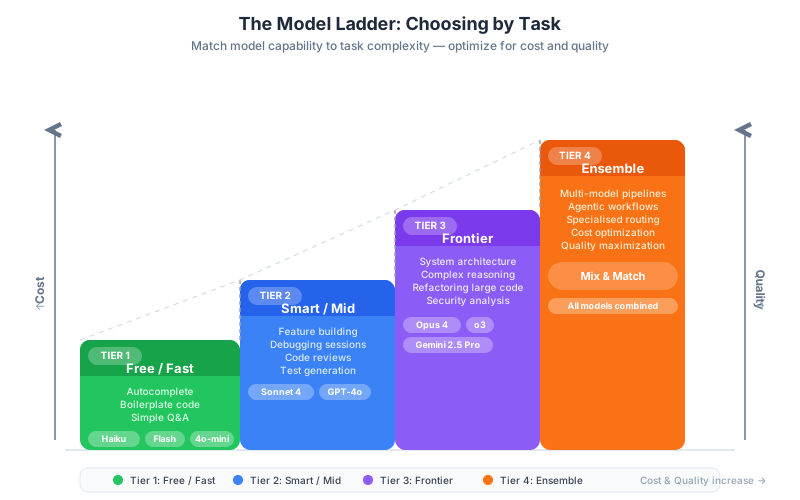
Why Tiers Matter
The single most common mistake developers make with AI models is using the same model for every task. Using a frontier model to complete a function signature wastes roughly 20–50x the cost. Using a fast, cheap model to design a distributed system risks getting architecturally broken advice. Model selection is a skill — and like any skill, it has a framework.
The Model Ladder organizes every major LLM into four tiers. The tiers are not about which model is "best." They are about matching capability and cost to the task at hand.
+------------------------------------------------------------------+
|                     THE MODEL LADDER                             |
+------------------------------------------------------------------+
|                                                                  |
|  TIER 4 — ENSEMBLE                                              |
|  ┌────────────────────────────────────────────────────────────┐ |
|  │  Multiple models working together                          │ |
|  │  Use: High-stakes decisions, cross-validation, pipelines   │ |
|  │  Cost: Variable (orchestration overhead)                   │ |
|  └────────────────────────────────────────────────────────────┘ |
|                            ▲                                     |
|                            │ when you need certainty            |
|                            │                                     |
|  TIER 3 — FRONTIER                                              |
|  ┌────────────────────────────────────────────────────────────┐ |
|  │  Claude Opus 4, OpenAI o3, Gemini 2.5 Pro                  │ |
|  │  Use: Architecture, complex reasoning, novel problems      │ |
|  │  Cost: $15–$75 per 1M input tokens                         │ |
|  └────────────────────────────────────────────────────────────┘ |
|                            ▲                                     |
|                            │ when task requires deep reasoning  |
|                            │                                     |
|  TIER 2 — SMART / MID                                          |
|  ┌────────────────────────────────────────────────────────────┐ |
|  │  Claude Sonnet 4, GPT-4o, Gemini 1.5 Pro                   │ |
|  │  Use: Feature building, refactoring, debugging, reviews    │ |
|  │  Cost: $3–$15 per 1M input tokens                          │ |
|  └────────────────────────────────────────────────────────────┘ |
|                            ▲                                     |
|                            │ when output quality matters        |
|                            │                                     |
|  TIER 1 — FAST / FREE                                          |
|  ┌────────────────────────────────────────────────────────────┐ |
|  │  Claude Haiku 3.5, Gemini 2.0 Flash, GPT-4o-mini           │ |
|  │  Use: Autocomplete, boilerplate, simple Q&A, formatting    │ |
|  │  Cost: $0.08–$1.00 per 1M input tokens                     │ |
|  └────────────────────────────────────────────────────────────┘ |
+------------------------------------------------------------------+
Tier 1: Fast / Free — The Workhorses
These models are optimized for speed and volume. Response latency is typically under 1 second. They excel at tasks where the answer space is constrained and errors are cheap to catch.
Primary models (as of April 2026):
| Model | Provider | Input Price | Output Price | Context |
|---|---|---|---|---|
| Claude Haiku 3.5 | Anthropic | $0.80/M | $4.00/M | 200K |
| Gemini 2.0 Flash | $0.10/M | $0.40/M | 1M | |
| GPT-4o-mini | OpenAI | $0.15/M | $0.60/M | 128K |
| Llama 3.1 8B (hosted) | Meta/Groq | ~$0.05/M | ~$0.08/M | 128K |
Best for:
- Inline autocomplete and tab-completion (the kind your IDE does thousands of times per day)
- Generating boilerplate: CRUD endpoints, migration files, test stubs, configuration templates
- Simple Q&A: "What is the syntax for a Python list comprehension?" or "How do I sort by a key in Go?"
- Formatting and linting hints
- Summarizing short documents
- Translating between similar languages (Python to JavaScript for a trivial function)
Not good for:
- Multi-file reasoning
- Complex debugging with non-obvious root causes
- Designing new systems or APIs
- Anything requiring sustained multi-step logic
Rule of thumb: If you could look up the answer in 30 seconds on a well-written documentation page, Tier 1 is sufficient.
Tier 2: Smart / Mid — The Development Partner
This is the tier you will use for the majority of active development work. These models have strong reasoning, can hold large codebases in context, understand architectural intent, and can produce production-quality code with minimal revision.
Primary models (as of April 2026):
| Model | Provider | Input Price | Output Price | Context |
|---|---|---|---|---|
| Claude Sonnet 4 | Anthropic | $3.00/M | $15.00/M | 200K |
| GPT-4o | OpenAI | $5.00/M | $15.00/M | 128K |
| Gemini 1.5 Pro | $3.50/M | $10.50/M | 1M | |
| Mistral Large | Mistral | $4.00/M | $12.00/M | 128K |
Best for:
- Implementing features end-to-end (write the handler, the service layer, and the tests)
- Refactoring code across multiple files
- Debugging with stack traces and multiple candidate causes
- Writing and reviewing pull requests
- Explaining complex existing code
- Converting requirements into implementation plans
- Security reviews of specific components
Not good for:
- Novel algorithm design with deep mathematical reasoning
- System-wide architectural decisions across dozens of services
- Tasks requiring PhD-level domain expertise
Rule of thumb: If the task would take a competent junior developer 30 minutes to 2 hours, Tier 2 is the right call.
Tier 3: Frontier — The Deep Thinker
Frontier models are reserved for tasks where reasoning quality has a direct business impact. They are significantly more expensive but produce qualitatively different output on hard problems — they consider more edge cases, make fewer logical errors, and can reason across very large codebases.
Primary models (as of April 2026):
| Model | Provider | Input Price | Output Price | Context |
|---|---|---|---|---|
| Claude Opus 4 | Anthropic | $15.00/M | $75.00/M | 200K |
| OpenAI o3 | OpenAI | $10.00/M | $40.00/M | 200K |
| Gemini 2.5 Pro | $7.00/M | $21.00/M | 1M | |
| OpenAI o1 | OpenAI | $15.00/M | $60.00/M | 128K |
Best for:
- Designing system architecture: data models, service boundaries, API contracts
- Novel algorithm design (implementing a custom scheduler, a query optimizer, a conflict resolution strategy)
- Complex debugging across the entire call stack with subtle race conditions or memory issues
- Security-sensitive decisions: cryptographic choices, authentication flows, authorization models
- Evaluating architectural tradeoffs with long-range consequences
- Writing technical specifications that will guide other developers
Not good for:
- High-volume, repetitive tasks (the cost is prohibitive)
- Simple boilerplate and autocomplete
- Tasks where a Tier 2 model already produces correct output
Rule of thumb: If the decision will be difficult or expensive to reverse, use a frontier model. If a mistake here costs hours or days of developer time, the frontier model's higher cost is justified.
Tier 4: Ensemble — Multiple Models for Multiple Strengths
Ensemble usage means routing different parts of a task to different models, or using multiple models to cross-check each other. This is an advanced pattern, but understanding it conceptually is important.
Common ensemble patterns:
Draft + Critique: Use a Tier 2 model to produce a first draft, then send that draft to a Tier 3 model with the instruction "critique this and identify flaws." This costs much less than running everything through Tier 3.
Specialized routing: Use a code-specific model for code tasks and a general reasoning model for planning tasks within the same pipeline.
Majority voting: For high-stakes decisions, generate three independent outputs from the same or different models and take the response that appears most frequently or ask a fourth model to adjudicate.
Generator + Verifier: One model generates code, a separate model (or a static analysis tool) verifies correctness. The verifier model does not need to be the same tier as the generator.
Part 2: Task-to-Model Mapping (25 min)
The Complete Decision Table
The table below covers the task types you will encounter daily as a developer. Use it as your first reference when starting any AI-assisted task.
| Task Type | Model Tier | Recommended Model | Why | Approx. Cost per Task |
|---|---|---|---|---|
| Inline autocomplete | Tier 1 | Haiku 3.5, Flash | Speed critical, quality bar is low, called thousands of times/day | $0.0001–$0.001 |
| Boilerplate generation | Tier 1 | Haiku 3.5, 4o-mini | Template-like, low reasoning required | $0.001–$0.01 |
| Simple Q&A (syntax help) | Tier 1 | Flash, 4o-mini | Factual retrieval, well-documented domain | $0.0005–$0.005 |
| Docstring / comment writing | Tier 1–2 | Haiku or Sonnet | Tier 1 for simple functions, Tier 2 for complex APIs | $0.001–$0.05 |
| Unit test generation | Tier 2 | Sonnet 4, GPT-4o | Needs to understand edge cases and error handling | $0.02–$0.20 |
| Feature implementation (1 file) | Tier 2 | Sonnet 4, GPT-4o | Core development work | $0.05–$0.50 |
| Feature implementation (multi-file) | Tier 2 | Sonnet 4, Gemini 1.5 Pro | Long context, cross-file reasoning | $0.10–$1.00 |
| Refactoring existing code | Tier 2 | Sonnet 4, GPT-4o | Needs to understand intent, not just syntax | $0.05–$0.50 |
| Code review / PR review | Tier 2 | Sonnet 4, GPT-4o | Pattern recognition + reasoning about intent | $0.10–$1.00 |
| Debugging (stack trace) | Tier 2 | Sonnet 4, GPT-4o | Root cause reasoning | $0.05–$0.30 |
| Debugging (complex/subtle bug) | Tier 3 | Opus 4, o3 | Multi-hypothesis reasoning, edge case analysis | $0.50–$5.00 |
| API design | Tier 2–3 | Sonnet 4 or Opus 4 | Tier 2 for straightforward CRUD, Tier 3 for novel domains | $0.10–$2.00 |
| System architecture design | Tier 3 | Opus 4, o3, Gemini 2.5 Pro | Long-range consequence reasoning | $1.00–$10.00 |
| Security review (whole component) | Tier 3 | Opus 4, o3 | Adversarial reasoning, edge cases that matter | $0.50–$5.00 |
| Codebase-wide refactor | Tier 2 (long-context) | Gemini 1.5 Pro, Sonnet 4 | Long context window more important than raw reasoning | $1.00–$10.00 |
| Batch processing (CI/CD task) | Tier 1 | Flash, Llama hosted | Cost-sensitive, high volume, acceptable error rate | $0.01–$0.10 per file |
| Translating between languages | Tier 1–2 | Haiku for simple, Sonnet for complex | Depends on idiom gap between languages | $0.01–$0.20 |
| Writing technical specs | Tier 3 | Opus 4, o3 | Long-range planning, anticipating edge cases | $1.00–$5.00 |
| Explaining unfamiliar code | Tier 1–2 | Haiku for snippets, Sonnet for systems | Complexity-dependent | $0.005–$0.50 |
| Open-source / self-hosted needs | Tier 1 equiv. | Llama 3.1 70B, Mistral 7B | No data leaves your infrastructure | Variable (compute cost) |
Cost Calculations for Representative Scenarios
These calculations use approximate token counts and prices as of April 2026. Token counts assume typical request sizes.
Scenario 1: Daily developer using autocomplete heavily
Assumptions: 500 autocomplete calls/day, avg 200 input tokens + 50 output tokens per call, Gemini 2.0 Flash at $0.10/M input, $0.40/M output.
Daily input tokens:  500 × 200 = 100,000 tokens = 0.1M
Daily output tokens: 500 × 50  = 25,000 tokens  = 0.025M

Daily cost: (0.1 × $0.10) + (0.025 × $0.40) = $0.01 + $0.01 = $0.02/day
Monthly cost: ~$0.60
Scenario 2: Feature implementation session (1 hour, Tier 2)
Assumptions: 20 back-and-forth exchanges, avg 2,000 input tokens + 800 output tokens per turn, Claude Sonnet 4.
Session input tokens:  20 × 2,000 = 40,000 tokens = 0.04M
Session output tokens: 20 × 800   = 16,000 tokens  = 0.016M

Session cost: (0.04 × $3.00) + (0.016 × $15.00) = $0.12 + $0.24 = $0.36
Monthly cost (20 sessions): ~$7.20
Scenario 3: Architecture review with frontier model
Assumptions: 5 deep exchanges, avg 8,000 input tokens + 2,000 output tokens, Claude Opus 4.
Session input tokens:  5 × 8,000 = 40,000 tokens = 0.04M
Session output tokens: 5 × 2,000 = 10,000 tokens = 0.01M

Session cost: (0.04 × $15.00) + (0.01 × $75.00) = $0.60 + $0.75 = $1.35
Monthly cost (4 sessions): ~$5.40
Scenario 4: Codebase-wide refactor (large codebase, Gemini 1.5 Pro)
Assumptions: Loading 500K tokens of codebase context, 3 refactoring passes, 3,000 output tokens per pass, Gemini 1.5 Pro.
Input tokens:  500,000 + (3 × 2,000) = 506,000 ≈ 0.506M
Output tokens: 3 × 3,000 = 9,000 ≈ 0.009M

Cost: (0.506 × $3.50) + (0.009 × $10.50) = $1.77 + $0.09 = $1.86
Scenario 5: Batch CI/CD code analysis (100 files/run, Llama 3.1 8B on Groq)
Assumptions: 100 files, avg 1,000 input tokens each, 200 output tokens each, Groq-hosted Llama at $0.05/M input, $0.08/M output.
Input tokens:  100 × 1,000 = 100,000 = 0.1M
Output tokens: 100 × 200   = 20,000  = 0.02M

Cost per run: (0.1 × $0.05) + (0.02 × $0.08) = $0.005 + $0.0016 = $0.007
100 runs/month: ~$0.70
Same with GPT-4o: (0.1 × $5.00) + (0.02 × $15.00) = $0.50 + $0.30 = $0.80/run = $80/month
Cost difference: 114x
The last comparison is the core argument for tier-aware model selection. Using a Tier 2 model for a Tier 1 task in a batch context costs over 100x more for the same output quality.
Part 3: Model Routing in Practice (25 min)
Using Cursor's Model Picker
Cursor, one of the leading AI-native IDEs, provides a model picker in the AI chat panel that lets you select the model for each interaction. Here is how to use it effectively:
Switching models mid-session in Cursor:
- In the Chat panel (Cmd+L or Ctrl+L), click the model name dropdown at the top of the panel
- Select from available models — Cursor typically offers Claude Sonnet 4, GPT-4o, and others
- The switch takes effect on the next message; the prior conversation history carries over
- You can switch back at any time without losing context
Practical workflow with Cursor model switching:
Start a feature session:
  - Model: Claude Sonnet 4 (Tier 2)
  - Activity: Implement the feature end-to-end

Hit a complex bug after 20 minutes:
  - Switch to: Claude Opus 4 (Tier 3)
  - Send the bug description and relevant code
  - Get the diagnosis

Switch back to Sonnet 4 for the fix:
  - Implement the Opus-diagnosed fix
  - Write tests
  - Resume normal Tier 2 work
This hybrid approach is a key productivity pattern. You pay for Tier 3 only for the minutes you actually need deep reasoning.
When to Switch Models Mid-Task
These are the signals that indicate a tier upgrade is warranted:
| Signal | Action |
|---|---|
| The model gives you the same wrong answer twice in a row | Switch up one tier |
| The task description keeps getting longer because you need more precision | Switch to Tier 3 for the planning phase |
| You are debugging something you have been stuck on for >30 minutes | Escalate to Tier 3 |
| The output has subtle errors that look correct but aren't | Tier 3 + cross-check |
| You are designing something that will be hard to change later | Use Tier 3 from the start |
| The task involves security, privacy, or compliance decisions | Use Tier 3 + human review |
And the signals that indicate a tier downgrade is fine:
| Signal | Action |
|---|---|
| You are filling in obvious boilerplate | Drop to Tier 1 |
| You are asking the same repetitive formatting question | Use Tier 1 or a snippet |
| The task is well-defined and the output is easily verifiable | Tier 1 or Tier 2 minimum |
| You are doing batch processing over many files with a simple transformation | Tier 1 |
API-Level Model Routing
When you build tools or scripts that call AI APIs, you need to select models programmatically. The following patterns handle this in a maintainable way.
Simple model router in Python:
"""
model_router.py — A simple model selection utility for AI-powered tools.

Usage:
    from model_router import select_model, ModelTier

    model = select_model(
        task="refactor",
        codebase_tokens=15000,
        is_security_sensitive=False
    )
    # Returns: "claude-sonnet-4-20250514"
"""

from dataclasses import dataclass
from enum import Enum
from typing import Optional


class ModelTier(Enum):
    FAST = "fast"
    SMART = "smart"
    FRONTIER = "frontier"


@dataclass
class ModelConfig:
    name: str
    tier: ModelTier
    input_price_per_million: float   # USD
    output_price_per_million: float  # USD
    context_window: int              # tokens
    provider: str


# Registry of available models — update prices periodically
MODEL_REGISTRY: dict[str, ModelConfig] = {
    # Tier 1 — Fast
    "claude-haiku-3-5-20241022": ModelConfig(
        name="claude-haiku-3-5-20241022",
        tier=ModelTier.FAST,
        input_price_per_million=0.80,
        output_price_per_million=4.00,
        context_window=200_000,
        provider="anthropic",
    ),
    "gemini-2.0-flash": ModelConfig(
        name="gemini-2.0-flash",
        tier=ModelTier.FAST,
        input_price_per_million=0.10,
        output_price_per_million=0.40,
        context_window=1_000_000,
        provider="google",
    ),
    "gpt-4o-mini": ModelConfig(
        name="gpt-4o-mini",
        tier=ModelTier.FAST,
        input_price_per_million=0.15,
        output_price_per_million=0.60,
        context_window=128_000,
        provider="openai",
    ),
    # Tier 2 — Smart / Mid
    "claude-sonnet-4-20250514": ModelConfig(
        name="claude-sonnet-4-20250514",
        tier=ModelTier.SMART,
        input_price_per_million=3.00,
        output_price_per_million=15.00,
        context_window=200_000,
        provider="anthropic",
    ),
    "gpt-4o": ModelConfig(
        name="gpt-4o",
        tier=ModelTier.SMART,
        input_price_per_million=5.00,
        output_price_per_million=15.00,
        context_window=128_000,
        provider="openai",
    ),
    # Tier 3 — Frontier
    "claude-opus-4-20250514": ModelConfig(
        name="claude-opus-4-20250514",
        tier=ModelTier.FRONTIER,
        input_price_per_million=15.00,
        output_price_per_million=75.00,
        context_window=200_000,
        provider="anthropic",
    ),
    "o3": ModelConfig(
        name="o3",
        tier=ModelTier.FRONTIER,
        input_price_per_million=10.00,
        output_price_per_million=40.00,
        context_window=200_000,
        provider="openai",
    ),
}


# Task-to-tier rules — the core routing logic
TASK_TIER_MAP: dict[str, ModelTier] = {
    "autocomplete":         ModelTier.FAST,
    "boilerplate":          ModelTier.FAST,
    "simple_qa":            ModelTier.FAST,
    "formatting":           ModelTier.FAST,
    "unit_tests":           ModelTier.SMART,
    "feature_implementation": ModelTier.SMART,
    "refactor":             ModelTier.SMART,
    "code_review":          ModelTier.SMART,
    "debug_simple":         ModelTier.SMART,
    "debug_complex":        ModelTier.FRONTIER,
    "architecture":         ModelTier.FRONTIER,
    "security_review":      ModelTier.FRONTIER,
    "api_design":           ModelTier.SMART,
    "technical_spec":       ModelTier.FRONTIER,
}

# Default preferred model per tier (can be overridden by env var)
DEFAULT_MODEL_PER_TIER: dict[ModelTier, str] = {
    ModelTier.FAST:     "claude-haiku-3-5-20241022",
    ModelTier.SMART:    "claude-sonnet-4-20250514",
    ModelTier.FRONTIER: "claude-opus-4-20250514",
}


def select_model(
    task: str,
    codebase_tokens: int = 0,
    is_security_sensitive: bool = False,
    force_tier: Optional[ModelTier] = None,
    preferred_provider: Optional[str] = None,
) -> str:
    """
    Select the appropriate model name for a given task.

    Args:
        task: Task type from TASK_TIER_MAP keys.
        codebase_tokens: Approximate input token count. If this exceeds a
                         model's context window, we upgrade to a longer-context
                         alternative automatically.
        is_security_sensitive: If True, escalates to FRONTIER tier.
        force_tier: Override the task-based selection entirely.
        preferred_provider: Prefer models from this provider when available.

    Returns:
        Model name string suitable for passing to an API call.

    Raises:
        ValueError: If the task is not recognized and force_tier is not set.
    """
    # Determine the required tier
    if force_tier is not None:
        required_tier = force_tier
    elif task not in TASK_TIER_MAP:
        raise ValueError(
            f"Unknown task '{task}'. Known tasks: {list(TASK_TIER_MAP.keys())}. "
            f"Use force_tier to override."
        )
    else:
        required_tier = TASK_TIER_MAP[task]

    # Security-sensitive tasks always escalate to frontier
    if is_security_sensitive and required_tier != ModelTier.FRONTIER:
        required_tier = ModelTier.FRONTIER

    # Get candidate models matching the tier
    candidates = [
        cfg for cfg in MODEL_REGISTRY.values()
        if cfg.tier == required_tier
    ]

    # Filter by context window if codebase_tokens is specified
    if codebase_tokens > 0:
        # Add 20% buffer for the output and conversation overhead
        required_context = int(codebase_tokens * 1.2)
        fitting = [c for c in candidates if c.context_window >= required_context]
        if fitting:
            candidates = fitting
        else:
            # No model in this tier can fit the context — look at all tiers
            all_fitting = [
                cfg for cfg in MODEL_REGISTRY.values()
                if cfg.context_window >= required_context
            ]
            if all_fitting:
                # Pick the cheapest model that fits
                candidates = sorted(
                    all_fitting,
                    key=lambda c: c.input_price_per_million
                )
            # else: fall through with original candidates (will truncate)

    # Apply provider preference
    if preferred_provider:
        preferred = [c for c in candidates if c.provider == preferred_provider]
        if preferred:
            candidates = preferred

    # Among remaining candidates, pick the cheapest (by input price)
    selected = min(candidates, key=lambda c: c.input_price_per_million)
    return selected.name


def estimate_cost(
    model_name: str,
    input_tokens: int,
    output_tokens: int,
) -> dict[str, float]:
    """
    Estimate the cost in USD for a given model call.

    Returns a dict with 'input_cost', 'output_cost', and 'total_cost'.
    """
    if model_name not in MODEL_REGISTRY:
        raise ValueError(f"Model '{model_name}' not found in registry.")

    cfg = MODEL_REGISTRY[model_name]
    input_cost = (input_tokens / 1_000_000) * cfg.input_price_per_million
    output_cost = (output_tokens / 1_000_000) * cfg.output_price_per_million
    return {
        "input_cost": round(input_cost, 6),
        "output_cost": round(output_cost, 6),
        "total_cost": round(input_cost + output_cost, 6),
    }


# --- Example usage ---
if __name__ == "__main__":
    # Everyday autocomplete task
    model = select_model("autocomplete")
    cost = estimate_cost(model, input_tokens=200, output_tokens=50)
    print(f"Autocomplete → {model}")
    print(f"  Cost: ${cost['total_cost']:.6f} per call\n")

    # Security-sensitive feature — should escalate to frontier
    model = select_model("feature_implementation", is_security_sensitive=True)
    print(f"Security feature → {model}\n")

    # Large codebase refactor — needs long context
    model = select_model("refactor", codebase_tokens=600_000)
    print(f"Large codebase refactor (600K tokens) → {model}\n")

    # Architecture design
    model = select_model("architecture")
    cost = estimate_cost(model, input_tokens=8000, output_tokens=2000)
    print(f"Architecture → {model}")
print(f" Cost: ${cost['total_cost']:.4f} per session\n")Cost optimization strategies:
Prompt caching: Anthropic and Google both offer prompt caching, which reduces cost by 75–90% when the same large system prompt or codebase context is sent repeatedly. If you are running a code analysis loop over a codebase, cache the codebase context.
# Anthropic prompt caching example
# Mark long-lived content with cache_control: {"type": "ephemeral"}
# Cache lasts 5 minutes; refreshed on each use
messages = [
    {
        "role": "user",
        "content": [
            {
                "type": "text",
                "text": large_codebase_context,  # Potentially 100K+ tokens
                "cache_control": {"type": "ephemeral"}
            },
            {
                "type": "text",
                "text": "Now analyze the authentication module for security issues."
            }
        ]
    }
]Batch API: For non-real-time tasks (nightly analysis, CI/CD checks), use the Batch API. Anthropic's Batch API offers 50% cost reduction for requests processed within 24 hours. OpenAI's Batch API offers similar savings.
Output length control: Output tokens are priced 3–5x higher than input tokens. Be specific about output format and length. "Respond in under 200 words" or "return only the code, no explanation" can cut output costs by 60–80%.
Part 4: Context Window Management (20 min)
What Is a Context Window?
A context window is the maximum amount of text — measured in tokens — that a model can process in a single inference call. Everything the model considers when generating its response must fit inside this window: the system prompt, the conversation history, the code files you paste, and the model's own output.
When content exceeds the context window, one of three things happens:
- The oldest content is silently dropped (truncation)
- The API returns an error
- Performance degrades as the model is forced to attend to more distant information
Understanding context windows is not just a technical constraint — it shapes how you structure interactions with AI tools.
Token Counting and Estimation
A token is roughly 0.75 words in English prose, or about 3–4 characters. For code, the ratio is different:
| Content Type | Approx. Tokens per 1000 characters |
|---|---|
| English prose | 175–200 tokens |
| Python code (dense) | 200–250 tokens |
| Python code (with comments) | 150–200 tokens |
| JSON data | 200–300 tokens |
| Minified JavaScript | 250–350 tokens |
| Markdown documentation | 150–200 tokens |
Estimating your codebase size:
# Count lines in your Python codebase
find . -name "*.py" | xargs wc -l | tail -1

# Rough conversion: 1 line of Python ≈ 10 tokens on average
# A 10,000-line codebase ≈ 100,000 tokens

# More accurate: use tiktoken (OpenAI's tokenizer, close to most models)
pip install tiktoken

python -c "
import tiktoken
import os

enc = tiktoken.get_encoding('cl100k_base')
total = 0
for root, dirs, files in os.walk('.'):
    # Skip common non-code directories
    dirs[:] = [d for d in dirs if d not in ['.git', 'node_modules', '__pycache__', '.venv']]
    for f in files:
        if f.endswith(('.py', '.js', '.ts', '.go', '.java', '.rs')):
            try:
                text = open(os.path.join(root, f)).read()
                total += len(enc.encode(text))
            except Exception:
                pass
print(f'Estimated tokens: {total:,}')
print(f'Estimated cost (Sonnet 4 input): \${total/1_000_000 * 3.00:.4f}')
"
Practical token budgets:
| Context Window Size | What Fits |
|---|---|
| 8K tokens | A few functions and a short conversation |
| 32K tokens | A medium-sized module (~500 lines + history) |
| 128K tokens | A small service codebase (~2,000 lines + tests) |
| 200K tokens | A medium service (~4,000 lines) or a large file + history |
| 1M tokens | An entire mid-sized application or a monorepo module |
How Different Models Handle Long Context
Advertised context windows and practical limits are not the same thing. Research consistently shows that model performance degrades when the relevant information appears in the middle of a very long context. This is the "lost in the middle" problem.
Performance vs. Document Position (conceptual)

  High  ██████████                         ████████
        ████████████                   ████████████
        ██████████████               ████████████████
  Low   ████████████████████████████████████████████████
        ^                                              ^
        Start of context                  End of context
        (beginning is remembered best; so is the very end)

        Middle sections are most likely to be ignored or misremembered.
Practical implications:
- Put the most important instructions and the most relevant code at the beginning or end of your prompt, not buried in the middle
- When loading a codebase, load the most relevant files first, not alphabetically
- For very long contexts (>100K tokens), consider chunking the task into smaller, focused subtasks rather than loading everything at once
Model-specific long-context behavior:
| Model | Advertised Context | Reliable Practical Limit | Long-Context Specialty |
|---|---|---|---|
| Claude Haiku 3.5 | 200K | ~100K for complex tasks | Solid across range |
| Claude Sonnet 4 | 200K | 150K+ reliable | Strong retrieval |
| Claude Opus 4 | 200K | 200K (SOTA performance) | Best long-context reasoning |
| GPT-4o | 128K | 100K for complex tasks | Good but degrades mid-context |
| Gemini 2.0 Flash | 1M | 500K useful range | Best for very long contexts |
| Gemini 1.5 Pro | 1M | 750K+ | Best-in-class long context |
When Context Window Size Is the Deciding Factor
Context window size should override tier-based cost considerations in these scenarios:
The whole codebase must fit: When you need the model to understand cross-file dependencies, naming conventions, or patterns that span the entire project, you need a model with a large enough window to hold all the relevant code simultaneously.
Long conversation chains: Agentic tasks that require dozens of back-and-forth turns accumulate context quickly. A 50-turn conversation with medium-length messages can easily consume 80K–120K tokens.
Large data files: Analyzing logs, CSV data, or large JSON payloads often requires loading the entire file. If your data file is 80K tokens, only models with 100K+ windows can handle it reliably.
Document-to-code tasks: Translating a long requirements document or a specification into code requires keeping the specification in context throughout. Long specs can easily reach 30K–50K tokens.
Decision rule: If input_tokens > 0.5 × context_window, consider splitting the task. If input_tokens > 0.8 × context_window, splitting is mandatory.
Part 5: Building Your Model Cheat Sheet (15 min)
The Personal Cheat Sheet Template
A model cheat sheet is a one-page reference you keep in your project repository (or pinned in your IDE) that maps your specific workflow to specific model choices. It eliminates decision fatigue by making model selection automatic for routine tasks.
Here is the template. Fill in the columns for your own tech stack in the exercise below.
============================================================
MY MODEL CHEAT SHEET — [Your Name] — Updated [Date]
============================================================

TECH STACK:
  Language(s): _______________________________________________
  Framework(s): _____________________________________________
  Database(s): ______________________________________________
  Cloud/Infra: ______________________________________________

------------------------------------------------------------
DAILY TASKS
------------------------------------------------------------

Task                     | Model             | Why
-------------------------|-------------------|---------------
Autocomplete             |                   |
Boilerplate CRUD         |                   |
Docstrings               |                   |
Simple Q&A               |                   |
Unit test generation     |                   |
Feature implementation   |                   |
Debugging (simple)       |                   |
Debugging (complex)      |                   |
Code review              |                   |
Refactoring              |                   |
Architecture decisions   |                   |
Security review          |                   |
Writing specs/docs       |                   |
Batch analysis (CI/CD)   |                   |

------------------------------------------------------------
CONTEXT WINDOW THRESHOLDS (MY CODEBASE)
------------------------------------------------------------

  Typical file size:          ________ tokens
  Typical module size:        ________ tokens
  Full codebase size:         ________ tokens

  → Single file tasks:        use _________________ (fits in any model)
  → Module-level tasks:       use _________________ (need ___K+ context)
  → Full-codebase tasks:      use _________________ (need ___K+ context)

------------------------------------------------------------
COST BUDGET (MONTHLY ESTIMATE)
------------------------------------------------------------

  Budget tier:  [ ] $0–10/mo  [ ] $10–50/mo  [ ] $50–200/mo  [ ] $200+

  Primary model for 80% of tasks: _____________________________
  Escalation model for deep work:  _____________________________
  Batch/automation model:          _____________________________

  Estimated monthly spend:   $___________

------------------------------------------------------------
ESCALATION TRIGGERS
------------------------------------------------------------

  I switch to Tier 3 when:
    1. ________________________________________________________
    2. ________________________________________________________
    3. ________________________________________________________

  I drop to Tier 1 when:
    1. ________________________________________________________
    2. ________________________________________________________

============================================================
Cost Estimation Worksheet
Use this worksheet to calculate your actual monthly AI model spend before you start or at the beginning of a new project.
COST ESTIMATION WORKSHEET
==========================

Step 1: Estimate daily task volume
  Autocomplete calls/day:         _______ × $0.0002 = $_______ /day
  Feature work sessions/day:      _______ × $0.40   = $_______ /day
  Code review sessions/day:       _______ × $0.30   = $_______ /day
  Deep debugging sessions/week:   _______ × $1.50   = $_______ /week
  Architecture sessions/month:    _______ × $3.00   = $_______ /month
  Batch CI/CD runs/month:         _______ × $0.01   = $_______ /month

Step 2: Sum to monthly
  Daily tasks (×22 working days):  $_______ /day × 22 = $_______ /month
  Weekly tasks (×4.3 weeks):       $_______ /week × 4.3 = $_______ /month
  Monthly tasks:                   $_______ /month

  Total estimated monthly cost:    $_______ /month

Step 3: Compare against alternatives
  Your IDE subscription (Cursor Pro / Copilot):  $_____ /month
  API usage (from Step 2):                        $_____ /month
  Total AI tooling spend:                         $_____ /month

  Value delivered per dollar spent: ___________________
Part 6: Hands-On Exercise (15 min)
Exercise: Build Your Personal Model Cheat Sheet
Complete the five scenarios below by selecting the most appropriate model and explaining why. Then use your answers to fill in your personal cheat sheet from Part 5.
Instructions: For each scenario, write:
- The model tier (Tier 1 / Tier 2 / Tier 3)
- A specific model name
- Your reasoning (2–3 sentences)
- Estimated cost per task
Scenario 1: Generating Migration Files
You are adding a new subscription_plan column to a PostgreSQL users table. You need to generate an Alembic migration file. The table schema is simple and well-understood. You will do this 3–5 times per week.
Your answer:
Tier:   _______
Model:  _______
Why:    ______________________________________________
        ______________________________________________
Cost:   $_______ per migration
Scenario 2: Tracking Down a Memory Leak
Your Python FastAPI service is leaking memory. It starts at 200MB and reaches 2GB after 48 hours in production. You have a heap profile, a 300-line service file, and the last 500 lines of application logs.
Your answer:
Tier:   _______
Model:  _______
Why:    ______________________________________________
        ______________________________________________
Cost:   $_______ per debugging session
Scenario 3: Analyzing a 400KB Log File
Your CI/CD pipeline generates a 400KB log file (approx. 120,000 tokens) per build. You want to automatically summarize failures and extract error patterns. This runs 50 times per day.
Your answer:
Tier:   _______
Model:  _______
Why:    ______________________________________________
        ______________________________________________
Cost:   $_______ per run
        $_______ per day
        $_______ per month
Scenario 4: Designing the Authorization Layer
You are building a multi-tenant SaaS application. You need to design the authorization model: roles, permissions, resource scoping, row-level security, and how it integrates with your existing JWT auth. This decision will affect every endpoint and will be very expensive to change later.
Your answer:
Tier:   _______
Model:  _______
Why:    ______________________________________________
        ______________________________________________
Cost:   $_______ per design session
Scenario 5: Explaining an Unfamiliar Open-Source Library
You just added celery to a project. You have never used it before and want to understand how task queues, workers, and brokers fit together at a conceptual level. You need a 2-paragraph explanation.
Your answer:
Tier:   _______
Model:  _______
Why:    ______________________________________________
        ______________________________________________
Cost:   $_______ for this question
Exercise: Reference Answers
Use these reference answers to check your reasoning. There is no single "correct" model name — the tier choice is what matters.
Scenario 1 — Migration files: Tier 1. This is templated, well-structured output with low reasoning requirements. Haiku 3.5, Flash, or 4o-mini are all appropriate. Cost: under $0.01 per migration.
Scenario 2 — Memory leak: Tier 3. Memory leaks are multi-causal, require hypothesis generation and elimination, and often involve subtle interactions between library internals and application code. Claude Opus 4 or o3 are appropriate. This is exactly the situation where a frontier model pays for itself. Cost: $1–3 per debugging session.
Scenario 3 — Log file analysis: Tier 1 with long-context consideration. The task is simple (extract patterns, summarize failures) but the input is large (120K tokens). Gemini 2.0 Flash has a 1M token context window and is priced at $0.10/M input — ideal for this use case. Cost: approx. $0.012 per run, $0.60/day, $18/month. Compare: using GPT-4o for the same task would cost $0.60/run, $30/day, $900/month — a 50x cost difference.
Scenario 4 — Authorization design: Tier 3. This is a high-stakes architectural decision with long-range consequences. The authorization model will be touched by every developer on the team and every endpoint in the system. Mistakes are expensive to fix. Claude Opus 4, o3, or Gemini 2.5 Pro. Cost: $2–5 for a thorough design session — well worth the price given the scope.
Scenario 5 — Library explanation: Tier 1 or Tier 2. Explaining a well-documented open-source library like Celery is a factual retrieval task. A Tier 1 model (Flash, Haiku) will answer this correctly. You could use Tier 2 if you want a more nuanced explanation with code examples, but it is not necessary. Cost: under $0.01.
ASCII Decision Flowchart
Use this flowchart when you are unsure which tier to use for an ambiguous task.
                    START: New Task
                         │
                         ▼
          ┌──────────────────────────────┐
          │  Is the output easily        │
          │  verifiable in < 30 seconds? │
          └──────────────────────────────┘
                   │           │
                  YES          NO
                   │           │
                   ▼           ▼
          ┌──────────────┐  ┌─────────────────────────────┐
          │  Is it       │  │  Does a mistake here cost    │
          │  boilerplate │  │  > 2 hours of developer time │
          │  or syntax?  │  │  to fix?                     │
          └──────────────┘  └─────────────────────────────┘
               │     │               │           │
              YES    NO             YES          NO
               │     │               │           │
               ▼     ▼               ▼           ▼
           TIER 1  ┌──────────┐   TIER 3    ┌──────────────────┐
                   │ Will it  │             │ Does it require  │
                   │ need to  │             │ multi-file or    │
                   │ reason   │             │ long context?    │
                   │ across   │             └──────────────────┘
                   │ files?   │                  │         │
                   └──────────┘                 YES        NO
                        │    │                  │          │
                       YES   NO                 ▼          ▼
                        │    │            TIER 2 +     TIER 2
                        ▼    ▼            long-context
                     TIER 2  TIER 1–2     model
                   (Sonnet)
                        │
                        ▼
          ┌─────────────────────────────┐
          │  Is it security-sensitive    │
          │  or hard to reverse?         │
          └─────────────────────────────┘
                   │          │
                  YES          NO
                   │          │
                   ▼          ▼
                TIER 3     TIER 2
             + human review
Checkpoint
Before moving to Lesson 5, confirm you can answer these questions without referring back to the lesson:
- Name two models in each of the four tiers
- Give the approximate input token price for a Tier 1 model and a Tier 3 model
- Explain in one sentence why you would use a Tier 1 model for autocomplete instead of a Tier 3 model
- Describe one scenario where context window size overrides the tier-based selection
- State two signals that mean you should escalate to a Tier 3 model mid-task
- Estimate the approximate cost of using GPT-4o vs Gemini Flash for a 100-file batch CI/CD analysis
Key Takeaways
The Model Ladder is a cost-quality spectrum, not a quality hierarchy. Tier 1 models are not inferior — they are optimized for a different task profile. Using Tier 3 for autocomplete is wasteful, not safe.
Most of your daily work belongs in Tier 2. Feature implementation, refactoring, code review, and debugging (most bugs) are Tier 2 tasks. Tier 2 models are fast enough for interactive use and smart enough for production-quality output.
Reserve Tier 3 for decisions that are hard to reverse. Architecture, security, complex debugging, and technical specs warrant frontier models. The extra cost is small relative to the cost of a wrong decision.
Context window is a hard constraint, not a soft preference. When your input exceeds a model's reliable context limit, the model will miss things. Choose context-appropriate models before worrying about reasoning quality.
Batch and automation workloads belong in Tier 1. The cost difference between Tier 1 and Tier 2 for high-volume tasks is often 10–50x. For CI/CD pipelines, nightly analysis, and automated review tasks, Tier 1 models deliver acceptable quality at a fraction of the cost.
Build a cheat sheet and update it quarterly. Model pricing and capabilities change rapidly. A cheat sheet that was accurate six months ago may recommend models that have since been superseded or repriced.
Next Lesson
Lesson 5: Prompting Patterns for Code — How to write prompts that consistently get high-quality code output: role assignment, chain-of-thought, few-shot examples, and structured output formats.