 JustLearn
Lesson 5: The Three Agent Architectures
Course: AI-Powered Development (Dev Track) | Duration: 2 hours | Level: Intermediate
Overview
By the end of this lesson you will be able to identify the three primary patterns for structuring AI agents, explain why architecture choices affect output quality, and select the right pattern for any given project size. You will walk away with a decision framework you can apply immediately.
Part 1: Why Architecture Matters (15 min)
The Solo Developer Analogy
Imagine a software project scoped for a team of five. Now imagine assigning everything to one developer: requirements, architecture, coding, testing, documentation, and deployment. They might finish a small prototype. But at enterprise scale, that solo developer becomes a bottleneck. Their memory fills up. Their focus splits. Quality degrades.
AI agents face exactly the same structural problem.
A single agent session — a single LLM conversation — has a finite context window. As that window fills with planning notes, code snippets, error messages, test outputs, and back-and-forth clarifications, the model's attention degrades. This is not a bug. It is a fundamental property of how transformer attention works: earlier tokens receive less weight as more tokens are added.
This degradation has a name in the practitioner community: context rot.
What Context Rot Looks Like in Practice
- The agent starts ignoring instructions it acknowledged 20 messages ago.
- Code generated in turn 50 contradicts decisions made in turn 5.
- The agent begins hedging, adding caveats, losing the assertive, accurate quality it had at turn 1.
- Hallucinations increase as the model attempts to fill gaps in a cluttered context.
The Modern Solution: Split Work Into Focused Agents
The engineering response to context rot is architectural: instead of cramming everything into one session, you decompose work across multiple agents, each with a focused role and a fresh context window.
This lesson maps three distinct architectures that address projects of increasing complexity:
Project Complexity
      |
      |   Small Fix / Quick Q&A
      |   ─────────────────────────────────────>  Architecture 1: Single Agent
      |
      |   Multi-file Feature / Test Generation
      |   ─────────────────────────────────────>  Architecture 2: Agent + SubAgents
      |
      |   Greenfield Product / Enterprise Scale
      |   ─────────────────────────────────────>  Architecture 3: Team Agent
      |
Understanding these three architectures is the single most important conceptual investment you can make as an AI-powered developer. Everything else — tool choice, prompt design, workflow setup — flows from getting the architecture right.
Part 2: Architecture 1 — Single Agent (The Solo Dev) (25 min)
Concept
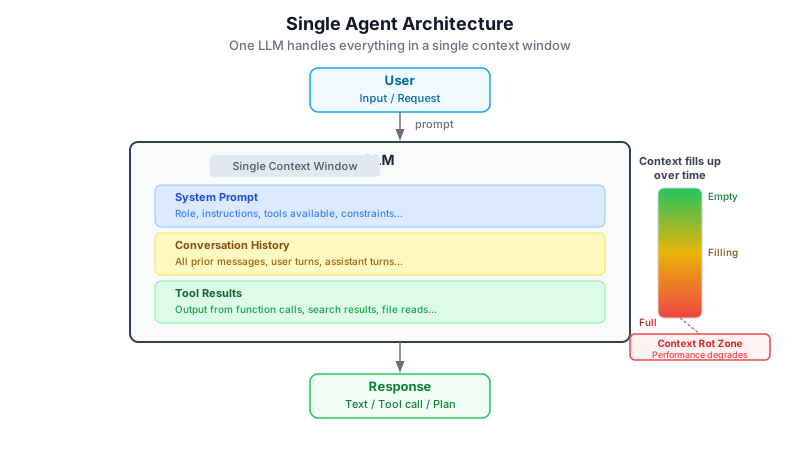
A Single Agent architecture means one LLM session handles the entire task: reading context, reasoning, producing output, and iterating — all within a single continuous conversation thread.
This is the default mode when you open Claude Code and start typing.
Detailed ASCII Diagram
┌─────────────────────────────────────────────────────────────────────┐
│                    ARCHITECTURE 1: SINGLE AGENT                     │
│                         (The Solo Dev)                              │
└─────────────────────────────────────────────────────────────────────┘

  YOU (Developer)
       │
       │  "Fix this bug in auth.py"
       ▼
┌──────────────────────────────────────────────────────────────────┐
│                                                                  │
│                     SINGLE AGENT SESSION                         │
│                                                                  │
│   ┌────────────────────────────────────────────────────────┐    │
│   │                  CONTEXT WINDOW                        │    │
│   │                                                        │    │
│   │   Turn 1:  User prompt + file content                  │    │
│   │   Turn 2:  Agent reads auth.py                         │    │
│   │   Turn 3:  Agent proposes fix                          │    │
│   │   Turn 4:  User asks follow-up                         │    │
│   │   Turn 5:  Agent refines fix                           │    │
│   │   Turn 6:  Agent writes file                           │    │
│   │   Turn N:  ....                                        │    │
│   │                                                        │    │
│   │   [All turns accumulate here — same session]           │    │
│   └────────────────────────────────────────────────────────┘    │
│                                                                  │
│   ┌──────────────┐   ┌──────────────┐   ┌──────────────────┐   │
│   │  READ FILES  │   │  EDIT FILES  │   │  RUN BASH CMDS   │   │
│   │  (Read tool) │   │  (Edit tool) │   │  (Bash tool)     │   │
│   └──────────────┘   └──────────────┘   └──────────────────┘   │
│                                                                  │
└──────────────────────────────────────────────────────────────────┘
       │
       │  Fixed code returned to you in the same conversation
       ▼
  YOUR CODEBASE

  ─────────────────────────────────────────────────────────────────
  CONTEXT HEALTH OVER TIME:

  Turn 1   ████████████████████████████████████████  100% capacity
  Turn 10  ███████████████████████████████░░░░░░░░░   75% quality
  Turn 25  ████████████████████░░░░░░░░░░░░░░░░░░░░   50% quality
  Turn 50  ████████░░░░░░░░░░░░░░░░░░░░░░░░░░░░░░░░   25% quality
                                                    ↑
                                            Context Rot Zone
  ─────────────────────────────────────────────────────────────────
How It Works
- You open Claude Code (or any Claude interface) and describe your task.
- Claude reads the relevant files, reasons about the problem, and proposes a solution.
- You iterate in the same session — asking follow-ups, requesting edits, running tests.
- All context (your messages, Claude's reasoning, file contents, tool outputs) accumulates in one conversation.
There is no orchestration layer. There is no spawning. One agent, one thread, one context window.
Pros
- Zero setup overhead. No frameworks, no configuration files, no orchestration logic.
- Immediate feedback loop. You and the agent iterate in real time.
- Full conversational context. The agent remembers everything you discussed in this session.
- Low cost. One model call at a time, no parallel execution overhead.
Cons
- Context rot is inevitable for any task exceeding roughly 30–40 turns or involving many large files.
- No parallelism. Tasks execute sequentially; there is no way to research and implement simultaneously.
- No specialization. The same agent handles planning, coding, testing, and debugging with no separation of concerns.
- Manual re-seeding. If you
/clearto recover context, you must manually re-supply all relevant background.
Example: A Simple Bug Fix with Claude Code
Scenario: A null pointer exception in src/auth/token_validator.py line 47.
You:    I'm getting a NullPointerException in token_validator.py line 47.
        Here's the traceback: [paste traceback]

Claude: Let me read that file.
        [Reads token_validator.py]
        The issue is that `user.session` can be None when the token
        has expired. Here is the fix:

        Line 47 — change:
          return user.session.token_hash == provided_hash
        to:
          if user.session is None:
              return False
          return user.session.token_hash == provided_hash

You:    Does this affect the refresh token flow?

Claude: Good question. Let me check the refresh token handler.
        [Reads token_refresh.py]
        No — the refresh flow calls `get_or_create_session` before
        reaching the validator, so session will always be set there.
        Your fix is safe to apply.
This is Architecture 1 in its ideal form: fast, conversational, targeted. The task is done in under 10 turns.
Code Walkthrough: A Typical Single-Agent Session
When Claude Code handles a task as a Single Agent, the flow looks like this under the hood:
[Session Start]
   │
   ├── System prompt loaded (Claude Code instructions, CLAUDE.md if present)
   │
   ├── User turn 1: "Fix the bug in auth.py"
   │     └── Claude invokes: Read("src/auth/token_validator.py")
   │           └── File contents added to context
   │
   ├── User turn 2: "Does this affect refresh flow?"
   │     └── Claude invokes: Read("src/auth/token_refresh.py")
   │           └── More content added to context
   │
   ├── User turn 3: "Apply the fix"
   │     └── Claude invokes: Edit("src/auth/token_validator.py", ...)
   │           └── Edit confirmed, diff added to context
   │
   └── [Session ends — all of the above lives in one context window]
Notice: every tool call result (file contents, edit confirmations, bash output) gets added to the context window. By turn 20, you are carrying a lot of weight.
When to Use Architecture 1
Use the Single Agent pattern when:
- The task is scoped and bounded: one file, one function, one clear question.
- Estimated time is under 30 minutes of active iteration.
- The task does not require parallel work streams.
- You want fast, low-friction access to Claude without setup overhead.
- Examples: quick bug fixes, code review of a single file, explaining a function, writing a docstring, one-off SQL queries.
Red flags that you need a different architecture:
- The task spans 5+ files.
- You catch yourself thinking "I need to /clear but I don't want to lose context."
- Claude starts contradicting earlier decisions.
- The task requires research AND implementation AND testing simultaneously.
Part 3: Architecture 2 — Agent + SubAgents (The Lead + Specialists) (30 min)
Concept
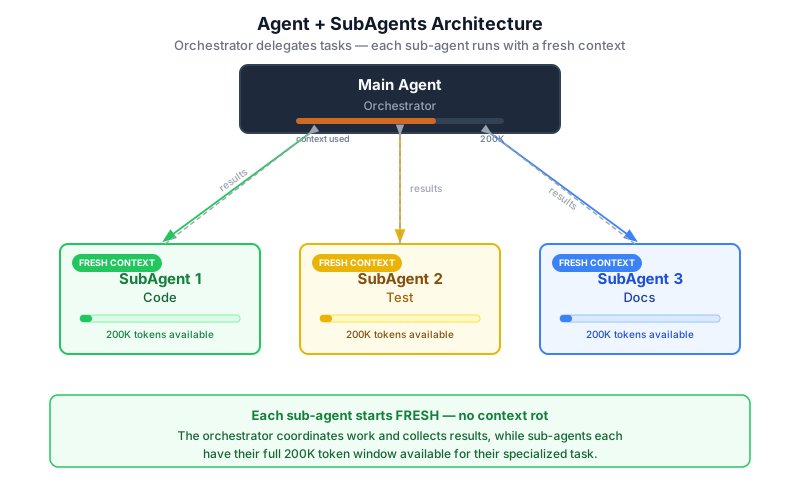
The Agent + SubAgents architecture introduces a hierarchy: one orchestrator agent (the "Lead") plans and coordinates, while multiple sub-agents (the "Specialists") execute focused tasks — each in their own fresh context window.
This is the architecture that powers Claude Code's built-in Agent tool and GSD (Get Stuff Done) framework's phase system.
Detailed ASCII Diagram
┌─────────────────────────────────────────────────────────────────────────┐
│               ARCHITECTURE 2: AGENT + SUBAGENTS                         │
│                    (The Lead + Specialists)                              │
└─────────────────────────────────────────────────────────────────────────┘

  YOU (Developer)
       │
       │  "Add user authentication to this Express app"
       ▼
┌─────────────────────────────────────────────────────────────────┐
│                                                                 │
│               ORCHESTRATOR AGENT (Main Session)                 │
│                                                                 │
│   Context Window: [task description + plans + summaries only]   │
│   Stays lean — never fills up with raw execution output         │
│                                                                 │
│   1. Reads high-level project files                             │
│   2. Produces an execution plan                                 │
│   3. Identifies which tasks need sub-agents                     │
│   4. Spawns sub-agents → waits → integrates results            │
│                                                                 │
└─────┬──────────────────┬──────────────────┬─────────────────────┘
      │                  │                  │
      │ SPAWN            │ SPAWN            │ SPAWN
      │                  │                  │
      ▼                  ▼                  ▼
┌───────────┐    ┌───────────────┐    ┌───────────────┐
│           │    │               │    │               │
│  CODING   │    │    TESTING    │    │     DOCS      │
│ SUBAGENT  │    │   SUBAGENT    │    │   SUBAGENT    │
│           │    │               │    │               │
│ Fresh     │    │ Fresh         │    │ Fresh         │
│ Context   │    │ Context       │    │ Context       │
│ Window    │    │ Window        │    │ Window        │
│           │    │               │    │               │
│ 200k tok  │    │ 200k tok      │    │ 200k tok      │
│           │    │               │    │               │
│ • Reads   │    │ • Reads impl  │    │ • Reads code  │
│   spec    │    │ • Writes      │    │ • Writes      │
│ • Writes  │    │   test files  │    │   README.md   │
│   impl    │    │ • Runs tests  │    │ • Writes      │
│   files   │    │ • Reports     │    │   API docs    │
│           │    │   results     │    │               │
└─────┬─────┘    └───────┬───────┘    └───────┬───────┘
      │                  │                    │
      │ RETURNS          │ RETURNS            │ RETURNS
      │ summary only     │ pass/fail + errors │ file paths created
      │                  │                    │
      └──────────────────┴────────────────────┘
                         │
                         ▼
          ┌──────────────────────────────┐
          │    ORCHESTRATOR INTEGRATES   │
          │    RESULTS + REPORTS TO YOU  │
          └──────────────────────────────┘

  ─────────────────────────────────────────────────────────────────
  CONTEXT HEALTH:

  Orchestrator:  ████░░░░░░░░░░░░░░░░░░░░░░░░░░░  Always ~20-30%
                 (only summaries return from sub-agents)

  Each SubAgent: ████████████████████████████████  Starts at 100%
                 (fresh window, does its work, returns summary, discarded)
  ─────────────────────────────────────────────────────────────────

  KEY INSIGHT: Sub-agent intermediate work (file reads, bash output,
  reasoning chains) NEVER enters the orchestrator's context window.
  Only the final summary does. This keeps the orchestrator lean
  for the entire duration of the project.
How It Works
- You give the orchestrator a complex task. The orchestrator reads high-level context (e.g., CLAUDE.md, project structure) and creates a plan.
- The orchestrator spawns a sub-agent via the Agent tool, passing a focused prompt and the minimal context that sub-agent needs.
- The sub-agent runs in its own isolated context window. It can read files, write code, run tests, and reason — all within its own 200k-token space. None of this intermediate work touches the orchestrator.
- The sub-agent completes and returns a summary (not a raw dump of everything it did).
- The orchestrator integrates the summary and either spawns the next sub-agent or returns results to you.
Each Sub-Agent Gets a FRESH Context Window (No Rot)
This is the key architectural insight of this pattern. Sub-agents do not inherit the accumulated conversation history of the orchestrator. They start clean, with only what the orchestrator explicitly passes to them.
Orchestrator Context at Turn 30:
  [20 turns of planning + 5 sub-agent summaries] = ~15% used

  Compare to Single Agent at Turn 30:
  [30 turns of everything] = ~60-70% used, quality already degrading
Sub-agents are disposable in the best sense: they do one thing well, return a clean result, and their context is discarded. The orchestrator stays fresh.
How GSD Uses This Architecture
GSD (Get Stuff Done) is an open-source framework by TACHES that implements this pattern for Claude Code. Its core insight is that each GSD phase maps to a set of sub-agents, and each sub-agent receives a fresh 200k-token context.
GSD's phase structure:
GSD PHASE SYSTEM
─────────────────────────────────────────────────────────
Phase: RESEARCH
  └── 4 parallel sub-agents investigate simultaneously:
        ├── Sub-agent A: research the tech stack
        ├── Sub-agent B: research existing features
        ├── Sub-agent C: research architecture options
        └── Sub-agent D: research known pitfalls
              └── All return findings → orchestrator synthesizes

Phase: PLAN
  └── 2 sub-agents in dialogue:
        ├── Sub-agent A: planner creates task breakdown
        └── Sub-agent B: checker validates the plan
              └── Iterates until plan is solid → orchestrator stores

Phase: EXECUTE (wave-based parallelism)
  └── Wave 1: independent tasks run in parallel sub-agents
        ├── Sub-agent A: implement core data models
        ├── Sub-agent B: implement API endpoints
        └── Sub-agent C: implement auth middleware
  └── Wave 2: dependent tasks run after Wave 1 completes
        ├── Sub-agent D: integrate models + endpoints
        └── Sub-agent E: wire auth into API layer
              └── Each plan fits in ~50% of a fresh context window
                  (atomic, no risk of degradation mid-task)

Phase: VERIFY
  └── Sub-agents check work against original goals:
        ├── Sub-agent A: verify feature completeness
        └── Sub-agent B: debug any failures found
─────────────────────────────────────────────────────────
Key GSD engineering choices that prevent context rot:
- Persistent spec files (
PROJECT.md,REQUIREMENTS.md,STATE.md) anchor context — they are files on disk, not conversation history. - Atomic git commits after each sub-agent task create a searchable implementation history.
- The main session stays at 30–40% context utilization while sub-agents do the heavy lifting.
How Claude Code's Built-in Agent Tool Works
Claude Code ships with a native sub-agent spawning mechanism. When Claude needs to do research without polluting the main conversation, it spawns one of these built-in sub-agents:
| Built-in SubAgent | Model | Purpose |
|---|---|---|
| Explore | Haiku | Read-only codebase search and analysis |
| Plan | Sonnet | Context gathering before proposing a plan |
| General-purpose | Sonnet | Multi-step tasks requiring both reads and writes |
| Bash | Sonnet | Running terminal commands in a separate context |
You can also define custom sub-agents as Markdown files with YAML frontmatter:
---
name: test-runner
description: Runs the test suite and reports only failing tests.
             Use proactively after any code change.
tools: Bash, Read, Glob
model: haiku
---

You are a test execution specialist. When invoked:
1. Run the full test suite via `npm test` or `pytest`
2. Capture only the failing tests and their error messages
3. Return a concise summary: N tests passed, M failed, with details
   on failures only.
Do not return the full test output — only failures and their root cause.
Sub-agents are stored in .claude/agents/ (project-level) or ~/.claude/agents/ (user-level). Claude automatically delegates to them based on their description.
Critical constraint: Sub-agents cannot spawn other sub-agents. The hierarchy is exactly one level deep in a single session. For deeper nesting, use Architecture 3 (Team Agents).
Key Concepts
Orchestration: The orchestrator does not do the work — it coordinates who does the work and in what order. Think of it as a tech lead who writes the ticket, not the code.
Context isolation: Each sub-agent's internal process (file reads, bash runs, reasoning) is invisible to the orchestrator. Only the output crosses the boundary.
Task decomposition: The quality of sub-agent results depends entirely on how well the orchestrator decomposes the task. A vague sub-agent prompt produces vague results. A focused, scoped prompt ("implement the password hashing module described in spec.md, write unit tests, return the file paths you created") produces precise results.
Parallel execution: Independent sub-agents can run simultaneously. GSD's wave system makes this explicit: all sub-agents in a wave run in parallel, then the next wave starts.
Example: GSD Spawning Coding, Testing, and Docs Agents
YOU:          /gsd:execute-phase  (executing Phase 2: Add Auth Module)

ORCHESTRATOR: Reading phase plan...
              Plan calls for 3 parallel tasks in Wave 1.
              Spawning sub-agents...

  ┌─ CODING SUBAGENT ──────────────────────────────────────────┐
  │ Prompt: "Implement JWT authentication per spec.md.         │
  │          Write to src/auth/. Return file paths created."   │
  │                                                            │
  │ [Reads spec.md, writes jwt_handler.py, token_validator.py] │
  │ [Runs: python -c "import jwt" to verify deps]             │
  │                                                            │
  │ Returns: "Created src/auth/jwt_handler.py,                 │
  │           src/auth/token_validator.py. All imports valid." │
  └────────────────────────────────────────────────────────────┘

  ┌─ TESTING SUBAGENT ─────────────────────────────────────────┐
  │ Prompt: "Write pytest unit tests for the auth module       │
  │          described in spec.md. Cover happy path and        │
  │          expired token edge case."                         │
  │                                                            │
  │ [Reads spec.md, writes tests/test_auth.py]                 │
  │                                                            │
  │ Returns: "Created tests/test_auth.py with 8 test cases.    │
  │           Cannot run yet — impl files not present."        │
  └────────────────────────────────────────────────────────────┘

  ┌─ DOCS SUBAGENT ────────────────────────────────────────────┐
  │ Prompt: "Write API documentation for the auth endpoints    │
  │          described in spec.md in OpenAPI 3.0 format."      │
  │                                                            │
  │ [Reads spec.md, writes docs/auth-api.yaml]                 │
  │                                                            │
  │ Returns: "Created docs/auth-api.yaml with 4 endpoints      │
  │           documented."                                     │
  └────────────────────────────────────────────────────────────┘

ORCHESTRATOR: Wave 1 complete. Starting Wave 2.
              Spawning integration sub-agent...
              [Wire impl + tests, run suite, report results]

              All 8 tests pass. Phase 2 complete.

YOU:          [see clean summary, no context rot, ready for Phase 3]
When to Use Architecture 2
Use the Agent + SubAgents pattern when:
- The task spans multiple files or has distinct parallel work streams.
- Estimated time exceeds 30 minutes of active iteration.
- You need to research AND implement AND test without one phase polluting another.
- You are using GSD and working through a multi-phase milestone.
- Examples: adding a new feature end-to-end, refactoring a module, generating a test suite for an existing codebase, building a new API endpoint with tests and docs.
Part 4: Architecture 3 — Team Agent (The Full Dev Team) (30 min)
Concept
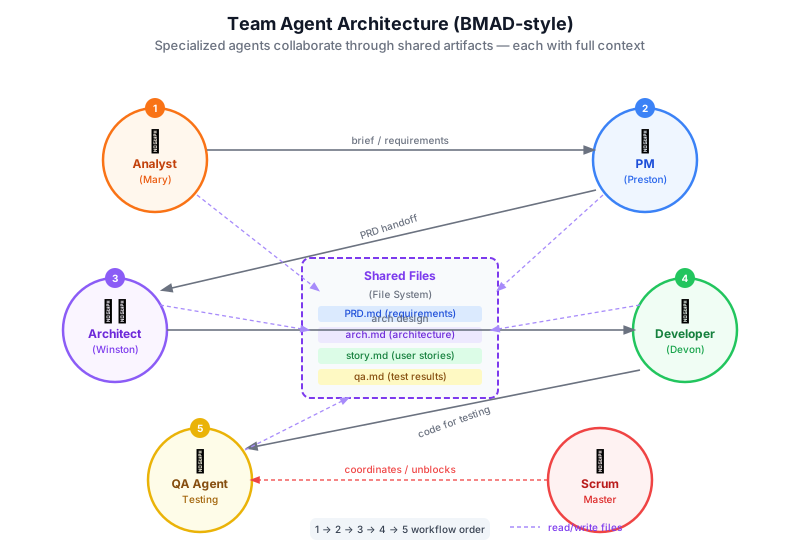
The Team Agent architecture goes beyond orchestrator-plus-workers. Here, multiple fully autonomous agents with distinct professional roles collaborate on a project, passing work to each other via shared specification files rather than direct spawning. Each agent is a specialist that embodies a different function in the software development lifecycle.
This is the architecture used by the BMAD Method (Breakthrough Method for Agile AI-Driven Development).
Detailed ASCII Diagram
┌─────────────────────────────────────────────────────────────────────────────┐
│                 ARCHITECTURE 3: TEAM AGENT                                  │
│                 (The Full Dev Team — BMAD Style)                            │
└─────────────────────────────────────────────────────────────────────────────┘

  YOU (Product Owner / Stakeholder)
         │
         │  "Build a subscription billing portal
         │   for our SaaS application"
         ▼
  ┌──────────────────────────────────────────────────────────────────────┐
  │                        SHARED ARTIFACT STORE                         │
  │                    (Files on disk — the team's memory)               │
  │                                                                      │
  │   docs/prd.md          ← Product Requirements Document               │
  │   docs/arch.md         ← Architecture Document                       │
  │   docs/stories/        ← User stories (one file per story)           │
  │   docs/epics/          ← Epics grouping related stories              │
  │   CHANGELOG.md         ← Running log of decisions                    │
  └──────────────────────────────────────────────────────────────────────┘
         ▲   │           ▲   │           ▲   │           ▲   │
         │   │           │   │           │   │           │   │
     READ│  WRITE    READ│  WRITE    READ│  WRITE    READ│  WRITE
         │   │           │   │           │   │           │   │
         │   ▼           │   ▼           │   ▼           │   ▼
  ┌──────────────┐ ┌───────────────┐ ┌──────────────┐ ┌──────────────┐
  │              │ │               │ │              │ │              │
  │   ANALYST    │ │   ARCHITECT   │ │  SCRUM MSTR  │ │  DEVELOPER   │
  │   AGENT      │ │   AGENT       │ │  AGENT       │ │  AGENT       │
  │              │ │               │ │              │ │              │
  │ Role:        │ │ Role:         │ │ Role:        │ │ Role:        │
  │ Translate    │ │ Design        │ │ Break work   │ │ Implement    │
  │ vague biz    │ │ scalable      │ │ into stories │ │ stories one  │
  │ needs into   │ │ system arch   │ │ and sprints  │ │ at a time    │
  │ clear PRD    │ │ matching PRD  │ │              │ │              │
  │              │ │               │ │ Reads:       │ │ Reads:       │
  │ Reads:       │ │ Reads:        │ │ prd.md       │ │ story file   │
  │ your input   │ │ prd.md        │ │ arch.md      │ │ arch.md      │
  │              │ │               │ │              │ │              │
  │ Writes:      │ │ Writes:       │ │ Writes:      │ │ Writes:      │
  │ prd.md       │ │ arch.md       │ │ story files  │ │ source code  │
  │              │ │               │ │              │ │              │
  └──────────────┘ └───────────────┘ └──────────────┘ └──────────────┘

  ┌──────────────┐ ┌───────────────┐ ┌──────────────┐
  │              │ │               │ │              │
  │  PRODUCT     │ │      QA       │ │     UX       │
  │  OWNER       │ │    AGENT      │ │   AGENT      │
  │  AGENT       │ │               │ │              │
  │              │ │ Role:         │ │ Role:        │
  │ Role:        │ │ Review code   │ │ Design user  │
  │ Validate     │ │ against spec; │ │ flows and    │
  │ outputs      │ │ flag gaps     │ │ UI contracts │
  │ against PRD  │ │               │ │              │
  │              │ │ Reads:        │ │ Reads:       │
  │ Reads:       │ │ source code   │ │ prd.md       │
  │ prd.md       │ │ story files   │ │              │
  │ built output │ │               │ │ Writes:      │
  │              │ │ Writes:       │ │ UX spec      │
  │ Writes:      │ │ QA report     │ │ files        │
  │ approval/    │ │               │ │              │
  │ rejection    │ │               │ │              │
  └──────────────┘ └───────────────┘ └──────────────┘

  ─────────────────────────────────────────────────────────────────────
  COMMUNICATION PROTOCOL:

  Agents DO NOT call each other directly.
  Agents communicate ONLY via files in the shared artifact store.

  Analyst  ──writes──> prd.md  ──read by──> Architect
  Architect ──writes──> arch.md ──read by──> Scrum Master + Developer
  Scrum Master ──writes──> stories/ ──read by──> Developer + QA
  Developer ──writes──> src/ ──read by──> QA + Product Owner
  QA ──writes──> qa_report.md ──read by──> Developer (for fixes)
  ─────────────────────────────────────────────────────────────────────
How It Works
In Architecture 3, there is no single orchestrator. Instead, a shared file system acts as the team's memory and communication channel. Each agent:
- Picks up work by reading the specification files relevant to its role.
- Does its job (analysis, design, planning, implementation, review).
- Deposits outputs as new or updated specification files.
- Hands off implicitly — the next agent in the chain reads the outputs.
This is asynchronous collaboration. You do not need to manually pass context from one agent to the next. The files do it.
BMAD Method: Architecture 3 in Practice
BMAD (Breakthrough Method for Agile AI-Driven Development) is an open-source framework that implements Architecture 3. It provides:
- Pre-built agent persona files for each role (Analyst, Architect, PM, Scrum Master, Developer, QA, UX, and more).
- Structured templates for PRD.md, arch.md, and story files so agents produce consistent, machine-readable handoff documents.
- A "Party Mode" that allows multiple agent personas to collaborate in a single session — useful for rapid ideation or resolving cross-role questions.
- Scale-adaptive logic: small tasks bypass formal phases (acting more like Architecture 1 or 2); large enterprise projects invoke the full ceremony.
BMAD v6 expands the framework with cross-platform agent teams, sub-agent inclusion for parallel execution within roles, and automation of the dev loop.
Walkthrough: Analyst → Architect → Developer Handoff
This is the core BMAD workflow for a new feature request.
STEP 1: YOU engage the ANALYST AGENT
─────────────────────────────────────────────────────────────────
  YOU:      "We need a subscription billing portal. Users should
             be able to upgrade, downgrade, cancel, and see
             invoice history. We use Stripe."

  ANALYST:  [Asks clarifying questions about user personas,
             billing cycles, proration rules, cancellation policy]
            [Writes docs/prd.md]

  prd.md excerpt:
  ───────────────
  ## Goals
  - Self-service subscription management for end users
  - Stripe as payment processor (existing integration)

  ## User Stories (high level)
  - As a user, I can upgrade my plan and be charged prorated amount
  - As a user, I can cancel and retain access until period end
  - As a user, I can download past invoices as PDF

  ## Out of Scope
  - Dunning / failed payment retry (Phase 2)
  - Multi-seat team billing (Phase 3)
─────────────────────────────────────────────────────────────────

STEP 2: YOU engage the ARCHITECT AGENT
─────────────────────────────────────────────────────────────────
  YOU:      "Read prd.md and produce the architecture document."

  ARCHITECT: [Reads prd.md]
             [Designs system components, data models, API contracts]
             [Writes docs/arch.md]

  arch.md excerpt:
  ────────────────
  ## Components
  - BillingPortalController: handles HTTP requests from frontend
  - StripeWebhookHandler: processes Stripe events (subscription
    updated, invoice paid, subscription cancelled)
  - SubscriptionService: business logic layer
  - InvoiceRepository: data access for invoice records

  ## Data Model
  - subscriptions table: user_id, stripe_subscription_id,
    plan_id, status, current_period_end
  - invoices table: subscription_id, stripe_invoice_id,
    amount_paid, pdf_url, created_at

  ## API Contracts
  POST /billing/upgrade     { plan_id }
  POST /billing/cancel
  GET  /billing/invoices    → [{ id, amount, date, pdf_url }]
─────────────────────────────────────────────────────────────────

STEP 3: YOU engage the SCRUM MASTER AGENT
─────────────────────────────────────────────────────────────────
  SCRUM MASTER: [Reads prd.md + arch.md]
                [Creates granular story files]

  docs/stories/story-001-upgrade-plan.md:
  ───────────────────────────────────────
  ## Story: User can upgrade subscription plan
  Acceptance Criteria:
  - POST /billing/upgrade returns 200 with new plan details
  - Stripe subscription is updated via API
  - subscription table reflects new plan_id and period_end
  - User receives upgrade confirmation email
  Technical Notes: See arch.md SubscriptionService.upgrade()
─────────────────────────────────────────────────────────────────

STEP 4: YOU engage the DEVELOPER AGENT
─────────────────────────────────────────────────────────────────
  DEVELOPER: [Reads story-001-upgrade-plan.md + arch.md]
             [Implements exactly what the story specifies]
             [Writes src/billing/subscription_service.py]
             [Writes src/billing/billing_controller.py]
             [Writes tests/test_upgrade.py]
             [Runs tests — all pass]
             [Reports completion back to you]

  KEY: The developer does NOT make architectural decisions.
       They implement the spec. Scope creep is prevented at
       the architecture layer, not the development layer.
─────────────────────────────────────────────────────────────────

STEP 5: YOU engage the QA AGENT
─────────────────────────────────────────────────────────────────
  QA:     [Reads story-001 + arch.md + source code]
          [Checks: does implementation match spec?]
          [Checks: edge cases covered in tests?]
          [Checks: no security issues in billing logic?]
          [Writes docs/qa/qa-story-001.md]

  QA report excerpt:
  ──────────────────
  PASS: POST /billing/upgrade returns 200 on valid plan_id
  PASS: Stripe API called with correct parameters
  FAIL: subscription table not updated when Stripe returns 402
        → Developer must add error handling for payment failures
  WARN: No rate limiting on /billing/upgrade endpoint
        → Consider for security hardening (Phase 2)
─────────────────────────────────────────────────────────────────
Why Specification Files Are the Communication Protocol
The choice to use files (rather than direct agent-to-agent API calls) is deliberate and powerful:
- Persistence: Files outlive any single conversation. You can resume work days later and each agent picks up exactly where the team left off.
- Auditability: Every file is version-controlled in git. You can see exactly what each agent decided and when.
- Human oversight: You review and approve specification files before the next agent reads them. You are in the loop at every handoff.
- Portability: The files work with any LLM, any Claude version, any future tool. The methodology is tool-agnostic.
- Scope control: By the time the developer reads their story file, the scope is already locked. Architectural decisions happened upstream. The developer cannot accidentally scope-creep because the spec does not permit it.
When to Use Architecture 3
Use the Team Agent pattern when:
- You are building a complete product or large feature from scratch.
- The project has multiple developers (human or AI) who need to stay in sync.
- You want full traceability — every decision documented and reviewable.
- You are working in an enterprise context where compliance and audit trails matter.
- The project will span days, weeks, or months — not hours.
- Examples: greenfield SaaS products, large refactors of legacy codebases, microservice migrations, any project where you would normally have a multi-person engineering team.
When Architecture 3 is overkill:
- Single-developer side projects with no compliance requirements.
- Tasks where the ceremony of PRD + arch + stories adds more time than it saves.
- Projects under ~1 week of work.
Part 5: Decision Framework (15 min)
The Architecture Selection Table
| Project Scope | Time Estimate | Architecture | Framework / Tool |
|---|---|---|---|
| Bug fix, single question | < 30 min | Single Agent | Plain Claude Code |
| Single file refactor | < 30 min | Single Agent | Plain Claude Code |
| Multi-file feature | 30 min – 4 hrs | Agent + SubAgents | GSD framework |
| Test suite generation | 30 min – 2 hrs | Agent + SubAgents | GSD or Claude Code sub-agents |
| New API endpoint + tests | 1 – 4 hrs | Agent + SubAgents | GSD |
| Full product feature | 4 hrs – 2 days | Agent + SubAgents or Team | GSD or BMAD Method |
| Greenfield product | Days to weeks | Team Agent | BMAD Method |
| Enterprise / team project | Weeks to months | Team Agent | BMAD Method |
| Compliance-sensitive work | Any duration | Team Agent | BMAD Method |
Decision Flowchart (ASCII)
START: You have a task to complete with AI assistance
         │
         ▼
   ┌─────────────────────────────────────┐
   │  Is the task bounded to 1-2 files   │
   │  and completable in under 30 min?   │
   └─────────────────────────────────────┘
         │                    │
        YES                   NO
         │                    │
         ▼                    ▼
   ┌───────────────┐   ┌──────────────────────────────────────┐
   │               │   │  Does the task require coordinated   │
   │ ARCHITECTURE 1│   │  work across multiple roles          │
   │ Single Agent  │   │  (Analyst → Architect → Developer)?  │
   │               │   └──────────────────────────────────────┘
   │ Tool: Plain   │               │                  │
   │ Claude Code   │              NO                 YES
   └───────────────┘               │                  │
                                   ▼                  ▼
                        ┌──────────────────┐  ┌────────────────┐
                        │                  │  │                │
                        │ ARCHITECTURE 2   │  │ ARCHITECTURE 3 │
                        │ Agent+SubAgents  │  │ Team Agent     │
                        │                  │  │                │
                        │ Tool: GSD        │  │ Tool: BMAD     │
                        │ framework or     │  │ Method         │
                        │ Claude Code      │  │                │
                        │ sub-agents       │  │                │
                        └──────────────────┘  └────────────────┘
                                   │
                                   │ ALSO consider Architecture 2 if:
                                   │ • Any of these are true:
                                   │   - Task > 30 min
                                   │   - 3+ files need changing
                                   │   - Research AND impl needed
                                   │   - Test generation required
                                   │   - Context rot appeared in
                                   │     past attempts
                                   │
                                   ▼
                        ┌──────────────────┐
                        │ Use GSD phases:  │
                        │ Research →       │
                        │ Plan →           │
                        │ Execute →        │
                        │ Verify           │
                        └──────────────────┘
Context Rot Warning Signs: Escalate Your Architecture
SINGLE AGENT warning signs → move to Agent + SubAgents:
  □ Claude contradicts a decision it made 10 turns ago
  □ You feel the urge to /clear but are afraid to lose context
  □ Claude is apologizing more than it is coding
  □ Responses are getting longer and less specific
  □ The task has been running for > 30 minutes

AGENT + SUBAGENTS warning signs → move to Team Agent:
  □ The project scope keeps expanding across phases
  □ Multiple people need to contribute or review decisions
  □ You need an audit trail for every architectural decision
  □ The project will last longer than a week
  □ Stakeholders require visibility into requirements before coding starts
Cost and Complexity Tradeoffs
                        COMPLEXITY
   LOW ────────────────────────────────────────────────► HIGH
    │
    │   Architecture 1   Architecture 2       Architecture 3
    │   ─────────────    ─────────────────    ────────────────────
    │   Cost: $         Cost: $$              Cost: $$$
    │   Setup: minutes  Setup: minutes-hours  Setup: hours-days
    │   Traceability: ✗ Traceability: partial Traceability: full
    │   Scalability: ✗  Scalability: medium   Scalability: high
    │   Context safety: Addresses rot via     Addresses rot via
    │   ✗ (rot)         fresh sub-windows     role separation +
    │                                         file-based handoffs
    ▼
  COST
Part 6: Hands-On Exercise (15 min)
Exercise: Diagram Your Project's Architecture
Take 10 minutes now to complete this worksheet for a real project you are currently working on or planning.
MY PROJECT ARCHITECTURE WORKSHEET
════════════════════════════════════════════════════════════════════

Project name: ___________________________________________________

What needs to be built or changed:
________________________________________________________________
________________________________________________________________

Estimated complexity (circle one):
  Small fix    /    Multi-file feature    /    Full product

Estimated time to complete with AI help:
  < 30 min    /    30 min – 4 hrs    /    > 4 hrs

Does this require distinct roles (Analyst / Architect / Developer)?
  Yes   /   No

ARCHITECTURE CHOICE (circle one):
  Architecture 1: Single Agent
  Architecture 2: Agent + SubAgents
  Architecture 3: Team Agent

TOOL / FRAMEWORK:
  Plain Claude Code    /    GSD    /    BMAD Method

If Architecture 2 — sketch the sub-agents you would spawn:
  Sub-agent 1 (role): _____________________
  Sub-agent 2 (role): _____________________
  Sub-agent 3 (role): _____________________
  Parallel or sequential? _________________

If Architecture 3 — which BMAD roles are needed?
  □ Analyst        □ Architect      □ Scrum Master
  □ Product Owner  □ Developer      □ QA
  □ UX Designer    □ Other: ________

════════════════════════════════════════════════════════════════════
Discussion Questions
After completing the worksheet, discuss with the group (or reflect individually):
- Have you experienced context rot without knowing what to call it? What did it feel like?
- If you have used Claude Code for a multi-file task, did you use single agent mode? How did it go? Would Architecture 2 have helped?
- What is the biggest project you can imagine tackling with Architecture 3? What would the PRD.md look like?
- GSD and BMAD are both open source. What is your instinct for which one fits your current work context?
- Are there tasks in your daily work where you are currently using Architecture 1 but should be using Architecture 2?
Checkpoint
Before moving on, verify you can answer all of the following without notes:
- What is context rot, and why does it happen?
- In Architecture 1, where does all conversation state live?
- In Architecture 2, what makes sub-agents immune to context rot from the orchestrator?
- What is the key constraint on sub-agents in Claude Code — what can they NOT do?
- In Architecture 3, how do agents communicate with each other? (Hint: not API calls)
- Name two specification files that BMAD agents use to pass work between roles.
- What framework implements Architecture 2 for Claude Code?
- What framework implements Architecture 3?
- You have a task involving 8 files and estimated 3 hours. Which architecture?
- You are building a greenfield SaaS product with 3 developers. Which architecture?
Key Takeaways
1. Architecture is the highest-leverage decision in AI-powered development. Getting the architecture right matters more than prompt tuning, model selection, or any other optimization. A poorly architected workflow degrades no matter how good your prompts are.
2. Context rot is real, predictable, and solvable. It is not random. It happens because transformer attention degrades over long contexts. The solution is architectural: fresh context windows via sub-agents or role separation via team agents.
3. The three architectures form a natural progression. Start with Architecture 1. When you hit context rot or parallel work needs, move to Architecture 2. When you need full traceability, multi-role coordination, or enterprise scale, move to Architecture 3.
4. Sub-agents in Architecture 2 are not a hack — they are the intended design. Claude Code was built with sub-agents as a first-class feature. GSD codifies best practices for using them at scale. Sub-agents run in isolated 200k-token windows; only summaries return to the orchestrator.
5. Architecture 3 uses files, not function calls, as its communication protocol. This is the key insight of BMAD. Files persist across sessions, are version-controlled, enable human oversight at every handoff, and make the entire development process auditable and resumable.
6. The decision is not permanent. You can start with Architecture 1 and escalate mid-task. Recognizing the warning signs of context rot and knowing which architecture to shift to is a core skill of the AI-powered developer.
Resources and Further Reading
- GSD Framework on GitHub — Open source, MIT licensed
- GSD v2 (TypeScript orchestrator) — Programmatic agent control
- GSD Framework Overview — The New Stack
- Beating Context Rot with GSD — The New Stack
- BMAD Method on GitHub — Open source
- BMAD Method Documentation
- Applied BMAD — Benny Cheung
- Claude Code Sub-agents Official Docs
- Building Agents with the Claude Agent SDK — Anthropic
- Claude Code Sub-agents: The 90% Performance Gain — Code With Seb
Next Lesson: Lesson 6 — Context Engineering: What Goes In the Window and Why It Matters