 JustLearn
Lesson 7: The Three Layers of Agent Action
Course: AI-Powered Development (Dev Track) | Duration: 2 hours | Level: Intermediate
Prerequisites
- Completed Lesson 6 (Agent Architecture — Agent vs SubAgent vs Team Agent)
- Basic Python (functions, dictionaries,
pip install) - Familiarity with Claude Code CLI or similar AI coding assistant
Learning Objectives
By the end of this lesson you will be able to:
- Explain why LLMs need an action layer and what that layer looks like
- Define a custom tool using JSON Schema and call it through the Claude API
- Create a project-scoped slash command (Command layer)
- Write a persistent Skill file (CLAUDE.md / SKILL.md) that shapes agent behavior
- Choose the right layer — Tool, Command, or Skill — for a given task
Part 1: Why Agents Need Actions (10 min)
The Plain LLM Problem
An LLM, left to itself, is a text-in / text-out machine. You send it words; it returns words. That is genuinely useful for explaining, summarising, and drafting — but it cannot:
- Read a file on your disk
- Run your test suite
- Commit to Git
- Call your company's internal API
To make it act in the world rather than just talk about the world, you must give it an action layer.
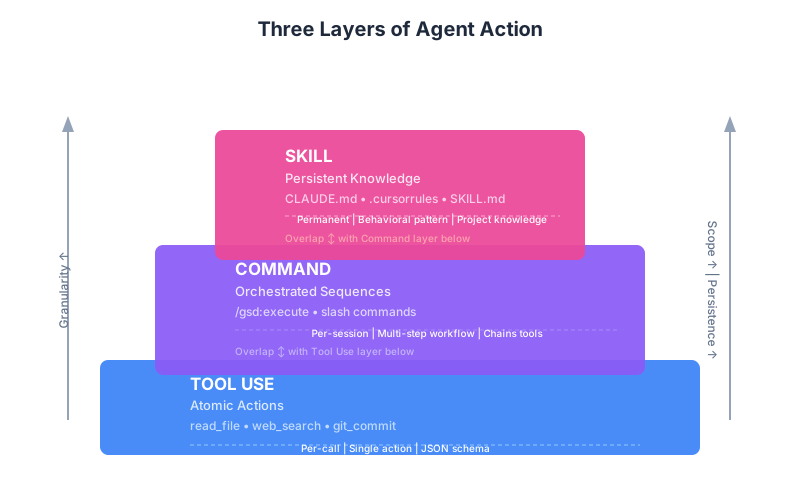
Three Layers, Increasing Abstraction
| Layer | What it is | Analogy |
|---|---|---|
| Tool Use | A single, atomic function the LLM can invoke | A hand tool (hammer, screwdriver) |
| Command | A pre-scripted sequence of tools | A shell script |
| Skill | Persistent knowledge and behavior rules | A trained habit or style guide |
Think of them as nesting rings: Skills shape how the agent thinks about a project; Commands orchestrate multi-step workflows; Tools are the atomic moves that do the actual work.
┌─────────────────────────────────────────┐
│  SKILL  (project knowledge, conventions)│
│  ┌───────────────────────────────────┐  │
│  │  COMMAND  (orchestrated sequence) │  │
│  │  ┌─────────────────────────────┐  │  │
│  │  │  TOOL  (one atomic action)  │  │  │
│  │  └─────────────────────────────┘  │  │
│  └───────────────────────────────────┘  │
└─────────────────────────────────────────┘
Part 2: Layer 1 — Tool Use (Atomic Actions) (30 min)
2.1 What Is a Tool?
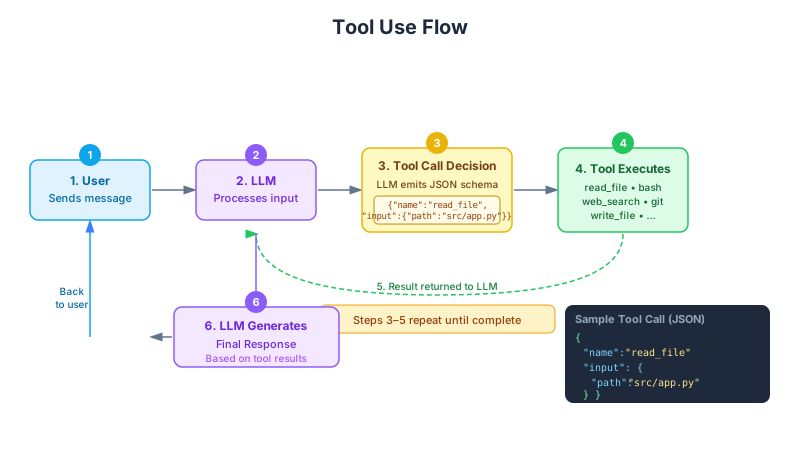
A tool is a typed function signature exposed to the LLM. The agent:
- Reads your tool definition (name + description + parameter schema)
- Decides — based on the conversation — whether and when to call it
- Returns a structured
tool_useblock with the exact arguments it chose - Your code executes the function and sends the result back
The LLM never runs code directly. It outputs intent; you execute action. This boundary is what makes tool use safe to audit and easy to mock in tests.
2.2 Anatomy of a Tool Definition
{
    "name": "read_file",
    "description": "Read the contents of a file at the given path. Use this when the user asks you to inspect, review, or summarise the contents of a local file.",
    "input_schema": {
        "type": "object",
        "properties": {
            "path": {
                "type": "string",
                "description": "Absolute or relative file path to read"
            },
            "encoding": {
                "type": "string",
                "description": "File encoding, defaults to utf-8",
                "default": "utf-8"
            }
        },
        "required": ["path"]
    }
}
Key fields:
| Field | Purpose | Write quality descriptions here |
|---|---|---|
name | Identifier used in API responses | Keep it snake_case, action-oriented |
description | How the LLM decides when to call | Most important field — be specific |
input_schema | JSON Schema for parameters | Drives validation and LLM accuracy |
Rule of thumb: If your
descriptionis vague, the LLM will call the tool at the wrong times. Write it like a docstring for a human, not a label.
2.3 Common Built-in Tools in Claude Code
Claude Code ships with a set of built-in tools you interact with daily:
| Tool | What it does |
|---|---|
Read | Read a file's contents |
Write | Write / overwrite a file |
Edit | Targeted string replacement in a file |
Bash | Execute a shell command |
Glob | Find files matching a pattern |
Grep | Search file contents with ripgrep |
WebSearch | Query the web for up-to-date information |
WebFetch | Fetch and read a URL |
MCP servers expose these same patterns to any MCP-compatible client, making tools portable across editors and AI assistants.
2.4 Live Demo: Custom Tool via Claude API (Python)
Install the SDK:
pip install anthropicFull runnable example — tool_demo.py
"""
tool_demo.py
Demonstrates Layer 1: Tool Use with the Claude API.
The agent decides when to call `read_file` and `list_directory`
based on the user's natural-language request.
"""

import anthropic
import os
import json

# ── Tool definitions (JSON Schema) ─────────────────────────────────────────

TOOLS = [
    {
        "name": "read_file",
        "description": (
            "Read the contents of a local file. "
            "Use when the user asks to inspect, review, or summarise a file. "
            "Returns the file contents as a string."
        ),
        "input_schema": {
            "type": "object",
            "properties": {
                "path": {
                    "type": "string",
                    "description": "Path to the file (absolute or relative to cwd)",
                },
                "encoding": {
                    "type": "string",
                    "description": "File encoding. Default: utf-8",
                    "default": "utf-8",
                },
            },
            "required": ["path"],
        },
    },
    {
        "name": "list_directory",
        "description": (
            "List files and directories inside a given path. "
            "Use when the user wants to explore what is in a folder."
        ),
        "input_schema": {
            "type": "object",
            "properties": {
                "path": {
                    "type": "string",
                    "description": "Directory path to list",
                },
            },
            "required": ["path"],
        },
    },
]

# ── Tool execution (YOUR code runs here, not the LLM) ──────────────────────

def execute_tool(name: str, inputs: dict) -> str:
    """Execute a tool call returned by the LLM and return a string result."""
    if name == "read_file":
        path = inputs["path"]
        encoding = inputs.get("encoding", "utf-8")
        try:
            with open(path, encoding=encoding) as f:
                content = f.read()
            return content if content else "(empty file)"
        except FileNotFoundError:
            return f"Error: File not found at '{path}'"
        except Exception as e:
            return f"Error reading file: {e}"

    elif name == "list_directory":
        path = inputs["path"]
        try:
            entries = os.listdir(path)
            files = [e for e in entries if os.path.isfile(os.path.join(path, e))]
            dirs = [e + "/" for e in entries if os.path.isdir(os.path.join(path, e))]
            return "\n".join(sorted(dirs) + sorted(files))
        except FileNotFoundError:
            return f"Error: Directory not found at '{path}'"
        except Exception as e:
            return f"Error listing directory: {e}"

    return f"Error: Unknown tool '{name}'"


# ── Agentic loop ───────────────────────────────────────────────────────────

def run_agent(user_message: str) -> str:
    """
    Run a simple agentic loop:
    1. Send message + tools to Claude
    2. If Claude calls a tool, execute it and loop
    3. Return when Claude returns a plain text response
    """
    client = anthropic.Anthropic()  # reads ANTHROPIC_API_KEY from env

    messages = [{"role": "user", "content": user_message}]
    print(f"\n[User] {user_message}\n")

    while True:
        response = client.messages.create(
            model="claude-sonnet-4-5",
            max_tokens=1024,
            tools=TOOLS,
            messages=messages,
        )

        # If the model returned text with no tool calls, we are done
        if response.stop_reason == "end_turn":
            final_text = "".join(
                block.text for block in response.content if hasattr(block, "text")
            )
            print(f"[Assistant] {final_text}")
            return final_text

        # The model wants to call one or more tools
        if response.stop_reason == "tool_use":
            # Add the assistant's tool_use blocks to message history
            messages.append({"role": "assistant", "content": response.content})

            # Execute each tool call and collect results
            tool_results = []
            for block in response.content:
                if block.type == "tool_use":
                    print(f"  [Tool Call] {block.name}({json.dumps(block.input)})")
                    result = execute_tool(block.name, block.input)
                    print(f"  [Tool Result] {result[:200]}{'...' if len(result) > 200 else ''}")
                    tool_results.append({
                        "type": "tool_result",
                        "tool_use_id": block.id,
                        "content": result,
                    })

            # Feed results back so the model can continue reasoning
            messages.append({"role": "user", "content": tool_results})

        else:
            # Unexpected stop reason — surface it and exit
            print(f"[Warning] Unexpected stop_reason: {response.stop_reason}")
            break

    return ""


# ── Entry point ────────────────────────────────────────────────────────────

if __name__ == "__main__":
    # Example 1: agent decides to call list_directory, then read_file
    run_agent("What Python files are in the current directory? Show me the contents of the first one you find.")

    # Example 2: agent answers directly (no tool needed)
run_agent("What is the difference between a list and a tuple in Python?")Run it:
export ANTHROPIC_API_KEY="sk-ant-..."
python tool_demo.py
Expected output (abbreviated):
[User] What Python files are in the current directory? ...

  [Tool Call] list_directory({"path": "."})
  [Tool Result] tool_demo.py
                requirements.txt

  [Tool Call] read_file({"path": "tool_demo.py"})
  [Tool Result] """
tool_demo.py
Demonstrates Layer 1: Tool Use ...

[Assistant] I found one Python file in the current directory: `tool_demo.py`.
Here is its contents: ...
2.5 Where Tool Use Appears in the Ecosystem
| Platform | Mechanism |
|---|---|
| Anthropic API | tools parameter in messages.create() |
| OpenAI API | functions / tools parameter (same JSON Schema pattern) |
| MCP Servers | Tools exposed over stdio or HTTP transport |
| Claude Code | Built-in tools + any connected MCP server |
| LangChain / LlamaIndex | @tool decorator, BaseTool class |
Part 3: Layer 2 — Command (Orchestrated Sequences) (25 min)
3.1 What Is a Command?
A command is a saved, reusable prompt (or prompt + instructions) that chains multiple tool calls together in a predictable sequence. Think of it as a shell script for your agent: instead of typing the same multi-step instructions every session, you invoke /my-command and the agent follows the script.
Commands live in two places:
| Location | Scope |
|---|---|
.claude/commands/*.md | Project-scoped (version-controlled, shared with team) |
~/.claude/commands/*.md | Personal/global (not committed) |
The recommended modern format is .claude/skills/<name>/SKILL.md, which adds YAML frontmatter and supports autonomous invocation (Claude loads the skill automatically when appropriate). Both formats are supported; the legacy .claude/commands/ directory keeps working.
3.2 How Slash Commands Work in Claude Code
When you type /review-pr in Claude Code:
- Claude Code looks for
.claude/commands/review-pr.md(legacy) or.claude/skills/review-pr/SKILL.md(modern) - The file contents are injected as system/context instructions
- Claude follows those instructions using its available tools
- The command can include
$ARGUMENTSplaceholders for dynamic input
Built-in slash commands (hardcoded in CLI):
/help          Show available commands
/clear         Clear conversation history
/compact       Summarise and compress context
/model         Switch model
/cost          Show token usage and cost
/status        Show project status
3.3 Example: Reviewing a PR
File: .claude/commands/review-pr.md
Review the pull request described in $ARGUMENTS (or the current branch if no PR number given).

Steps:
1. Run `git diff main...HEAD` to see all changes
2. For each changed file, use the Read tool to understand context
3. Check for:
   - Logic errors or off-by-one bugs
   - Missing error handling
   - Security issues (SQL injection, XSS, secrets in code)
   - Missing or outdated tests
   - Naming clarity
4. Produce a structured report:
   - LGTM items (things done well)
   - Suggestions (non-blocking improvements)
   - Required changes (blocking issues)
5. End with an overall assessment: APPROVE / REQUEST CHANGES / NEEDS DISCUSSION
Usage:
/review-pr 142
3.4 Example: Full gsd:execute-style Workflow Command
This mirrors the pattern of the gsd:execute command used in this repo. It shows how a command orchestrates sub-agents and tools in sequence.
File: .claude/commands/ship-feature.md
Ship the feature described in $ARGUMENTS by executing the full development loop.

## Workflow

### Step 1 — Read the plan
- Read PLAN.md or .gsd/phases/current.md to understand the task
- If no plan exists, ask the user to describe the feature before continuing

### Step 2 — Implement
- Write the code changes required
- Follow all conventions in CLAUDE.md
- Do not create files that are not needed

### Step 3 — Test
- Run the test suite: `npm test` or `pytest` depending on the project
- If tests fail, fix them before proceeding
- If no tests exist for the new code, write them

### Step 4 — Self-review
- Read every file you changed
- Check for typos, missing imports, and debug statements left behind

### Step 5 — Commit
- Stage only the files you changed: `git add <specific files>`
- Write a conventional commit message: `feat(<scope>): <description>`
- Commit: `git commit -m "..."`

### Step 6 — Report
- Summarise what was done in 3-5 bullet points
- List any assumptions made
- Flag anything that needs human review
3.5 Modern Skill Format with Frontmatter
File: .claude/skills/ship-feature/SKILL.md
---
name: ship-feature
description: Ship a feature by running the full implement → test → commit loop
user-invocable: true
allowed-tools:
  - Read
  - Write
  - Edit
  - Bash
  - Glob
  - Grep
---

Ship the feature described in $ARGUMENTS by executing the full development loop.

[... same workflow steps as above ...]
The frontmatter keys:
| Key | Purpose |
|---|---|
name | The /slash-command name |
description | Used by Claude to auto-invoke the skill when appropriate |
user-invocable | Whether users can call it explicitly (default: true) |
allowed-tools | Restrict which built-in tools this skill may use |
agent | Set to true to run skill in a separate sub-agent context |
Part 4: Layer 3 — Skill (Persistent Knowledge + Behavior) (25 min)
4.1 What Is a Skill?
A skill is not a single action — it is a persistent instruction set that shapes how the agent behaves across an entire project or session. Where a Tool answers "can you do X?" and a Command answers "do steps X, Y, Z in order," a Skill answers "here is how you should think and behave in this codebase."
Skills are the difference between a generic AI assistant and one that feels like it already knows your project.
4.2 Common Skill Formats
| File | Location | Purpose |
|---|---|---|
CLAUDE.md | Project root or ~/.claude/ | Primary project conventions for Claude Code |
.cursorrules | Project root | Cursor IDE conventions (also read by some agents) |
SKILL.md | .claude/skills/<name>/ | Named, invocable skill with frontmatter |
.github/copilot-instructions.md | Project root | GitHub Copilot conventions |
Claude Code reads CLAUDE.md automatically at startup — no invocation needed. It is the highest-leverage place to encode project knowledge.
4.3 Full Example: CLAUDE.md for a FastAPI Project
# Project: PayFlow API

## Stack
- Python 3.12, FastAPI, SQLModel, PostgreSQL, Redis
- Testing: pytest + httpx (async)
- Package manager: uv (not pip, not poetry)
- Migrations: Alembic
- Lint/format: ruff (format + lint)

## Architecture Rules
- All business logic lives in `src/services/`, not in route handlers
- Route handlers in `src/api/` only: validate input, call a service, return response
- Database models in `src/models/`, Pydantic schemas in `src/schemas/`
- Never import from `src/api/` inside `src/services/` (one-way dependency)

## Coding Conventions
- All public functions must have type annotations
- No bare `except:` clauses — catch specific exceptions
- Never use `print()` in production code — use `structlog.get_logger()`
- All datetime values must be timezone-aware (use `datetime.now(UTC)`)
- Prefer `pathlib.Path` over `os.path`

## Testing Conventions
- Every service function must have at least one test
- Test files mirror source: `src/services/payment.py` → `tests/services/test_payment.py`
- Use factory-boy fixtures, never raw model construction in tests
- Assert on response *shape* and *status code*, not exact string messages

## Git Conventions
- Conventional commits: `feat`, `fix`, `refactor`, `test`, `docs`, `chore`
- Scope = module name: `feat(payment): add stripe webhook handler`
- Never commit secrets, `.env`, or migration files without review

## Available Custom Commands
- `/ship-feature <description>` — full implement → test → commit loop
- `/review-pr [PR number]` — structured PR review
- `/db-migrate <description>` — create and apply an Alembic migration

## Do Not
- Do not run `alembic upgrade head` in production — only in development
- Do not delete migration files
- Do not change `src/core/config.py` without asking
4.4 Full Example: SKILL.md for Database Migration
File: .claude/skills/db-migrate/SKILL.md
---
name: db-migrate
description: Create and apply a SQLAlchemy/Alembic database migration
user-invocable: true
allowed-tools:
  - Read
  - Write
  - Edit
  - Bash
  - Glob
---

Create and apply an Alembic database migration for: $ARGUMENTS

## Pre-flight Checks
1. Read `alembic/env.py` to understand the migration environment
2. Read `src/models/` to find relevant SQLModel models
3. Confirm the database URL is set: `echo $DATABASE_URL`

## Generate the Migration
1. Identify what changed (new table, new column, index, constraint)
2. Run: `alembic revision --autogenerate -m "<description>"`
3. Read the generated migration file in `alembic/versions/`
4. IMPORTANT: Review the autogenerated migration — autogenerate misses:
   - Non-nullable column additions to tables with existing rows
   - Enum type changes
   - Custom constraints with server defaults
5. Fix any issues found in the migration file

## Apply the Migration (development only)
1. Run: `alembic upgrade head`
2. Confirm success: `alembic current`

## Write a Regression Test
1. In `tests/test_migrations.py`, add a test that:
   - Applies the migration
   - Verifies the schema change is present
   - Downgrades (`alembic downgrade -1`)
   - Verifies the schema change is reversed

## Report
List:
- Migration file created (path + revision ID)
- Tables/columns affected
- Whether a data migration is needed (flag for human review if so)
4.5 Full Example: .cursorrules for a React/TypeScript Project
File: .cursorrules
You are an expert TypeScript/React engineer working on PayFlow Dashboard.

## Tech Stack
- React 19, TypeScript 5.5, Vite
- State: Zustand (no Redux)
- Data fetching: TanStack Query v5
- Styling: Tailwind CSS v4 + shadcn/ui
- Testing: Vitest + React Testing Library
- Router: TanStack Router

## Code Style
- Functional components only — no class components
- Named exports only — no `export default` except for route files
- Props interfaces prefixed with the component name: `ButtonProps`, not `Props`
- Event handlers named `handle<Event>`: `handleClick`, `handleSubmit`
- Custom hooks in `src/hooks/`, prefixed with `use`: `usePaymentStatus`
- Never use `any` — use `unknown` and narrow it

## Component Structure
Every component file follows this order:
1. Imports (external libs, then internal, then types)
2. Types / interfaces
3. Component function
4. Sub-components (if small enough to colocate)
5. Export

## State Management
- Local UI state: `useState` / `useReducer`
- Server state: TanStack Query — never store server data in Zustand
- Global client state (auth, theme, preferences): Zustand stores in `src/stores/`

## File Naming
- Components: PascalCase (`PaymentCard.tsx`)
- Hooks: camelCase (`usePaymentStatus.ts`)
- Utilities: camelCase (`formatCurrency.ts`)
- Test files: `*.test.tsx` colocated with the component

## Do Not
- Do not import from `@/features/X` inside `@/features/Y` — use shared `@/components`
- Do not use `useEffect` for data fetching — use TanStack Query
- Do not commit `console.log` statements
- Do not use inline styles — use Tailwind classes
4.6 How to Write Effective Skills
Structure your skill in three sections:
- Context — what this project is, its stack, its constraints
- Rules — specific dos and don'ts (be concrete, not aspirational)
- Patterns — reusable code patterns or examples the agent should follow
Tips:
- Use concrete examples over abstract principles. "Use
structlog.get_logger()notprint()" beats "use proper logging." - Add a "Do Not" section. Negative constraints are just as important as positive ones.
- Keep it current. Update CLAUDE.md whenever the team adopts a new convention.
- Version-control it. CLAUDE.md belongs in your repo alongside the code it describes.
Part 5: Comparison Table (10 min)
Tool vs Command vs Skill
| Dimension | Tool | Command | Skill |
|---|---|---|---|
| Scope | Single atomic action | Multi-step workflow | Whole project / session |
| Persistence | Defined in code / API call | File on disk (.claude/commands/) | File on disk (CLAUDE.md, SKILL.md) |
| Invocation | LLM decides autonomously | User types /command-name or LLM triggers | Loaded automatically at startup |
| Example | read_file, run_test | /ship-feature, /review-pr | CLAUDE.md, .cursorrules |
| Written by | Developer (API schema) | Developer (Markdown file) | Developer/Team lead (Markdown) |
| Changes over time | Rarely | Occasionally | Evolves with project |
| Who benefits | One API call | One repeated workflow | Entire team, every session |
When to Create Each
Create a Tool when:
- You need the agent to interact with an external system (API, database, filesystem)
- The action has a clear input/output contract
- You want type-safe, auditable execution
Create a Command when:
- You find yourself giving the same multi-step instructions repeatedly
- A workflow should be shared across the team
- You want a one-liner invocation for a complex process
Create a Skill when:
- You are onboarding the agent to a new project
- You have conventions the whole team should enforce
- You want consistent behavior across sessions without re-explaining context
How They Work Together
Developer types: /ship-feature "add Stripe webhook"
         │
         ▼
[Skill] CLAUDE.md loads automatically
        → Agent knows: FastAPI, uv, conventional commits, ruff
         │
         ▼
[Command] .claude/skills/ship-feature/SKILL.md
         → Orchestrates: read plan → implement → test → commit
         │
         ▼
[Tools] Agent uses: Read, Write, Edit, Bash
        → Reads files, runs pytest, stages and commits changes
The Skill provides the context, the Command provides the script, and the Tools do the work.
Part 6: Hands-on (20 min)
You will create all three layers for a small project: a Python script that checks whether a URL is reachable.
Exercise 1: Create a Custom Tool (Tool Use API)
Create exercises/url_checker_tool.py:
"""
exercises/url_checker_tool.py
Layer 1 exercise: define and use a custom `check_url` tool.
"""

import anthropic
import requests

# Step 1: Define the tool schema
CHECK_URL_TOOL = {
    "name": "check_url",
    "description": (
        "Check whether a given URL is reachable. "
        "Returns the HTTP status code and response time in milliseconds. "
        "Use this when the user wants to verify if a website or API endpoint is up."
    ),
    "input_schema": {
        "type": "object",
        "properties": {
            "url": {
                "type": "string",
                "description": "The full URL to check (must include http:// or https://)",
            },
            "timeout_seconds": {
                "type": "number",
                "description": "Request timeout in seconds. Default: 5",
                "default": 5,
            },
        },
        "required": ["url"],
    },
}


# Step 2: Implement the tool execution
def check_url(url: str, timeout_seconds: float = 5.0) -> dict:
    """Execute the check_url tool."""
    import time
    start = time.monotonic()
    try:
        response = requests.get(url, timeout=timeout_seconds, allow_redirects=True)
        elapsed_ms = int((time.monotonic() - start) * 1000)
        return {
            "status": "reachable",
            "http_status_code": response.status_code,
            "response_time_ms": elapsed_ms,
            "final_url": response.url,
        }
    except requests.exceptions.ConnectionError:
        return {"status": "unreachable", "error": "Connection refused or DNS failure"}
    except requests.exceptions.Timeout:
        return {"status": "timeout", "error": f"No response within {timeout_seconds}s"}
    except Exception as e:
        return {"status": "error", "error": str(e)}


# Step 3: Wire it into an agent loop
def run(user_message: str) -> None:
    import json
    client = anthropic.Anthropic()
    messages = [{"role": "user", "content": user_message}]

    while True:
        response = client.messages.create(
            model="claude-sonnet-4-5",
            max_tokens=512,
            tools=[CHECK_URL_TOOL],
            messages=messages,
        )

        if response.stop_reason == "end_turn":
            for block in response.content:
                if hasattr(block, "text"):
                    print(block.text)
            break

        if response.stop_reason == "tool_use":
            messages.append({"role": "assistant", "content": response.content})
            results = []
            for block in response.content:
                if block.type == "tool_use":
                    print(f"Checking: {block.input.get('url')}")
                    result = check_url(**block.input)
                    results.append({
                        "type": "tool_result",
                        "tool_use_id": block.id,
                        "content": json.dumps(result),
                    })
            messages.append({"role": "user", "content": results})


if __name__ == "__main__":
run("Are these URLs up? https://anthropic.com and https://this-domain-does-not-exist-xyz.com")Run it:
pip install anthropic requests
python exercises/url_checker_tool.py
Exercise 2: Create a Slash Command
Create .claude/commands/check-urls.md in your project:
Check whether the URLs listed in $ARGUMENTS are reachable.

For each URL:
1. Use the Bash tool to run: `curl -o /dev/null -s -w "%{http_code} %{time_total}" --max-time 5 <URL>`
2. Report: URL | Status | Response Time
3. Flag any URL that returns a non-2xx status code or times out

Present results as a Markdown table.
Format: | URL | Status Code | Response Time | Notes |
Test it in Claude Code:
/check-urls https://anthropic.com https://python.org https://fake-url-xyz.io
Exercise 3: Create a Skill File (CLAUDE.md section)
Add the following section to your project's CLAUDE.md (create it if it does not exist):
# URL Checker Project

## Purpose
A Python utility that checks whether URLs are reachable, returns HTTP status codes
and response times.

## Stack
- Python 3.12
- `requests` library for HTTP calls
- `anthropic` library for AI-powered analysis
- `pytest` for testing

## Conventions
- All URL-checking logic lives in `src/checker.py`, not in scripts or tests
- Always set a timeout on HTTP calls (default: 5 seconds)
- Return structured dicts from checker functions, never raise exceptions to callers
- Test files in `tests/`, named `test_<module>.py`

## Running Tests
```bash
pytest tests/ -v
Do Not
- Do not hardcode URLs in
src/checker.py— accept them as parameters - Do not log raw HTTP response bodies — they may contain secrets
- Do not use
requests.get()without a timeout
Available Commands
/check-urls <url1> <url2> ...— check URL reachability
---

## Checkpoint

Before moving to Lesson 8, verify you can answer these questions:

- [ ] What does the LLM actually execute when a tool is called? (Trick question — it executes nothing. Your code does.)
- [ ] What is the difference between `stop_reason: "end_turn"` and `stop_reason: "tool_use"` in a Claude API response?
- [ ] Where does a project-scoped slash command live on disk?
- [ ] What file does Claude Code read automatically at startup for project conventions?
- [ ] When should you use a Command instead of a Skill?

---

## Key Takeaways

1. **LLMs generate intent; your code executes action.** The tool-use boundary is a deliberate safety and auditability feature.

2. **Tool descriptions are the most important field.** Vague descriptions cause the LLM to call tools at the wrong time or with wrong arguments. Write them like docstrings.

3. **Commands are reusable scripts for your agent.** Store them in `.claude/commands/` or `.claude/skills/` and share them via version control.

4. **CLAUDE.md is always loaded.** Put your most important project conventions there — not just for Claude, but as living documentation for the whole team.

5. **Three layers compose.** A Skill provides context; a Command orchestrates a workflow; Tools do the actual work. Use all three together for maximum leverage.

6. **MCP makes tools portable.** Tools exposed through the Model Context Protocol work across Claude Code, Cursor, and any MCP-compatible client — write once, use everywhere.

---

## Further Reading

- [Claude Tool Use API Docs](https://platform.claude.com/docs/en/agents-and-tools/tool-use/overview)
- [Programmatic Tool Calling (Claude)](https://platform.claude.com/docs/en/agents-and-tools/tool-use/programmatic-tool-calling)
- [Model Context Protocol Specification](https://modelcontextprotocol.io/specification/2025-11-25)
- [MCP 2026 Roadmap](http://blog.modelcontextprotocol.io/posts/2026-mcp-roadmap/)
- [Claude Code Skills Docs](https://code.claude.com/docs/en/skills)
- [Claude Code Slash Commands](https://code.claude.com/docs/en/slash-commands)
- [Awesome Claude Code (community skills/commands)](https://github.com/hesreallyhim/awesome-claude-code)
- [Claude Code Customization Guide](https://alexop.dev/posts/claude-code-customization-guide-claudemd-skills-subagents/)

---

*Next Lesson: Lesson 8 — Memory and Context Management — How Agents Remember*