 JustLearn
Lesson 12: Choosing Your Framework — Decision Matrix
Course: AI-Powered Development (Dev Track) | Duration: 2 hours | Level: Intermediate
Learning Objectives
By the end of this lesson, you will be able to:
- Apply a weighted decision matrix to select the right AI workflow framework for any project
- Run GSD, Spec Kit, and BMAD hands-on with real tasks
- Combine frameworks for maximum leverage without adding unnecessary overhead
- Build a team AI workflow playbook that you can deploy immediately
Prerequisites
- Lessons 7–11 of this module (GSD, Spec Kit, and BMAD overviews)
- Claude Code installed and working (
claude --version) - A small demo project you can use for the exercises (any Python or Node repo)
Part 1: Decision Matrix Deep Dive (20 min)
Why a Matrix, Not a Rule
Every framework comparison you find online gives you a simple rule: "Use BMAD for big projects, GSD for daily work." This is not wrong, but it is not complete. Real decisions require weighing multiple factors simultaneously — and the weights differ by team.
A weighted scoring matrix makes the trade-offs explicit, reproducible, and discussable. When your team disagrees on which framework to use, a shared matrix replaces opinion with structured reasoning.
The Five Decision Factors
Factor 1 — Team Size
| Team Configuration | Implication |
|---|---|
| Solo developer | Lower coordination overhead; GSD's autonomous mode and minimal ceremony are high-value |
| 2–4 developers | Light governance needed; Spec Kit's shared spec-as-truth pays dividends |
| 5+ developers | Explicit handoff artifacts become critical; BMAD's PRD/arch/story chain scales |
Factor 2 — Project Complexity
Complexity has two dimensions: technical depth (how hard is it to build?) and scope breadth (how many distinct features?). Score each independently and take the higher of the two.
| Complexity Level | Examples |
|---|---|
| Low | Bug fixes, single-endpoint additions, config changes |
| Medium | New service with 3–5 routes, refactoring a module |
| High | New greenfield product, re-architecture, multi-system integration |
Factor 3 — Tool Lock-in Tolerance
GSD requires the GSD skill installed in Claude Code. BMAD requires BMAD agent files. Spec Kit requires /specify and /plan slash commands. Ask: how much does your team mind adopting framework-specific tooling?
| Tolerance | What it means |
|---|---|
| Low | Team prefers vanilla Claude Code; any added ceremony is friction |
| Medium | Team will adopt a framework if it proves its value within one sprint |
| High | Team actively wants structure; willing to invest in setup and maintenance |
Factor 4 — Learning Curve Budget
How much time does your team have to learn a new workflow before shipping value?
| Budget | Constraint |
|---|---|
| Days | Stick to GSD or Spec Kit; BMAD's multi-agent model takes a week to internalize |
| Weeks | All three frameworks are viable |
| No constraint | BMAD's full power becomes accessible |
Factor 5 — Governance and Auditability Needs
Does your project require formal review gates, compliance artifacts, or audit trails?
| Governance Level | Examples |
|---|---|
| None | Personal project, prototype, internal tool |
| Light | Small team, informal review required before merge |
| Heavy | Regulated industry (finance, health), external audit, multi-stakeholder sign-off |
The Scoring Matrix
Score your project from 1–5 on each factor using the column that best matches your situation. Multiply by the weight. Sum the columns.
FRAMEWORK SELECTION SCORING MATRIX
====================================
Higher score = stronger fit for that framework

Factor               Weight | GSD | Spec Kit | BMAD
------------------   ------ | --- | -------- | ----
Team size: solo        1.5  |  5  |    3     |  2
Team size: 2-4         1.5  |  4  |    5     |  3
Team size: 5+          1.5  |  2  |    4     |  5

Complexity: low        1.0  |  5  |    3     |  1
Complexity: medium     1.0  |  4  |    5     |  3
Complexity: high       1.0  |  2  |    4     |  5

Lock-in tolerance: low 1.2  |  4  |    3     |  2
Lock-in tolerance: med 1.2  |  4  |    4     |  3
Lock-in tolerance: hi  1.2  |  3  |    4     |  5

Learning budget: days  0.8  |  5  |    4     |  1
Learning budget: weeks 0.8  |  4  |    5     |  3
Learning budget: none  0.8  |  3  |    4     |  5

Governance: none       1.0  |  5  |    3     |  2
Governance: light      1.0  |  4  |    5     |  4
Governance: heavy      1.0  |  1  |    4     |  5
How to use this matrix:
- For each factor, pick the row that matches your project.
- Multiply the score in each framework column by the weight.
- Sum the weighted scores across all factors.
- The highest total indicates your primary framework.
- Scores within 10% of each other indicate a hybrid is appropriate.
Worked Example: Scoring a Real Project
Project: A new internal analytics dashboard — FastAPI backend, React frontend. Team of 3 developers. 2-week delivery target. No external compliance requirements. Team is comfortable with Claude Code but has not used any framework yet.
| Factor | Row chosen | Weight | GSD | Spec Kit | BMAD |
|---|---|---|---|---|---|
| Team size | 2–4 | 1.5 | 4 × 1.5 = 6.0 | 5 × 1.5 = 7.5 | 3 × 1.5 = 4.5 |
| Complexity | Medium | 1.0 | 4 × 1.0 = 4.0 | 5 × 1.0 = 5.0 | 3 × 1.0 = 3.0 |
| Lock-in tolerance | Medium | 1.2 | 4 × 1.2 = 4.8 | 4 × 1.2 = 4.8 | 3 × 1.2 = 3.6 |
| Learning budget | Weeks | 0.8 | 4 × 0.8 = 3.2 | 5 × 0.8 = 4.0 | 3 × 0.8 = 2.4 |
| Governance | Light | 1.0 | 4 × 1.0 = 4.0 | 5 × 1.0 = 5.0 | 4 × 1.0 = 4.0 |
| TOTAL | 22.0 | 26.3 | 17.5 |
Result: Spec Kit is the clear primary choice. GSD is within reasonable range as a complement (use GSD for individual task execution within a Spec Kit-governed project). BMAD scores low — the 2-week timeline and medium complexity don't justify the multi-agent overhead.
Exercise 1.1 — Score Your Own Project
Take a project you are currently working on (or planning). Fill in the matrix:
My project: _______________________________

Factor               Weight | GSD score | Spec Kit score | BMAD score
Team size:            1.5  |           |                |
Complexity:           1.0  |           |                |
Lock-in tolerance:    1.2  |           |                |
Learning budget:      0.8  |           |                |
Governance level:     1.0  |           |                |
                           |           |                |
WEIGHTED TOTAL:            |           |                |

Primary framework recommendation: _______
Hybrid consideration: _______
Part 2: GSD Hands-on Track (25 min)
What GSD Does
GSD (Get Stuff Done) is an autonomous task execution framework for Claude Code. It structures a task into a research phase, a plan phase, and an execution phase, producing atomic commits with test results and a verification checkpoint at the end.
The key mental model: you hand GSD a goal in plain English, and it handles the decomposition, execution, and verification. Your job is to review the output and decide whether to merge.
Step-by-Step: Running GSD Quick
For this exercise we use a demo project — any Flask or FastAPI project works. If you do not have one, clone the demo:
git clone https://github.com/pallets/flask.git /tmp/flask-demo
cd /tmp/flask-demo
git checkout 3.0.0  # Pin to a known tag
Step 1: Start Claude Code in your project root
cd /tmp/flask-demo
claude
Step 2: Invoke GSD quick with a concrete task
/gsd:quick "Add user authentication — basic username/password login endpoint
that validates credentials against a hardcoded dict (demo only), returns a
JWT token on success, and returns 401 on failure. Include a test for both cases."
What GSD does internally at this point:
- Research phase — reads your codebase structure, existing tests, dependencies
- Plan phase — decomposes into atomic steps (add dependency, create route, create test, run test)
- Execution phase — implements each step, runs tests, commits after each passing step
- Verification — runs the full test suite, reports results
Step 3: Watch the execution
GSD will output its progress. Key things to watch for:
[GSD] Research complete: 3 relevant files identified
[GSD] Plan:
  1. Add PyJWT to requirements.txt
  2. Create auth.py with /login route
  3. Create tests/test_auth.py with 2 test cases
  4. Run pytest

[GSD] Executing step 1...  [commit: feat(auth): add PyJWT dependency]
[GSD] Executing step 2...  [commit: feat(auth): add /login endpoint]
[GSD] Executing step 3...  [commit: test(auth): add login endpoint tests]
[GSD] Running tests...     [PASSED: 2/2]
[GSD] Verification complete.
Step 4: Review the output
git log --oneline -5         # See the atomic commits
git diff HEAD~3 HEAD         # Review all changes
pytest tests/test_auth.py -v # Re-run tests yourself
Verify:
- Each commit is a logical, atomic unit (not one giant "add everything" commit)
- Tests pass
- The code is readable and matches your project's style
Step 5: Merge or iterate
If the output is good: git push origin HEAD or open a PR.
If you want changes: claude and describe what to revise. GSD will apply targeted edits rather than re-running from scratch.
Tips for Getting the Most Out of GSD
Be specific about acceptance criteria. "Add authentication" is vague. "Add a POST /login endpoint that returns a signed JWT with 1-hour expiry, validated against a users table in the database, with a test for valid login, invalid password, and missing user" gives GSD exactly what it needs to write the right code and the right tests.
Specify the test framework. If your project uses pytest, say "using pytest." If you use unittest, say so. GSD will infer from your existing tests, but explicit is faster.
Use /gsd:quick for tasks under 4 hours of human effort. For larger tasks, use the full GSD workflow (/gsd:new-project, /gsd:plan-phase, /gsd:execute-phase) to keep phases reviewable.
Let GSD commit. The atomic commit pattern is the primary value. Do not turn off auto-commits — reviewing small, logical commits is much faster than reviewing a 500-line diff.
Common GSD Mistakes
| Mistake | Problem | Fix |
|---|---|---|
| Vague task description | GSD makes assumptions that don't match intent | Add acceptance criteria, data model, and API contract |
| Interrupting mid-execution | Leaves repo in a partial state | Let GSD complete a phase; interrupt between phases |
| Skipping verification review | Catches output as "done" when tests pass but logic is wrong | Always read the code, not just the test results |
| Running GSD on tasks requiring human judgment | Auth design, schema design, security architecture | Use GSD for implementation; design decisions stay with humans |
Exercise 2.1 — GSD on Your Project
Run /gsd:quick on a small, well-defined task in your own project. Write down:
Task description used: _______________________________
Number of commits produced: _______
Tests passed: _____ / _____
Did the output match your expectation? Y/N
One thing you would specify differently next time: _______
Part 3: Spec Kit Hands-on Track (20 min)
What Spec Kit Does
Spec Kit structures work around a persistent specification document. The spec is written in plain language, converted to an executable plan, and then each task in the plan is executed one at a time. The spec is the source of truth — when requirements change, you update the spec and re-plan.
This changes the AI's role: instead of being a task executor (GSD), it becomes a collaborative specifier and planner, with execution happening in traceable steps.
Step-by-Step: Write, Plan, Execute
Step 1: Write a spec with /specify
Open Claude Code in your project root and run:
/specify

I want to add a user profile page to this web app. Requirements:
- Authenticated users can view their own profile (name, email, join date)
- Users can update their display name (1-50 chars, alphanumeric + spaces)
- Profile picture upload (JPEG/PNG, max 2MB, stored in /uploads/)
- Public profiles viewable by anyone (read-only)
- Private profile editing requires authentication
Spec Kit will produce a structured spec document. Review it carefully — this is where you catch misunderstandings before a single line of code is written. Key sections:
# Spec: User Profile Page

## Functional Requirements
- FR-01: Authenticated user can GET /profile (own profile)
- FR-02: User can PATCH /profile with {display_name}
- FR-03: User can POST /profile/avatar with image file
...

## Data Model
- User: {id, email, display_name, avatar_path, created_at}

## API Contract
- GET  /profile          → {id, email, display_name, avatar_url, created_at}
- PATCH /profile         → {display_name} → {success: true}
- POST  /profile/avatar  → multipart/form-data → {avatar_url}
- GET  /users/{id}       → {display_name, avatar_url} (public)

## Acceptance Criteria
- AC-01: Display name update rejects empty string
- AC-02: Avatar upload rejects files > 2MB
...

## Out of Scope
- Social features, follower counts, activity feed
Edit the spec until it matches your intent exactly. This is a document you can show to stakeholders, include in a PR, and reference when requirements change.
Step 2: Convert to a plan with /plan
/plan
Spec Kit reads your spec and produces a sequenced task list:
Plan: User Profile Page
Generated from: spec-user-profile.md

Phase 1 — Data Layer
  Task 1.1: Add display_name and avatar_path columns to users table (migration)
  Task 1.2: Update User model

Phase 2 — API Routes
  Task 2.1: GET /profile route with auth middleware
  Task 2.2: PATCH /profile route with validation
  Task 2.3: POST /profile/avatar with file handling
  Task 2.4: GET /users/{id} public route

Phase 3 — Tests
  Task 3.1: Unit tests for model changes
  Task 3.2: Integration tests for all 4 routes (success + failure cases)

Phase 4 — Verification
  Task 4.1: Run full test suite
  Task 4.2: Manual smoke test checklist
Review the plan: are the tasks in the right order? Is anything missing? Is any task too large (should be split)? Edit the plan file directly if needed.
Step 3: Execute one task
/execute task 1.1
Claude Code executes only that task, shows you the diff, and waits. Review. If good, move to the next:
/execute task 1.2
This granular execution keeps you in control. You are not waiting for an autonomous run to complete — you review after each task and catch issues early.
Step 4: Review the spec as source of truth
When a requirement changes mid-way through execution:
- Update the spec document (the single source of truth)
- Run
/planagain — Spec Kit re-diffs the spec against what has been completed - Execute the new/changed tasks
This is the key advantage over GSD: requirements changes are managed systematically, not through ad-hoc follow-up prompts.
When to Use Spec Kit Over GSD
| Situation | Use Spec Kit |
|---|---|
| Multiple developers need to review requirements before code is written | Yes |
| Requirements are still being finalized | Yes — spec captures the moving target |
| You need a compliance artifact (spec reviewed and signed off) | Yes |
| Task is well-defined and < 4 hours of work | Use GSD instead |
| You want maximum autonomy and speed | Use GSD instead |
Exercise 3.1 — Write a Spec
Write a spec for a real feature in your project using /specify. After Spec Kit generates the document:
Feature specced: _______________________________
Number of functional requirements: _______
Number of acceptance criteria: _______
One ambiguity you discovered by writing the spec: _______
Part 4: BMAD Hands-on Track (20 min)
What BMAD Does
BMAD (Breakthrough Method for Agile Development) structures work around specialist AI agents that hand off between each other: an analyst produces a PRD, an architect produces a technical design, and a developer implements against those artifacts. The artifacts (PRD.md, arch.md, story.md) are permanent, reviewable files.
BMAD is the highest-ceremony framework in this course. It is optimized for greenfield projects, distributed teams, and situations where the analyst, architect, and developer roles benefit from genuine separation.
Setting Up BMAD on a Sample Project
Step 1: Initialize a demo project
mkdir /tmp/bmad-demo && cd /tmp/bmad-demo
git init
echo '# Demo Project' > README.md
git add README.md && git commit -m "init"
Step 2: Start the analyst agent
claude

You are acting as the BMAD Analyst agent. I need to build a task management
API — a simple REST API that allows users to create, read, update, and delete
tasks, with tags, priorities (low/medium/high), and due dates. Users are
pre-created (no auth needed for this exercise).

Please produce PRD.md for this project.
The analyst will ask clarifying questions. Answer them. The output is a Product Requirements Document:
# PRD: Task Management API
## Version: 1.0 | Status: Draft | Date: 2026-04-01

## Problem Statement
...

## User Stories
- US-01: As a user, I can create a task with title, description, priority, and due date
- US-02: As a user, I can list all tasks with optional filter by priority or tag
...

## Functional Requirements
...

## Non-Functional Requirements
- Response time: < 200ms for list operations
- Test coverage: > 80%

## Out of Scope
- Authentication, user management, file attachments
Review PRD.md. Edit anything that does not match your intent.
Step 3: Hand off to the architect
You are now the BMAD Architect agent. Read PRD.md and produce arch.md —
the technical architecture document for this project.
The architect reads the PRD and produces the architecture document:
# Architecture: Task Management API
## Based on: PRD.md v1.0

## Tech Stack
- Runtime: Python 3.12
- Framework: FastAPI
- Database: SQLite (dev) / PostgreSQL (prod)
- ORM: SQLAlchemy 2.0
- Testing: pytest + httpx

## Data Model
tasks: {id, title, description, priority, due_date, created_at, updated_at}
tags:  {id, name}
task_tags: {task_id, tag_id}

## API Routes
GET    /tasks           → List tasks (filter: priority, tag, due_before)
POST   /tasks           → Create task
GET    /tasks/{id}      → Get task
PUT    /tasks/{id}      → Update task
DELETE /tasks/{id}      → Delete task
POST   /tasks/{id}/tags → Add tag to task

## File Structure
src/
  main.py
  models.py
  schemas.py
  routes/tasks.py
  routes/tags.py
tests/
  test_tasks.py
  test_tags.py
Review arch.md. The key check: does the tech stack match your team's capabilities? Does the data model capture all requirements from the PRD?
Step 4: Hand off to the developer — generate story.md
You are now the BMAD Developer agent. Read PRD.md and arch.md. Produce
story.md — a prioritized list of implementation stories, each with
acceptance criteria and a size estimate.
# Stories: Task Management API
## Based on: PRD.md v1.0, arch.md v1.0

## Story 1: Project scaffold (S — 30 min)
Acceptance criteria: FastAPI app starts, /health returns 200, pytest passes

## Story 2: Task CRUD (M — 2 hr)
Acceptance criteria:
- POST /tasks creates and returns task with all fields
- GET /tasks/{id} returns 404 for missing task
- PUT /tasks/{id} updates and returns updated task
- DELETE /tasks/{id} returns 204
- Tests for all four cases

## Story 3: Task list with filters (M — 2 hr)
...
Step 5: Execute against the artifacts
With the three artifacts in place, a developer (human or GSD) can now implement against a clear, reviewed specification. The artifacts provide the context that makes implementation unambiguous.
/gsd:quick "Implement Story 1 from story.md — project scaffold with FastAPI,
following the file structure in arch.md"
What the BMAD Handoff Buys You
The three-artifact chain (PRD → arch → stories) produces several advantages that matter at scale:
- Reviewable requirements. PRD.md is reviewable by non-technical stakeholders before any code is written.
- Consistent context. Every developer (human or AI) working on the project has the same grounding documents.
- Change management. When requirements change, you update the PRD, the architect revises arch.md, and the developer revises story.md. Changes propagate systematically.
- Onboarding. A new team member reads three files and understands the project.
The cost: setup time (1–2 hours for the analyst/architect pass), maintenance discipline (keeping artifacts current), and the cognitive overhead of the multi-agent model.
Exercise 4.1 — Run the BMAD Handoff
On the BMAD demo project or your own greenfield project, run the full analyst → architect handoff. At the end, review:
PRD.md sections: _______
arch.md tech stack chosen: _______
One requirement in PRD that changed during the architect review: _______
Time taken for full handoff: _______ minutes
Part 5: Combining Frameworks (15 min)
You Do Not Have to Choose One
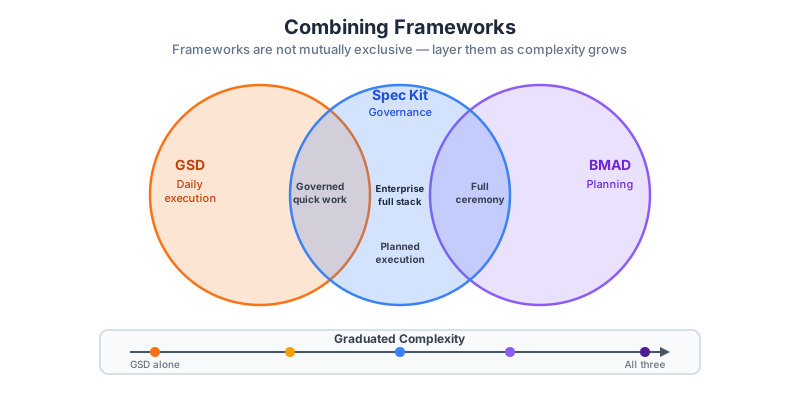
The three frameworks are not mutually exclusive. They operate at different levels of the development lifecycle:
BMAD        — Project inception and architecture
Spec Kit    — Feature specification and governance
GSD         — Individual task execution
The combinations that work best in practice:
Combination 1: GSD for Daily Work + BMAD for Greenfield
This is the most common pattern for teams that ship regularly:
New project or major feature → BMAD analyst + architect
  ↓
PRD.md, arch.md, story.md produced
  ↓
Daily implementation → /gsd:quick "Implement Story N from story.md"
  ↓
GSD executes, commits, verifies
  ↓
PR reviewed against original artifacts
When it works: Teams that build greenfield services monthly (microservices shops, product teams with a regular release cadence). BMAD provides the durable architecture context; GSD provides daily execution speed.
When it breaks down: Very small teams (1–2 devs) where the BMAD setup cost is disproportionate to the project size.
Combination 2: Spec Kit for Governance + GSD for Execution
This is the pattern for regulated or multi-stakeholder environments:
Feature request arrives
  ↓
/specify → spec.md (reviewed and approved by stakeholders)
  ↓
/plan → task list
  ↓
Each task → /gsd:quick "Implement [task description]"
  ↓
GSD commits; spec stays as audit trail
When it works: FinTech, healthcare, or enterprise environments where a human-readable specification must exist before implementation begins. Spec Kit provides the governance artifact; GSD provides execution speed within the approved scope.
When it breaks down: Fast-moving prototyping where the spec would be outdated before it is reviewed.
The Graduated Complexity Approach
Match framework complexity to task complexity:
Task complexity →         Low          Medium          High
Framework used  →         GSD          Spec Kit        BMAD
Ceremony level  →         Minimal      Moderate        Full
Human review    →   After execution  At each task   At each artifact
Artifacts       →   Commits only     spec.md         PRD + arch + stories
The rule: start with GSD. Reach for Spec Kit when you need a written spec for review or when the task is large enough to need a plan. Reach for BMAD when you are starting something significant from scratch.
Creating Your Team's Framework Playbook
A framework decision should not happen ad hoc. The playbook captures the decision for your team so that every developer makes the same choice under the same conditions.
Playbook decision tree (template):
Is this a new greenfield project or major re-architecture?
  YES → Use BMAD to produce PRD + arch, then GSD for execution
  NO ↓

Does this feature require stakeholder sign-off before implementation?
  YES → Use Spec Kit to produce spec.md, then GSD per task
  NO ↓

Is this task < 4 hours of work with clear acceptance criteria?
  YES → Use GSD quick
  NO ↓

Break the task into sub-tasks, re-evaluate each sub-task above
Exercise 5.1 — Map Your Upcoming Work
Take your next three upcoming development tasks. Assign each one to a framework using the decision tree above:
Task 1: _______________________________
Framework: _______
Reason: _______

Task 2: _______________________________
Framework: _______
Reason: _______

Task 3: _______________________________
Framework: _______
Reason: _______
Part 6: Building Your Team Playbook (20 min)
The Team AI Workflow Playbook
The playbook is a living document — typically a file in your repo at docs/ai-workflow-playbook.md — that captures your team's decisions about how to use AI tools. It answers the questions that new team members will ask, and it prevents each developer from making the same decisions independently.
Below is a complete template. Fill it in during or after this session.
Playbook Template
# AI Workflow Playbook
## [Team Name] | Version: 1.0 | Last Updated: [Date]

---

## 1. Tool Selection

### Primary AI Coding Tool
- Tool: Claude Code (claude.ai/code)
- Version requirement: latest stable
- Installation: [link to internal setup guide]

### When to Use Claude Code
- Code generation, explanation, and refactoring: always appropriate
- Architecture decisions: use as a thinking partner, not the decision maker
- Security-sensitive code: use Claude Code to draft, human reviews mandatory

### When NOT to Use Claude Code
- Generating credentials, secrets, or keys
- Committing without human review (automated pipelines excepted — see §5)
- Tasks involving PII without data handling review

---

## 2. Framework Selection

### Decision Matrix (fill in your team's weights)

| Factor | Weight | Notes |
|---|---|---|
| Team size | 1.5 | [current size: ___] |
| Complexity | 1.0 | |
| Lock-in tolerance | 1.2 | [team preference: ___] |
| Learning budget | 0.8 | |
| Governance needs | 1.0 | [compliance level: ___] |

### Default Assignments

| Task Type | Framework | Rationale |
|---|---|---|
| Bug fix (< 2 hr) | GSD quick | Low ceremony, high speed |
| New feature (2–8 hr) | GSD quick or Spec Kit | Spec Kit if stakeholder review needed |
| Large feature (> 8 hr) | Spec Kit | Mandatory spec review |
| Greenfield service | BMAD + GSD | PRD/arch required before implementation |
| Compliance feature | Spec Kit | Spec.md is the audit artifact |
| Prototype / spike | GSD quick | Speed over governance |

---

## 3. Review Process

### Review Requirements by Risk Level

| Risk Level | Examples | Review Requirements |
|---|---|---|
| Low | Style changes, comments, test additions | Self-review + CI pass |
| Medium | New routes, model changes, config updates | 1 peer review + CI pass |
| High | Auth, payments, PII handling, schema migration | 2 peer reviews + security checklist |
| Critical | Infra changes, secrets management, third-party integrations | Tech lead review + external audit |

### What to Review in AI-Generated Code

Reviewers should check:
- [ ] Does the code match the spec/story/task description?
- [ ] Are edge cases handled (empty input, null values, large input)?
- [ ] Are error messages informative without leaking internals?
- [ ] Are tests testing behavior, not implementation details?
- [ ] Are there hardcoded values that should be configuration?
- [ ] Is the code readable and consistent with surrounding code?

---

## 4. Quality Gates

### Mandatory Gates Before Merge

- [ ] All tests pass (CI enforced)
- [ ] No new linting errors (ruff / eslint / equivalent)
- [ ] Coverage does not decrease below [___]%
- [ ] No hardcoded secrets (secret scanning enforced)
- [ ] Human review completed (risk level determines how many)

### AI-Specific Quality Checks

- [ ] GSD tasks: atomic commits present (not one mega-commit)
- [ ] Spec Kit tasks: spec.md present and linked in PR description
- [ ] BMAD tasks: PRD.md and arch.md linked in PR description

---

## 5. When to Use AI vs Manual Coding

| Use AI | Use Manual Coding |
|---|---|
| Boilerplate (CRUD routes, test scaffolding) | Security architecture decisions |
| Test generation for existing functions | Cryptography implementation |
| Refactoring to a consistent pattern | Performance-critical inner loops (profile first) |
| Documentation generation | Business logic that requires deep domain expertise |
| Migration scripts with clear before/after | Compliance logic (review AI output carefully) |
| Code explanation and exploration | Novel algorithms (use AI for explanation, write manually) |

---

## 6. Token and Cost Budgets

### Guidance by Task Type

| Task Type | Expected Token Use | Cost Guide (claude-3-7-sonnet) |
|---|---|---|
| GSD quick (simple task) | 10K–50K tokens | $0.03 – $0.15 |
| GSD quick (complex task) | 50K–200K tokens | $0.15 – $0.60 |
| Spec Kit (write + plan) | 20K–80K tokens | $0.06 – $0.24 |
| BMAD (full handoff) | 50K–150K tokens | $0.15 – $0.45 |
| Large codebase analysis | 100K–500K tokens | $0.30 – $1.50 |

Note: Token counts are approximate. Monitor actual usage in your first month
and adjust these estimates.

### Cost Controls

- Per-task token budget: [set your limit, e.g., 200K tokens]
- Monthly team budget: [e.g., $50–$200 depending on team size]
- Flag for review: any single task exceeding [e.g., 300K tokens]
- Use `claude --token-limit` flag to cap runaway tasks

---

## 7. Framework-Specific Guidelines

### GSD

- Use `/gsd:quick` for tasks with clear acceptance criteria
- Review every commit GSD produces — do not merge without reading
- Use `/gsd:pause-work` if you need to stop mid-task; resume with `/gsd:resume-work`
- For repeating workflows, create a custom slash command

### Spec Kit

- Spec.md must exist in the PR before review begins (for medium/high risk features)
- Product owner or tech lead signs off on spec before `/plan` is run
- Spec updates require a new plan generation — do not execute against a stale plan

### BMAD

- Analyst agent runs in a fresh Claude Code session (prevents context contamination)
- PRD.md requires at least one non-technical reader review
- arch.md requires tech lead review before developer agent runs
- Story estimates are rough guides, not commitments — adjust as implementation reveals complexity

---

## 8. Escalation and Override

If AI-generated code fails review three times on the same task:
1. Stop using AI for that task
2. Write it manually
3. Document why AI was not effective (for playbook improvement)

If cost is exceeding budget:
1. Check for runaway context (large files being re-read unnecessarily)
2. Scope tasks more narrowly
3. Use a lower-cost model for research/planning phases

---
Exercise 6.1 — Start Your Team's Playbook
Copy the template above into docs/ai-workflow-playbook.md in your project. Fill in:
- Section 2: your team's default framework assignments
- Section 3: your actual review requirements
- Section 6: your actual token/cost budgets
This does not need to be complete today — it is a starting point. The best playbooks are updated incrementally as your team learns what works.
Checkpoint
Before finishing this lesson, confirm you can do the following:
- Fill in the decision matrix for a real project and reach a defensible framework recommendation
- Run
/gsd:quickon a task with clear acceptance criteria and review the atomic commits - Write a spec with
/specify, convert it to a plan with/plan, and execute one task - Run the BMAD analyst → architect handoff and produce PRD.md and arch.md
- Identify two tasks in your current work where GSD + BMAD combined is better than either alone
- Fill in at least sections 2, 3, and 6 of the team playbook template
Key Takeaways
- The decision matrix makes framework selection explicit and discussable. Score your project against team size, complexity, lock-in tolerance, learning budget, and governance needs — then commit to the result.
- GSD is the highest-velocity option: clear task description +
/gsd:quick+ atomic commit review. Use it for the majority of implementation work. - Spec Kit is governance-first: the spec.md document is the artifact that precedes code. Use it when requirements need stakeholder review or when compliance audit trails are required.
- BMAD is architecture-first: the PRD → arch → stories chain provides durable project context. Use it for greenfield services and any project where multiple developers need shared grounding.
- Combining frameworks is not hedging — it is appropriate matching of ceremony to complexity. BMAD for inception, Spec Kit for governance, GSD for execution is a coherent production workflow.
- The team playbook is the most important output of this lesson. Decisions made once in the playbook are not re-made for every task.
Congratulations — You Have Completed the AI-Powered Development Track
This lesson is the capstone of the Developer Track. Over 12 sessions you have covered:
- Module 1: The AI coding landscape — what changed, why it changed, and which tools occupy which niches
- Module 2: The model zoo — how to select and configure models by task type, cost, and capability
- Module 3: Agent architecture — the agentic loop, tool use, orchestration, and the mental model for directing agents rather than prompting assistants
- Module 4: Tools, commands, and skills — extending Claude Code with MCP, custom slash commands, and reusable workflows
- Module 5: Memory and context — context windows, context rot, CLAUDE.md, and the techniques for keeping agents effective over long sessions
- Module 6: Workflow frameworks — GSD, Spec Kit, and BMAD; how to choose between them; how to combine them; and how to embed the right choice in a team playbook
The shift from AI as autocomplete to AI as agent director is not primarily a technical shift — it is a workflow and judgment shift. You now have the vocabulary, the frameworks, and the hands-on experience to lead that shift in your team.
The field will continue to change. New models, new frameworks, new primitives will arrive. The mental models in this course — task appropriateness, verification, graduated complexity, the playbook — are stable enough to apply to whatever comes next.