 JustLearn
Lesson 11: Workflow Frameworks — GSD vs Spec Kit vs BMAD
Course: AI-Powered Development (Dev Track) | Duration: 2 hours | Level: Intermediate
Learning Objectives
By the end of this lesson, students will be able to:
- Explain what Spec-Driven Development (SDD) is and why it matters
- Describe the core philosophy and workflow of each of the three major AI dev frameworks: GSD, Spec Kit, and BMAD
- Compare GSD, Spec Kit, and BMAD across key dimensions (team size, project complexity, tooling, learning curve)
- Choose the right framework for a given project scenario using the decision flowchart
- Execute at least one framework's first command on a sample project
Prerequisites
- Completed Lessons 1–10 of this course (AI Coding Landscape through Memory & Context)
- Familiarity with Claude Code or another AI coding assistant
- Basic understanding of software project structure (files, directories, git)
- Comfortable with the concept of "slash commands" in AI tools
Lesson Outline
Part 1: Why Frameworks Matter (15 min)
The Problem with Raw Vibe Coding
Raw vibe coding — firing prompts at an AI and accepting whatever it produces — works brilliantly for small, contained tasks:
- "Write a Python function to parse this JSON"
- "Fix the CSS alignment on this card"
- "Add input validation to this form field"
But the moment you try to use that same approach on a real project — something with 5+ files, multiple features, a real architecture, and sessions that span days — it collapses. Here is why:
Context Rot
Every AI session has a context window. As the conversation grows, early decisions get buried. The model "forgets" the architecture you agreed on in turn 2 by the time you're at turn 40. It starts making choices that contradict earlier decisions. Code becomes inconsistent. You spend more time course-correcting than building.
Scope Creep
Without a written spec, each new prompt can subtly shift the goal. The AI helpfully adds features you didn't ask for, or silently drops ones you did. Without a document pinning down "what are we building?", the target moves every session.
Ping-Pong Hell
You ask for a feature. The AI implements it. You notice it broke something else. You ask it to fix that. It breaks something else again. Without structured verification, you're stuck in an endless loop of patch-and-break.
Half-Baked Handoffs
When you close a session and come back the next day, you have to re-explain context. Without structured artifacts (plans, specs, phase files), every session restarts from scratch.
What Is Spec-Driven Development (SDD)?
Spec-Driven Development is a structured approach to AI-assisted coding that solves all of the above by introducing written artifacts as the source of truth before code is written.
The core idea: the AI doesn't just code — it first helps you specify, plan, and structure the work, then executes against that structure.
SDD is not:
- Waterfall planning (it stays agile and iterative)
- Exhaustive documentation for documentation's sake
- A way to slow down fast developers
SDD is:
- A set of written artifacts (spec, plan, task list) that anchor every AI session
- A workflow that prevents context rot by giving each AI session a clean, bounded scope
- A governance layer that makes AI output predictable and reviewable
Three frameworks represent the current state of the art in SDD:
| Framework | Creator | Best For | Native Tool |
|---|---|---|---|
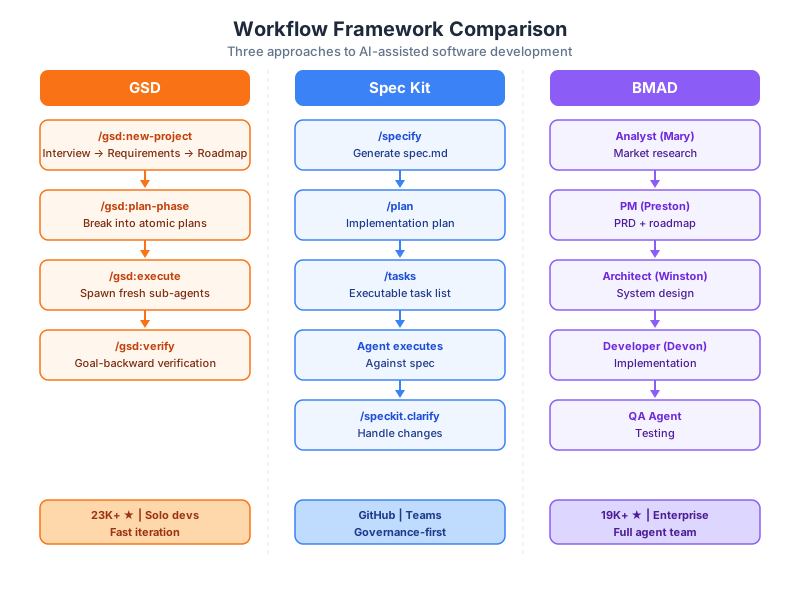
| GSD | TACHES (Lex Christopherson) | Solo devs, small teams, fast execution | Claude Code |
| Spec Kit | GitHub (open-source) | Teams using GitHub ecosystem | Any AI agent |
| BMAD | BMAD community | Large teams, enterprise, complex greenfield | Any AI agent |
The rest of this lesson is a detailed tour of all three.
Part 2: Framework 1 — GSD (Get Shit Done) (30 min)
Background and Creator
GSD (Get Shit Done) was created by Lex Christopherson, who goes by the handle TACHES (also known as glittercowboy). He launched it in late 2025 and it reached 31,000+ GitHub stars at peak traction, making it one of the fastest-growing developer tools of its era.
It is used by engineers at Amazon, Google, Shopify, Webflow, and hundreds of other organizations. The repository lives at github.com/gsd-build/get-shit-done.
Philosophy: "Hidden Complexity, Exposed Simplicity"
GSD's design principle is that the framework should do a tremendous amount of work invisibly, while presenting the developer with a handful of clean, memorable commands. The developer says /gsd:new-project — and behind the scenes, GSD runs parallel research agents, extracts requirements, scopes a v1, and generates a phased roadmap. The complexity is there; you just don't have to manage it yourself.
The problem Lex was solving: "Claude is brilliant, but without structure it drifts. Context rots. Sessions become ping-pong hell. Half-baked snippets instead of finished features."
GSD's answer: fresh sub-agent contexts for every plan, structured artifacts connecting every phase, and goal-backward verification to confirm work actually works.
Best For
- Solo developers who need to move fast
- Small teams (2–5 developers)
- Projects that need fast execution without bureaucratic overhead
- Teams already using Claude Code as their primary AI tool
The GSD Toolchain
GSD is built natively for Claude Code via its custom slash command system. It installs as a set of ~50 Markdown prompt files plus a Node.js CLI helper. When you install GSD, it registers its slash commands in your project's .claude/ directory.
GSD 2.0 evolved into a standalone CLI built on the Pi SDK, giving it direct TypeScript access to the agent harness itself — allowing it to clear context between tasks, inject the right files at dispatch time, manage git branches, track cost and token usage, detect stuck loops, recover from crashes, and auto-advance through an entire milestone without human intervention.
Community forks have extended GSD to OpenCode and Gemini CLI, so the multi-runtime story is growing.
How GSD Works — Detailed Workflow
GSD organizes development into phases, each phase containing plans, each plan containing a maximum of 3 tasks. This constraint is intentional: it keeps sub-agent context small, focused, and deterministic.
Phase 1
  ├── Plan 1.1  (max 3 tasks)  → fresh sub-agent
  ├── Plan 1.2  (max 3 tasks)  → fresh sub-agent
  └── Plan 1.3  (max 3 tasks)  → fresh sub-agent

Phase 2
  ├── Plan 2.1  (max 3 tasks)  → fresh sub-agent
  └── Plan 2.2  (max 3 tasks)  → fresh sub-agent
The full command lifecycle:
Step 1: /gsd:new-project — Initialization
You run this once at the start of a project. GSD initiates an iterative interview process, asking clarifying questions about your project. Behind the scenes, it spawns parallel research agents to investigate your domain and technology stack.
Output artifacts:
spec.md— scoped requirements (v1 and v2 split)roadmap.md— phased delivery plan- Workflow settings (mode, depth, parallelization toggles)
- Agent toggles (Researcher, Plan-Checker, Verifier on/off)
Step 2: /gsd:plan-phase — Break a Phase into Plans
For each phase in the roadmap, you run this command. GSD breaks the phase into atomic plans, each expressed in XML format with a maximum of 3 tasks. Plans within a phase are grouped into "waves" based on dependencies — parallel within a wave, sequential across waves.
Output: a set of .xml plan files in the .gsd/ directory.
Step 3: /gsd:execute-phase — Spawn Sub-Agents
GSD spawns a fresh sub-agent per plan. Each agent receives:
- The plan's XML (what to build)
- Relevant spec sections (the contract)
- No prior conversation history (no context rot)
The 200,000-token window belongs entirely to that one plan. Agents within a wave run in parallel; waves run sequentially.
Step 4: /gsd:verify-work — Goal-Backward Verification
Standard testing asks: "Did we complete the tasks?" GSD asks: "What must be TRUE for success criteria to be met?"
The verifier focuses on observable behaviors, not implementation details. It asks questions like "Can you log in?" or "Does the filter return correct results?" rather than "Was the function written as specified?"
This is a deliberate inversion — working backward from the goal rather than forward from the task list.
Additional Commands (Selected)
| Command | Purpose |
|---|---|
/gsd:discuss-phase | Clarify phase before planning |
/gsd:research-phase | Research implementation approach |
/gsd:quick | Execute a quick one-off task |
/gsd:progress | Check project progress |
/gsd:debug | Systematic debugging with paper trail |
/gsd:pause-work | Create context handoff for next session |
/gsd:resume-work | Resume from previous handoff |
/gsd:add-todo | Capture idea without breaking flow |
/gsd:health | Diagnose planning directory |
/gsd:cleanup | Archive accumulated phase data |
Core Innovation: Fresh Sub-Agent Contexts
This is GSD's most important technical insight. Traditional AI-assisted development keeps one long conversation thread running. Every message adds to context. By message 50, the model is managing 50,000 tokens of prior conversation, most of it irrelevant to the current task.
GSD eliminates this by never reusing a context window. Each plan gets a virgin context. The sub-agent has exactly what it needs and nothing more.
The result: no context rot, no accumulated drift, no ping-pong.
ASCII Diagram: GSD Workflow
  YOU                GSD                 SUB-AGENTS
   |                  |                       |
   |--/gsd:new-project-->|                    |
   |                  |--[interview]--------->|
   |                  |<--[parallel research]-|
   |<--spec.md + roadmap--|                   |
   |                  |                       |
   |--/gsd:plan-phase--->|                    |
   |<--XML plans (waves)--|                   |
   |                  |                       |
   |--/gsd:execute-phase->|                   |
   |                  |--plan 1.1 [fresh ctx]->agent-A
   |                  |--plan 1.2 [fresh ctx]->agent-B  (parallel wave)
   |                  |--plan 1.3 [fresh ctx]->agent-C
   |                  |<---done (wave 1)------|
   |                  |--plan 2.1 [fresh ctx]->agent-D
   |                  |<---done (wave 2)------|
   |<--all plans complete--|                  |
   |                  |                       |
   |--/gsd:verify-work-->|                    |
   |                  |--[goal-backward]--->verifier-agent
   |<--pass/fail + notes--|                   |
Live Demo Walkthrough: /gsd:new-project
Here is what a real session looks like:
$ /gsd:new-project

GSD: Tell me about your project. What are you building?
> A task management API with user auth and team workspaces.

GSD: Who are the users? How many concurrent users do you expect?
> Internal teams at a startup. Maybe 50 concurrent.

GSD: What's your preferred stack?
> Node.js, PostgreSQL, REST API. No frontend yet.

GSD: Do you have any existing code or starting from scratch?
> Starting from scratch.

[GSD spawns research agents in background...]
[Research: Node.js REST patterns, PostgreSQL schemas, JWT auth patterns]

GSD: Based on our conversation, here's the v1 scope:
  - User registration and JWT authentication
  - Team workspace CRUD
  - Task CRUD with assignment
  - Basic permissions (owner/member roles)

  v2 (future):
  - Notifications
  - File attachments
  - Activity audit log

  Generating phased roadmap...
  [writes spec.md]
  [writes roadmap.md with 4 phases]

Done. Run /gsd:plan-phase to begin Phase 1.
Part 3: Framework 2 — Spec Kit (25 min)
Background and Creator
Spec Kit was created and open-sourced by GitHub itself — the same company that makes GitHub Copilot. The repository is at github.com/github/spec-kit.
The fact that GitHub built and published this framework is significant: it signals an institutional commitment to spec-driven development as the right model for AI-assisted coding at scale.
Philosophy: "Specifications Are the Source of Truth"
Where GSD focuses on fast execution through context isolation, Spec Kit focuses on the specification artifact itself as the permanent, authoritative document that governs all AI activity. Every AI action — planning, coding, changing, clarifying — is done in service of the spec.
The spec is not a byproduct. The spec is the product. Code is just its implementation.
Best For
- Teams already embedded in the GitHub ecosystem (Copilot, GitHub Actions, Issues)
- Organizations that need governance around AI-generated code
- Teams that want tool-agnostic specs (run the same spec on Claude, GPT-4, Gemini, Copilot)
- Projects where specification reuse across multiple implementations is valuable
- Organizations with strong conventions that need to be enforced consistently
The Spec Kit Toolchain
Spec Kit is designed to be tool-agnostic. After running specify init, it installs slash commands in all major agent prompt directories simultaneously:
.claude/(Claude Code).github/prompts/(GitHub Copilot).pi/prompts/(Pi coding agent)
This means the same SDD workflow — the same spec, the same plan, the same tasks — runs on any supported AI backend without modification.
There is also a VS Code extension (Spec Kit Assistant) that provides a visual orchestrator for the full SDD workflow, with support for Claude, Gemini, GitHub Copilot, and OpenAI.
How Spec Kit Works
Step 1: specify init
Run once in your project root. Installs the Spec Kit slash commands in all supported agent directories. Generates a starter constitution.md.
Step 2: /speckit.specify (or /specify) — Generate the Spec
The AI interviews you about your project and produces a structured spec.md capturing:
- Project goals and non-goals
- User personas and use cases
- Feature requirements (functional and non-functional)
- Constraints (performance, security, compliance)
- Technology choices
Step 3: /speckit.plan (or /plan) — Technical Plan
Converts the spec into a plan.md containing:
- Architectural approach
- Data models and schema
- API surface and data flow
- Library and dependency choices
- Key implementation decisions with rationale
Step 4: /speckit.tasks (or /tasks) — Task Breakdown
Breaks the plan into a set of individual task files. Each task file is:
- Self-contained (includes enough context for an AI or human to act on it)
- Scoped to a single unit of work
- Linked to the relevant spec and plan sections it implements
Step 5: Agent Execution
The AI agent (your tool of choice) executes tasks against the spec and plan. Because the spec is tool-agnostic, you can switch agents mid-project without losing alignment.
Step 6: /speckit.clarify — Handle Changes and Underspecification
When requirements change, or when the AI identifies ambiguity in the spec, /speckit.clarify (formerly /quizme) triggers a reverse-questioning flow. The AI asks you clarifying questions to identify missing requirements, fill gaps, and ensure consistency before proceeding.
It also runs a cross-artifact consistency analysis pass — checking that the spec, plan, and tasks are all aligned with each other.
The constitution.md — The Constitutional Layer
This is Spec Kit's signature innovation. The constitution.md is a set of non-negotiable principles that govern every spec generated in your project or organization. It captures:
- Testing approach requirements ("all features must have unit and integration tests")
- Architectural conventions ("CLI-first development", "no ORMs — raw SQL only")
- Security requirements ("all endpoints require authentication")
- Stack preferences ("TypeScript, no JavaScript")
- Code style conventions
The constitution is applied to every new spec automatically. This means even as your team uses AI to generate specs rapidly, every output respects your organization's standards. It is a powerful governance tool for teams that use AI at scale.
ASCII Diagram: Spec Kit Workflow
  specify init
       |
       v
  constitution.md  <-- non-negotiable principles (set once)
       |
       v
  /speckit.specify
       |
       v
   spec.md  <-- source of truth
       |
       v
  /speckit.plan
       |
       v
   plan.md  <-- architecture + decisions
       |
       v
  /speckit.tasks
       |
       v
  tasks/
  ├── task-001.md
  ├── task-002.md
  └── task-003.md
       |
       v
  Agent executes tasks  <-- any supported AI tool
  (Claude / Copilot / Gemini / GPT-4)
       |
  [change request?]
       |
       v
  /speckit.clarify  --> cross-artifact consistency check
       |
       v
  spec.md updated  -->  re-plan  -->  re-task  -->  execute
Key Differentiator: Tool-Agnostic Constitutional Framework
Spec Kit is the only framework in this comparison that is explicitly tool-agnostic by design. A team can generate a spec using GitHub Copilot, hand the tasks to Claude for execution, validate with a GPT-4-based QA tool, and merge using Copilot's PR reviewer — all against the same spec.
This is especially valuable for organizations that don't want to lock into a single AI vendor, and for teams where different developers use different AI tools.
Part 4: Framework 3 — BMAD Method (25 min)
Background and Creator
The BMAD Method (Breakthrough Method for Agile AI Driven Development) emerged from the open-source community and reached 19,000+ GitHub stars on GitHub at github.com/bmad-code-org/BMAD-METHOD. Version 4 is widely adopted; Version 6 is in alpha.
BMAD has been ported to Claude Code as a dedicated fork at github.com/24601/BMAD-AT-CLAUDE.
Philosophy: "Simulate a Full Agile Team with AI Agents"
BMAD's premise is that a single AI agent wearing all hats — analyst, product manager, architect, developer, QA — produces worse results than multiple agents, each deeply specialized in one role.
Rather than one AI with a big prompt, BMAD gives you a cast of specialized agents that mirror the roles in a real agile software team. Each agent has a crafted persona, expertise boundaries, and a specific artifact it owns.
The result is role-isolated, context-engineered agents communicating through shared structured files.
Best For
- Large teams (5+ developers)
- Enterprise organizations with governance requirements
- Complex greenfield projects that need a full architecture before coding starts
- Teams that want AI to mirror their existing agile processes
- Projects with regulatory, compliance, or security requirements (the structured artifacts provide audit trails)
The BMAD Agent Cast
BMAD ships with a full team of named agents, each specialized:
| Agent | Persona | Role | Primary Artifact |
|---|---|---|---|
| bmad-analyst | Mary | Market analysis, research, feasibility | Brief, research report |
| bmad-pm | John | Product requirements, epics, user stories | PRD.md |
| bmad-ux-designer | Sally | User flows, UX specifications | UX spec |
| bmad-architect | Winston | System design, architecture decisions | arch.md |
| bmad-sm | Bob | Sprint planning, story creation, backlog | story.md files |
| bmad-dev | Amelia (Devon in some versions) | Implementation, coding | code + comments |
| bmad-qa | — | Testing, quality assurance | test plans, bug reports |
The agents are not simultaneously active. You activate one at a time, it does its work, produces its artifact, and then you move to the next agent in the pipeline.
How BMAD Works — The Agent Pipeline
BMAD follows a four-phase cycle: Analysis → Planning → Solutioning → Implementation.
Phase 1: Analysis (Mary — bmad-analyst)
Mary conducts market analysis, feasibility research, and competitive landscape review. She acts as an early reality check: is this project actually worth pursuing? Her output is a structured brief that informs whether to proceed and what the scope should be.
Mary asks relentless questions. She pulls in external data. She challenges assumptions. You must convince her the project has merit before she signs off.
Phase 2: Product Planning (John — bmad-pm)
John takes Mary's brief and builds the PRD.md — the Product Requirements Document. He defines:
- The problem statement
- Target users and personas
- Feature scope for MVP vs. future releases
- Success metrics
- Epics and user stories
John continues to guide with questions, but you control the scope. The PRD is version-controlled in git. Nothing proceeds without a locked PRD.
Phase 3: UX Design (Sally — bmad-ux-designer)
Sally takes the PRD and produces the UX spec: user flows, wireframe descriptions, interaction patterns, and edge case handling. She defines the user's experience before a single line of code is written.
Phase 4: Architecture (Winston — bmad-architect)
Winston takes the PRD and UX spec and designs the technical system. His output is arch.md:
- System architecture and component diagram
- Data models and schema
- API design
- Technology stack choices with rationale
- Architecture Decision Records (ADRs)
Winston will refuse to move forward if the PRD is ambiguous. He enforces technical rigor.
Phase 5: Sprint Planning (Bob — bmad-sm)
Bob is the Scrum Master. He takes the PRD and architecture, breaks the work into sprints, and creates individual story.md files — one per story, each containing:
- Story description and acceptance criteria
- Technical context (relevant sections of arch.md)
- Dependencies and blockers
- Estimated complexity
Phase 6: Development (Amelia/Devon — bmad-dev)
The developer agent works through the story files one by one. Each story gives the agent a scoped, self-contained task with all necessary context embedded. This is the BMAD equivalent of GSD's fresh sub-agent context: the story file contains everything the dev agent needs.
Phase 7: QA (bmad-qa)
The QA agent reviews completed stories, runs tests, identifies edge cases (the "Edge Case Hunter" capability runs as a parallel code review layer), and creates bug reports with enough context for the dev agent to fix.
Communication Through Shared Files
BMAD agents do not communicate directly with each other. They communicate through shared structured files:
- Mary writes the brief → John reads it to write PRD.md
- John writes PRD.md → Winston reads it to write arch.md
- Winston writes arch.md → Bob reads it to write story.md files
- Bob writes story.md → Amelia reads it to write code
- Amelia writes code → QA agent reads it to write test plans
This file-based communication pattern means:
- Every handoff is auditable (the files are in git)
- Any agent can be re-run on updated inputs without affecting others
- Agents have strict context boundaries — Winston doesn't know about Bob's sprint plans; he only knows about the PRD
ASCII Diagram: BMAD Workflow
  [Project Idea]
       |
       v
  Mary (Analyst)
  - Market research
  - Feasibility
       |
       v
   brief.md
       |
       v
  John (PM)
  - Requirements
  - Epics & stories
       |
       v
   PRD.md
       |
       v
  Sally (UX)          Winston (Architect)
  - User flows    +   - System design
  - UX spec           - arch.md
       \                  /
        \                /
         v              v
          Bob (Scrum Master)
          - Sprint planning
          - Story breakdown
               |
               v
    story-001.md  story-002.md  story-003.md
          |             |             |
          v             v             v
    Amelia (Dev)  Amelia (Dev)  Amelia (Dev)
    [reads story]  [reads story]  [reads story]
          |             |             |
          v             v             v
         code          code          code
          |
          v
    QA Agent
    - Test plans
    - Bug reports
    - Edge case hunting
Core Innovation: Context-Engineered Role-Isolated Agents
BMAD's breakthrough is role isolation. Each agent is engineered for deep expertise in its domain and strict ignorance of other domains. The analyst doesn't try to architect. The architect doesn't try to manage scope. The developer doesn't try to make product decisions.
This produces a kind of emergent quality that single-agent approaches miss: the same discipline that prevents a human analyst from writing code also prevents the AI analyst from writing code — keeping each artifact authoritative, focused, and clean.
Part 5: Side-by-Side Comparison (15 min)
Detailed Comparison Table
| Dimension | GSD | Spec Kit | BMAD |
|---|---|---|---|
| Creator | TACHES (Lex Christopherson) | GitHub (open-source) | BMAD community |
| GitHub Stars | 31,000+ | — | 19,000+ |
| Native Tool | Claude Code | Any AI agent | Any AI agent |
| Setup Time | ~5 minutes | ~10 minutes | ~30–60 minutes |
| Learning Curve | Low | Medium | High |
| Team Size | Solo to small (1–5) | Small to medium (2–20) | Medium to large (5–50+) |
| Project Scope | Feature-level to mid-size projects | Mid-size to large | Large greenfield, enterprise |
| Context Rot Solution | Fresh sub-agent per plan | Spec as persistent anchor | Role-isolated agents + story files |
| Spec Overhead | Low (spec.md + roadmap.md) | Medium (spec.md + plan.md + tasks/ + constitution.md) | High (brief + PRD + UX spec + arch.md + story files) |
| Artifact Count | Low | Medium | High |
| Git Integration | Strong (built-in branching) | Strong (GitHub-native) | Strong (all artifacts versioned) |
| Multi-Agent Parallelism | Yes (parallel waves) | No (sequential) | Partial (parallel dev stories) |
| Tool Agnostic? | No (Claude Code native) | Yes (any AI backend) | Yes (any AI backend) |
| Governance Features | Medium | High (constitution.md) | Very High (full audit trail) |
| Flexibility | High | Medium | Low (structured process) |
| Best Analogy | A great solo dev with a checklist | A product team's issue tracker | A full agile team standup |
When Each Framework Wins
GSD wins when:
- You are a solo developer or a small team
- Speed to execution matters more than process documentation
- You are using Claude Code already
- The project is new and you want to explore quickly
- You want AI to handle session management for you
Spec Kit wins when:
- Your team is already in the GitHub ecosystem
- You need specs that survive across AI tool changes
- Your organization has coding standards to enforce (constitution.md)
- You want governance without heavy ceremony
- Multiple developers use different AI tools on the same project
BMAD wins when:
- You are building a complex greenfield project
- You have a large team that maps to agile roles
- You need enterprise-grade audit trails
- You want strict separation between product, design, architecture, and development
- Regulatory or compliance requirements demand structured documentation
Decision Flowchart (ASCII)
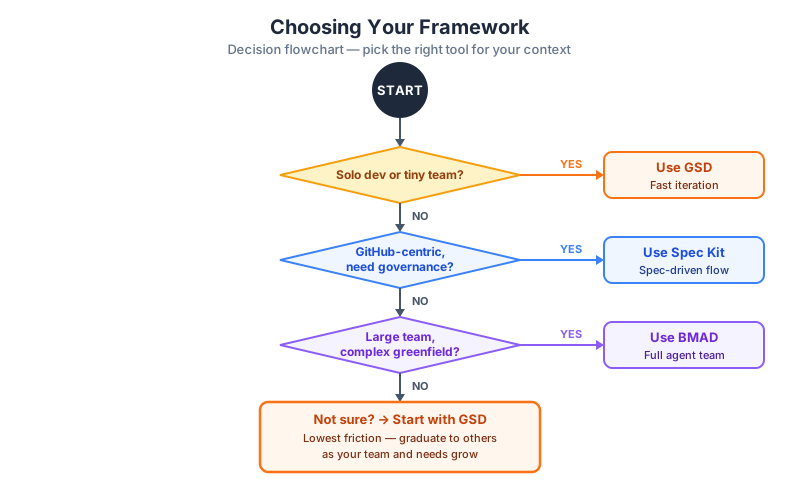
  Start: New Project
         |
         v
  [Solo developer?]
   |         |
  YES        NO
   |         |
   v         v
  GSD    [Team uses GitHub Copilot
          or needs tool-agnostic specs?]
              |         |
             YES        NO
              |         |
              v         v
           Spec Kit  [Large team / enterprise /
                      complex greenfield?]
                        |         |
                       YES        NO
                        |         |
                        v         v
                      BMAD     [Not sure?]
                                  |
                                  v
                          Start with GSD
                          (easiest onramp,
                           migrate later if needed)
A Note on Combining Frameworks
These frameworks are not mutually exclusive. Several teams use GSD for fast feature work and BMAD for new product planning, or use Spec Kit's constitution.md as a governance layer on top of GSD's execution workflow.
The important thing is to have a framework, not to debate frameworks indefinitely. Any structured approach beats unstructured vibe coding at scale.
Part 6: Hands-On Practice (10 min)
Exercise: Pick One Framework and Take It Live
Pick one of the three frameworks and apply it to the following sample task:
Sample Task: You are building a simple URL shortener service. Users can submit a long URL and receive a short code. Entering the short code in a browser redirects to the long URL. The service should track click counts.
If you chose GSD:
- Make sure Claude Code is installed:
npm install -g @anthropic-ai/claude-code - Install GSD in a new project folder: follow instructions at github.com/gsd-build/get-shit-done
- Run
/gsd:new-projectin Claude Code - Answer the interview questions about the URL shortener
- Review the generated
spec.mdandroadmap.md - Deliverable: Share your
spec.mdoutput
If you chose Spec Kit:
- Install Spec Kit:
npx specify initin a new project folder - Review the generated
constitution.md— add at least one rule relevant to your preferences - Run
/speckit.specifyand answer questions about the URL shortener - Run
/speckit.planto generate the technical plan - Run
/speckit.tasksto generate the task list - Deliverable: Share your
spec.md,plan.md, and task count
If you chose BMAD:
- Clone the BMAD repo and install as directed at github.com/bmad-code-org/BMAD-METHOD
- Activate the Analyst agent (Mary) and brief her on the URL shortener
- Let her produce the brief
- Activate the PM agent (John) and produce a draft
PRD.md - Deliverable: Share your brief and
PRD.mddraft
Reflection Questions (discuss with a partner or write down)
- What surprised you about the framework you chose?
- At what point in the workflow did the AI's output feel most useful vs. most generic?
- If you were starting a real project next week, which framework would you reach for first? Why?
Checkpoint
Knowledge Check (answer before moving on)
- What is context rot, and how does GSD solve it?
- What is the purpose of
constitution.mdin Spec Kit? - Name four of BMAD's specialized agent roles and the artifact each one produces.
- A 3-person startup wants to launch a new SaaS MVP in 4 weeks. Which framework do you recommend? Why?
- What does "goal-backward verification" mean in GSD?
- What makes Spec Kit "tool-agnostic" and why does that matter?
Graded Exercise (submit before next session)
Choose one framework and write a 500-word reflection covering:
- Which framework you chose and why
- The specific project you applied it to
- One thing the framework helped you see that you wouldn't have seen without it
- One limitation or friction point you experienced
- Whether you would recommend it to a colleague, and under what conditions
Key Takeaways
- Raw vibe coding fails at scale due to context rot, scope creep, and inconsistent output — structured frameworks are not optional, they are essential
- Spec-Driven Development (SDD) anchors all AI activity to written artifacts that persist across sessions
- GSD (TACHES, 31,000+ stars) solves context rot through fresh sub-agent contexts and structured phases — best for solo devs and small teams using Claude Code
- Spec Kit (GitHub, open-source) treats the spec as the supreme source of truth and is tool-agnostic — best for GitHub-centric teams that need governance
- BMAD (community, 19,000+ stars) simulates a full agile team with role-isolated specialized agents — best for large teams and complex greenfield projects
- The right framework depends on team size, project scope, and tooling — use the decision flowchart when in doubt
- When unsure, start with GSD — lowest friction, fastest feedback, easiest to migrate from
Common Mistakes to Avoid
- Skipping the spec step in GSD and jumping straight to
/gsd:execute-phase— the spec and roadmap are what make execution coherent - Treating Spec Kit's constitution.md as optional — without it, you get spec quality but not governance
- Trying to run all BMAD agents simultaneously — BMAD requires sequential handoffs; rushing this defeats its purpose
- Treating these frameworks as rigid rules — they are defaults, not dogma; adapt them to your team's needs
- Switching frameworks mid-project without migrating artifacts — pick one and commit for the duration of a project
Homework / Self-Study
-
Install and try: Install GSD or Spec Kit in a personal project (even a toy project) and complete one full cycle (spec through execution). Note what worked and what felt awkward.
-
Watch: Search YouTube for "BMAD method demo" — watch one walkthrough of the full agent pipeline. Pay attention to how the PRD.md is constructed.
-
Read: Read the GitHub Spec Kit
spec-driven.mdfile in the repository for the official opinionated take on why specs matter. -
Compare: Find one public project on GitHub that uses any of these three frameworks. Read its spec/plan artifacts. What do you notice about quality and completeness compared to projects without specs?
Next Lesson Preview
In Lesson 12: Advanced Context Engineering, we will:
- Deep-dive into CLAUDE.md and project memory files
- Learn how to engineer system prompts for long-running projects
- Build a custom context injection system for your own workflow
- Explore how GSD, Spec Kit, and BMAD each handle context injection differently
References and Resources
- GSD Repository: github.com/gsd-build/get-shit-done
- GSD 2.0: github.com/gsd-build/gsd-2
- GitHub Spec Kit: github.com/github/spec-kit
- Spec Kit Documentation: speckit.org
- Microsoft Dev Blog on Spec Kit: developer.microsoft.com/blog/spec-driven-development-spec-kit
- BMAD Method: github.com/bmad-code-org/BMAD-METHOD
- BMAD Docs: docs.bmad-method.org
- BMAD for Claude Code: github.com/24601/BMAD-AT-CLAUDE
- LogRocket deep-dive on Spec Kit: blog.logrocket.com/github-spec-kit
- GSD beginner guide: dev.to/alikazmidev/the-complete-beginners-guide-to-gsd
Back to Module Overview | Next Lesson: Advanced Context Engineering →