 JustLearn
Lesson 9: Memory, Context, and the #1 Problem in Vibe Coding
Course: AI-Powered Development (Dev Track) | Duration: 2 hours | Level: Intermediate
Overview
This is the most important lesson in the course. Everything you learn about prompting, tools, and workflows eventually collides with one hard constraint: the context window. When you understand how AI memory works — and what happens when it fills up — you become a fundamentally better agent director. When you don't understand it, you spend hours debugging problems that aren't bugs.
Session: A5.1 — "What Are Memory and Context? — Visual Explainer"
What you will be able to do after this lesson:
- Explain what a context window is and why it is finite
- Describe the three types of agent memory and when each one persists
- Recognize the symptoms of context rot before it derails a session
- Measure context usage in Claude Code and Cursor
- Adjust your workflow to stay inside the quality zone
Prerequisites
- Lesson 7 (Agent Architecture) — you understand what an agent is
- Lesson 8 (Tool Use) — you understand how tool results flow back into the agent
- You have Claude Code installed and can run a basic session
Part 1: The Context Window — The Agent's Working Memory (25 min)
What Is a Context Window?
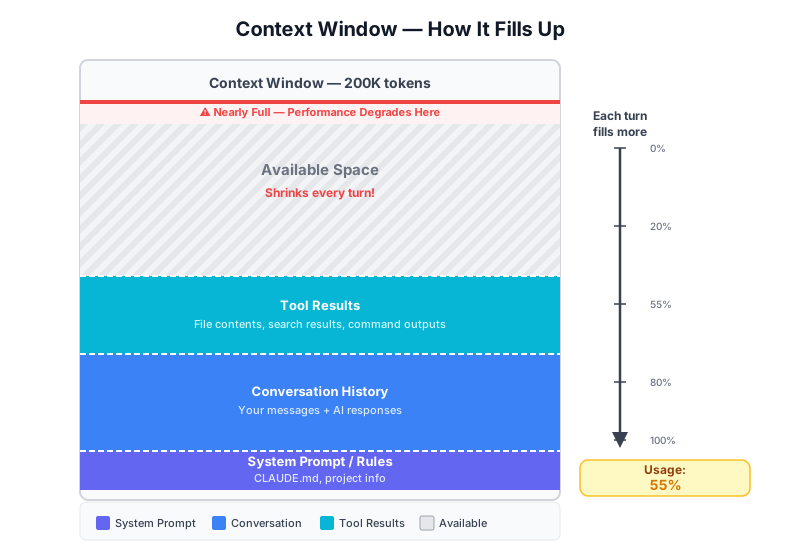
A language model does not have persistent memory between API calls. Every time the model generates a response, it reads a single large block of text — the context window — and produces a reply. That block contains everything: your instructions, the full conversation so far, every file the agent read, every tool result it received.
The context window is the agent's only source of truth in that moment.
Think of it as a whiteboard. The model can see everything written on the whiteboard, and it can write back. But the whiteboard has a fixed size. Once it is full, you either erase something or stop writing.
Visual: The Context Window as a Container
┌─────────────────────────────────────────────────────────────────┐
│                    CONTEXT WINDOW (200,000 tokens)               │
├─────────────────────────────────────────────────────────────────┤
│  SYSTEM PROMPT / RULES                          ~2,000 tokens   │
│  (CLAUDE.md, project info, agent instructions)                  │
├─────────────────────────────────────────────────────────────────┤
│  CONVERSATION HISTORY                                           │
│  Turn 1: User message + Assistant response      ~1,000 tokens   │
│  Turn 2: User message + Assistant response      ~1,500 tokens   │
│  Turn 3: User message + Assistant response      ~2,000 tokens   │
│  ...                                                            │
│  Turn N: User message + Assistant response      ~2,000 tokens   │
├─────────────────────────────────────────────────────────────────┤
│  TOOL RESULTS                                                   │
│  File read: src/api/users.ts                    ~3,000 tokens   │
│  File read: src/api/auth.ts                     ~2,500 tokens   │
│  Bash output: npm test                          ~1,200 tokens   │
│  File read: src/models/user.model.ts            ~1,800 tokens   │
│  Search results: 5 files matching "auth"        ~4,000 tokens   │
├─────────────────────────────────────────────────────────────────┤
│  AVAILABLE SPACE  ████████████░░░░░░░░░░░░░░░░░  60% used      │
│                   ↑ shrinks every single turn                   │
└─────────────────────────────────────────────────────────────────┘
What Goes Into the Context Window
Every token in the context window falls into one of four categories:
| Category | Examples | Typical Size |
|---|---|---|
| System prompt | CLAUDE.md, agent rules, project description | 500 – 5,000 tokens |
| Conversation history | Every user message and assistant reply | 500 – 3,000 tokens per turn |
| Tool results | File contents, bash output, search results | 500 – 10,000 tokens per tool call |
| Current turn | Your new message | 10 – 500 tokens |
The key insight: none of this ever leaves the window. Every turn adds more. The agent cannot selectively forget Turn 3 while remembering Turn 10. It is all-or-nothing.
What Is a Token?
A token is the smallest unit the model processes. It is not a word, not a character, not a line — it is a subword unit produced by a tokenizer.
Rough rules of thumb:
- 1 token ≈ 4 characters of English text
- 1 token ≈ 0.75 words
- 1,000 tokens ≈ 750 words ≈ ~1.5 pages of text
- A typical source code file (200 lines) ≈ 1,500 – 3,000 tokens
- A long README ≈ 1,000 – 2,000 tokens
"Hello, world!"   →  4 tokens   ["Hello", ",", " world", "!"]
"authentication"  →  3 tokens   ["auth", "enti", "cation"]
"src/api/users"   →  5 tokens   ["src", "/", "api", "/", "users"]
Code is often token-dense. A 300-line TypeScript file with types, generics, and imports can cost 4,000+ tokens. JSON configuration files are expensive. Minified code is very expensive.
Current Context Window Sizes (as of 2026)
| Model | Context Window | Notes |
|---|---|---|
| Claude 3.5 Sonnet / Claude 3.7 | 200,000 tokens | ~150,000 words |
| Claude 3 Opus | 200,000 tokens | |
| GPT-4o | 128,000 tokens | |
| GPT-4 Turbo | 128,000 tokens | |
| Gemini 1.5 Pro | 1,000,000 tokens | 1M token window |
| Gemini 1.5 Flash | 1,000,000 tokens | |
| Gemini 2.0 Flash | 1,000,000 tokens |
Larger is not always better. A 1M token window does not mean a 1M token conversation is coherent. Models begin to lose precision in the middle of very long contexts — a phenomenon called the "lost in the middle" problem. Information at the start and end of the context is recalled more reliably than information buried in the middle.
Visual: The Glass Analogy
Turn 1          Turn 5          Turn 15         Turn 25
   │               │               │               │
   ▼               ▼               ▼               ▼
┌─────┐         ┌─────┐         ┌─────┐         ┌─────┐
│     │         │▓▓▓▓▓│         │▓▓▓▓▓│         │▓▓▓▓▓│ ← overflow
│     │         │▓▓▓▓▓│         │▓▓▓▓▓│         │▓▓▓▓▓│
│     │         │▓▓▓▓▓│         │▓▓▓▓▓│         │▓▓▓▓▓│
│▓▓▓▓▓│         │▓▓▓▓▓│         │▓▓▓▓▓│         │▓▓▓▓▓│
│▓▓▓▓▓│         │▓▓▓▓▓│         │▓▓▓▓▓│         │▓▓▓▓▓│
└─────┘         └─────┘         └─────┘         └─────┘
  8% full         35% full        72% full       100% full

Each turn:  System prompt + all history + all tool results + new message
Once the glass overflows, one of three things happens:
- The model hard-fails with a context limit error
- The API silently truncates the oldest messages
- The agent starts exhibiting context rot symptoms (covered in Part 3)
Part 2: Three Types of Agent Memory (25 min)
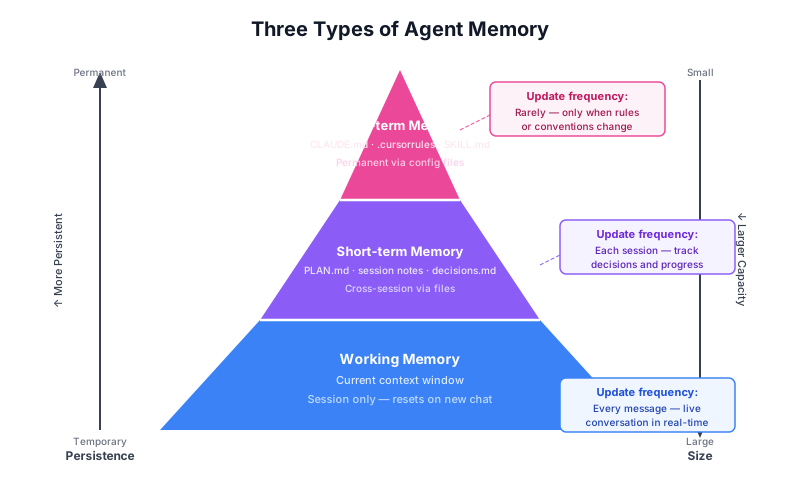
Agents operating in Claude Code and similar tools do not have one type of memory — they have three. Understanding which type to use for what purpose is a core skill for anyone directing agents.
Memory Type 1: Working Memory
What it is: The content currently inside the context window.
Scope: Single session only. Cleared when you close the conversation.
What lives here:
- Everything the agent has read this session
- Every message you sent
- Every tool result returned
- The current state of your thinking
Analogy: Your desk while you are working. Everything you need right now is spread out on it. When you leave for the day, the desk is cleared.
Characteristics:
- Instantly accessible — the model can reference anything in it
- Finite — fills up over time
- Volatile — gone when the session ends
- Expensive — every item in it costs tokens every turn
Memory Type 2: Short-term Memory
What it is: Information written to files that persist between sessions, designed to be read at the start of the next session.
Scope: Cross-session, but intentionally temporary. Updated frequently.
What lives here:
- Session summaries ("what we did today")
- Current task status — GSD's
PLAN.md,PROGRESS.md - In-progress notes, decisions made, blockers encountered
- Compact representations of working memory
Analogy: The notepad on your desk that you fill in before you leave. Tomorrow you read it to rebuild context fast.
How to use it: When you start a new session, read the summary file into context. This reconstructs working memory cheaply (a 500-token summary vs. re-reading 50,000 tokens of previous conversation).
Examples in practice:
PLAN.md— current milestone, active phase, next stepsPROGRESS.md— what was done, what is blocked.claude/session-summary.md— handoff notes
Memory Type 3: Long-term Memory
What it is: Permanent configuration and instruction files that are loaded at the start of every session, every time.
Scope: Permanent. Changed deliberately, not frequently.
What lives here:
- Agent behavior rules (
CLAUDE.md) - Editor preferences (
.cursorrules,.cursor/rules/) - Project standards (
SKILL.md,CONVENTIONS.md) - User preferences and style guides
- Project architecture decisions
Analogy: The employee handbook and your personal notes about how you work. You don't rewrite them every day, but they shape every session.
How to use it: Write decisions here once so you never have to re-explain them. "Always use TypeScript strict mode" in CLAUDE.md means you never spend context tokens re-stating it.
Memory Type Comparison
┌──────────────────┬───────────────────┬──────────────────┬──────────────────┐
│ Property         │ Working Memory    │ Short-term       │ Long-term        │
├──────────────────┼───────────────────┼──────────────────┼──────────────────┤
│ Location         │ Context window    │ Files (PLAN.md)  │ Files (CLAUDE.md)│
│ Scope            │ Current session   │ Cross-session    │ Permanent        │
│ Update freq      │ Every turn        │ End of session   │ Rarely           │
│ Auto-loaded      │ Yes (always)      │ Manually / agent │ Yes (always)     │
│ Size limit       │ Context window    │ Unlimited        │ Keep it concise  │
│ Cost             │ Tokens every turn │ Load once        │ Tokens every turn│
│ Example          │ File you just read│ PLAN.md          │ CLAUDE.md        │
│ Analogy          │ Desk right now    │ Notepad          │ Employee handbook│
└──────────────────┴───────────────────┴──────────────────┴──────────────────┘
ASCII Diagram: Memory Hierarchy
                        ╔══════════════════════════╗
                        ║     LONG-TERM MEMORY      ║
                        ║  CLAUDE.md, .cursorrules  ║
                        ║  SKILL.md, CONVENTIONS.md ║
                        ║  Permanent. Authoritative.║
                        ╚══════════════╤═══════════╝
                                       │ loaded every session
                        ╔══════════════▼═══════════╗
                        ║    SHORT-TERM MEMORY      ║
                        ║  PLAN.md, PROGRESS.md,    ║
                        ║  session-summary.md       ║
                        ║  Persists across sessions ║
                        ╚══════════════╤═══════════╝
                                       │ loaded at session start
                   ╔═══════════════════▼═══════════════════╗
                   ║           WORKING MEMORY               ║
                   ║     Current context window contents    ║
                   ║  All messages + tool results + files   ║
                   ║  Session only. Gone when you close.    ║
                   ╚═══════════════════════════════════════╝

       Small & stable          Medium & managed         Large & volatile
       (100s of tokens)        (1K–5K tokens)           (10K–150K tokens)
Why This Hierarchy Matters
Without this mental model, developers do two common mistakes:
Mistake 1: Trusting working memory across sessions. You build up 30 turns of context in a long session, then close it. The next day you open a fresh session expecting the agent to "remember" — but it doesn't. Working memory is gone.
Mistake 2: Re-explaining the same rules every session. If you spend 500 tokens every session explaining your coding style, move it to CLAUDE.md. That 500-token investment pays off in every future session.
Part 3: Context Rot — Live Demo (25 min)
What Is Context Rot?
Context rot is the gradual degradation of agent output quality as the context window fills up. It is not a bug. It is not a model failure. It is a predictable consequence of finite context combined with the statistical nature of attention in transformer models.
As the context fills:
- Early information becomes harder to attend to (it is "further away" mathematically)
- The model must compress its understanding of a larger history
- Contradictions in the context create ambiguity the model resolves by guessing
- The signal-to-noise ratio of the context decreases
The result: an agent that was doing excellent work at Turn 5 starts making mistakes at Turn 20, and is unreliable by Turn 40.
Live Demo Walkthrough
Follow these steps in an actual Claude Code session to observe context rot directly.
Setup:
# Create a demo project with multiple files
mkdir context-rot-demo && cd context-rot-demo
git init

# Create 15 source files with distinct content
for i in $(seq 1 15); do
  echo "// Module $i\nexport const module${i}Name = 'module-$i';\nexport const module${i}Config = { id: $i, enabled: true };" > "module-$i.ts"
done
Step 1: Start a fresh session
Open Claude Code. Note the context usage: it should show near 0%.
Step 2: Read files and make edits (turns 1–10)
You: Read all 15 module files and tell me what they contain.
[Claude reads 15 files — this adds ~30,000 tokens to the context]

You: Add a 'version' field to module-1, module-2, and module-3 configs.
[Claude edits 3 files — adds more context]

You: Now add a 'deprecated' flag to module-7 through module-10.
[More edits, more context]

You: Add a logging statement to every module's config.
[More edits — context is now at ~60%+]
Step 3: Ask about something from Turn 1
You: What was the original content of module-1.ts before any edits?
Watch what happens. A degraded agent will:
- Describe a mix of the original and the edited version
- Confuse module-1 with module-3 (they look similar)
- State a version number that does not match what was actually edited
- Say it "doesn't have the original" even though it read it in turn 1
Step 4: Observe context usage
In Claude Code, run /cost to see token usage. You will typically see 60,000 – 100,000 tokens consumed.
Step 5: The contradiction test
You: Does module-7 have a 'deprecated' flag set to true or false?
If context rot has set in, the agent may contradict what it told you two turns ago.
Signs of Context Rot
You can diagnose context rot without measuring tokens directly:
SYMPTOM                          │ LIKELY CAUSE
─────────────────────────────────┼──────────────────────────────────────────
Mixes up two similar file names  │ Early file reads pushed out of attention
Forgets a constraint you stated  │ System prompt or early instruction buried
Contradicts a previous answer    │ Conflicting information in long history
Writes code that ignores rules   │ CLAUDE.md tokens compete with tool results
"I don't have information about" │ Tool result truncated or scrolled past
Suddenly changes style/format    │ Style rules no longer in effective range
Makes the same fix twice         │ Cannot recall it already made that edit
Asks you to re-state context     │ It knows it is missing information
Why "Vibe Coding Doesn't Scale" Without Context Management
The phrase "vibe coding" describes the experience of iterating with an AI using natural language, riding the creative flow without a formal structure. This works beautifully for small tasks. It fails predictably for long tasks.
The math is simple:
- Each turn in a complex session adds ~2,000–5,000 tokens
- A session with 40 turns consumes 80,000–200,000 tokens
- At 200K tokens, you are at the hard limit for Claude
- Before that limit, quality degrades significantly starting around 60–80% fill
Without context management, a two-hour "vibe coding" session produces:
- Excellent results for the first 30 minutes
- Acceptable results for the next 30 minutes
- Increasingly unreliable results for the final hour
- Significant rework as you discover the agent broke earlier code
Part 4: Why This Is the #1 Problem (20 min)
Long Sessions Degrade in Quality
This is not an opinion — it is a measurable phenomenon. The quality of agent output is a function of:
- Model capability (fixed for a given model)
- Quality of your prompt and instructions (you control this)
- Context fill level (you control this, but many developers don't realize it)
Quality vs. context fill is roughly inverse: as fill goes up, quality goes down, and the relationship accelerates near the limit.
A developer who runs 20-turn sessions manages this intuitively. A developer who runs 100-turn sessions is fighting a losing battle, even with a great model.
The Compounding Problem
Context rot creates a compounding problem. The agent makes a mistake (say, it forgets a constraint). You correct it. The correction adds more context. The correction and the original mistake both live in the window, creating ambiguity about what is correct. The agent now must navigate a context that contains both the wrong answer and the correction. This makes the next mistake more likely.
Turn 10: Agent makes mistake A (forgot constraint X)
Turn 11: You correct it ("remember, X must be true")
Turn 12: Agent makes mistake B (forgot constraint Y — window too full)
Turn 13: You correct it
Turn 14: Agent re-introduces mistake A (original correction is now far back)
Turn 15: You re-correct A
Turn 16: Agent introduces mistake C
...
This spiral is familiar to anyone who has tried to build a complex feature in a single long session. You feel like you are going in circles. You are — the agent is cycling through a degraded context.
Real-World Case Studies
Case 1: The Disappearing Authentication Rule
A developer was building a REST API with Claude Code. At Turn 2, they stated: "All endpoints must check for a valid JWT token before processing." Twenty turns later, after reading a dozen files and generating several new endpoints, the agent generated an endpoint with no auth check. The developer did not notice. The API shipped to staging with an unauthenticated endpoint.
Root cause: the auth requirement was stated early in the conversation. By Turn 22, it was buried under 80,000 tokens of code, tool results, and back-and-forth. The agent's effective attention on that instruction had dropped significantly.
Case 2: The File Name Swap
A developer asked an agent to refactor two similar services: UserService and AdminService. The agent read both files, then began making edits. By turn 15, when it edited UserService, it was accidentally applying logic intended for AdminService. Both files had similar names and structure. As context filled, the model's disambiguation between them degraded.
Case 3: The Style Reversal
A team had a strict CLAUDE.md rule: "Always use named exports, never default exports." After 45 turns of refactoring (reading 30 files, editing 20), the agent began generating export default in new files. It had not forgotten the rule — the rule was still in the context. But with 180,000 tokens filling the window, the system prompt instructions were competing with 179,000 tokens of other content for attention.
The Math
Session with 50 turns, mixed complexity:

Turn  1–10:  ~2,000 tokens/turn  =  20,000 tokens
Turn 11–20:  ~3,000 tokens/turn  =  30,000 tokens  (files being read)
Turn 21–30:  ~3,500 tokens/turn  =  35,000 tokens  (edits + bash output)
Turn 31–40:  ~3,000 tokens/turn  =  30,000 tokens
Turn 41–50:  ~2,500 tokens/turn  =  25,000 tokens
─────────────────────────────────────────────────
Total:                             140,000 tokens

At 200K context: 70% full by Turn 50
Quality begins degrading around Turn 30 (60% fill)
This math is unavoidable. Every professional developer using AI agents needs to internalize it.
The Productivity Inversion
The cruellest aspect of context rot is that it inverts your productivity curve. In a normal coding session, you get faster as you go — you understand the codebase better, you have momentum, you remember what you did. In a context-degraded AI session, you get slower:
Without context management:

Productivity
    │
100%│  ▓▓▓
    │  ▓▓▓▓▓▓
    │  ▓▓▓▓▓▓▓▓▓
 50%│  ▓▓▓▓▓▓▓▓▓▓▓▓▓▓
    │  ▓▓▓▓▓▓▓▓▓▓▓▓▓▓▓▓▓▓
 25%│  ▓▓▓▓▓▓▓▓▓▓▓▓▓▓▓▓▓▓▓▓▓▓▓▓
    └──────────────────────────────── turns
       10   20   30   40   50

You spend more time correcting AI than coding.
Part 5: Measuring Context Usage (15 min)
Measuring in Claude Code
Claude Code provides two ways to see context usage:
Method 1: The /cost command
At any point in a session, type /cost in Claude Code. You will see:
Session cost: $0.23
Tokens used: 45,231 (input) + 8,122 (output) = 53,353 total
Context: 45,231 / 200,000 = 22.6% used
Run /cost regularly — every 5–10 turns — to track your usage.
Method 2: Visual context bar
In newer versions of Claude Code, a context usage bar appears in the session header. It fills as you use more tokens. The color shifts from green to yellow to red.
Method 3: Token estimation
If you want to estimate before running /cost:
- Count the files you have read (each ~2,000 tokens average)
- Count your turns (each ~2,000 tokens average for mixed conversation)
- Add system prompt (~2,000 tokens for a typical CLAUDE.md)
- Sum = rough token estimate
Measuring in Cursor
Cursor does not expose context usage as directly, but you can:
- Open Settings → AI → see the model's context window size
- Use the
@filereferences carefully — each adds its full content to context - Watch for the "context too long" warning Cursor shows when nearing limits
- Use
@codebasesparingly — it performs semantic search rather than loading all files
Rules of Thumb
Context Fill    │ Status      │ Action
────────────────┼─────────────┼────────────────────────────────────────
0% – 40%        │ Green       │ Work freely, no management needed
40% – 60%       │ Yellow      │ Be intentional about what you add
60% – 80%       │ Orange      │ Actively manage context (summarize, compact)
80% – 95%       │ Red         │ Start a new session soon
95% – 100%      │ Critical    │ Context rot is active, quality unreliable
Quality Degradation Curve
Output Quality
    │
100%├──────────────────────
    │                      ╲
 85%│                        ╲
    │                          ╲
 70%│                            ╲─────────
    │                                      ╲
 50%│                                        ╲────
    │                                             ╲
 30%│                                               ╲───
    │                                                   ╲
 10%│                                                     ╲──────
    └──────┬────────────────┬──────────────┬───────────────┬──────
          20%              40%            60%             80%  100%
                        Context Window Fill Level

Zone 1 (0–40%):   Full quality. Agent has full context, full attention.
Zone 2 (40–60%):  Minor degradation. Occasional imprecision.
Zone 3 (60–80%):  Noticeable degradation. Plan context management.
Zone 4 (80%+):    Significant degradation. Start new session.
Note: this curve varies by model. Larger context windows (Gemini 1M) do not automatically give you more quality zones — they give you more space before the same degradation pattern begins.
When to Start a New Session
Start a new session when:
- Context fill exceeds 70–80%
- You are about to start a significantly different task
- You notice any symptoms of context rot
- The session has been running for more than 1.5–2 hours of active work
- You have more than 30–40 turns of meaningful back-and-forth
Before closing the session, have the agent write a handoff summary:
Write a 500-word summary of everything we have done this session:
- What files we changed and why
- What decisions we made
- What the current state of the code is
- What the next steps are

Write this to PLAN.md.
Then in the new session:
Read PLAN.md and continue from where we left off.
This is short-term memory management in action.
Part 6: Hands-on Exercise (10 min)
Exercise: Measure Your Context Degradation Point
Goal: Find the point in a real session where your agent's quality begins to drop.
Setup (2 min)
Create a small project:
mkdir context-exercise && cd context-exercise
git init
# Create 10 small files, each with a distinct module
for i in $(seq 1 10); do
  cat > "service-$i.ts" << EOF
// Service $i
export interface Service${i}Config {
  id: number;
  name: string;
  enabled: boolean;
}

export class Service${i} {
  private config: Service${i}Config;

  constructor(config: Service${i}Config) {
    this.config = config;
  }

  getStatus(): string {
    return this.config.enabled ? 'active' : 'inactive';
  }
}
EOF
done
Task sequence (5 min)
Run these tasks in a single Claude Code session. After each task, run /cost and record the token count.
Task 1:  Read service-1.ts and service-2.ts. Describe what they do.
         Record: tokens used after task 1 = ____

Task 2:  Add a 'version: string' field to Service1Config.
         Record: tokens used after task 2 = ____

Task 3:  Read service-3.ts through service-7.ts.
         Record: tokens used after task 3 = ____

Task 4:  What was the original interface for Service1Config?
         (This tests recall of task 1)

Task 5:  Add a 'timeout: number' field to services 3, 5, and 7.
         Record: tokens used after task 5 = ____

Task 6:  Read service-8.ts through service-10.ts.
         Record: tokens used after task 6 = ____

Task 7:  List all the fields you added across all services in this session.
         (This tests accumulated recall — compare to your notes)

Task 8:  Which services have a 'version' field?
         (This tests specific recall from early in the session)
Analysis (3 min)
Compare the agent's answers to tasks 4, 7, and 8 against what actually happened. Identify:
- At what token count did the first error or imprecision appear?
- Which task produced the first sign of context rot?
- What was the context fill percentage at that point?
Fill in your degradation profile:
My degradation profile for this session:
- First sign of imprecision at: ____ tokens (____ % fill)
- Definite context rot at:      ____ tokens (____ % fill)
- My personal "start new session" threshold: ____ %
This threshold is yours to own. Different models, different project types, and different task complexity all shift it. Knowing your threshold makes you a dramatically more effective agent director.
Checkpoint
Answer these questions before moving to Lesson 10. If you cannot answer confidently, re-read the relevant section.
Concept checks:
- What are the four categories of content that fill a context window?
- A file is 300 lines of TypeScript. Approximately how many tokens is it?
- What is the difference between short-term and long-term memory in an agent workflow?
- Name three symptoms of context rot.
- At what context fill percentage should you begin actively managing context?
Application checks:
- How do you measure context usage in a Claude Code session right now?
- You are at Turn 35 of a complex refactoring session. The context is at 75%. What do you do?
- You want the agent to always use a specific code style in every session, forever. Which type of memory do you use?
Reflection: Think of a past AI coding session that went badly — where the agent started making mistakes or going in circles. In hindsight, was context rot a factor? What would you do differently now?
Key Takeaways
-
The context window is finite. Every model has a hard token limit. Every turn adds tokens. The window fills up.
-
Tokens = working memory. Everything the agent knows right now — files read, instructions given, conversation history — lives in the context window and costs tokens on every single turn.
-
There are three types of memory. Working memory (context window, session only), short-term memory (files like PLAN.md, cross-session), and long-term memory (files like CLAUDE.md, permanent). Use all three deliberately.
-
Context rot is predictable and measurable. Quality begins degrading around 60% fill. By 80%, you are in degraded territory. At 100%, you are at the hard limit. This is not a bug — it is physics.
-
Long sessions degrade. Task 1 in a 50-turn session will be excellent. Task 40 may be unreliable. Without context management, you spend more time correcting the AI than writing code.
-
Measure it. Use
/costin Claude Code. Know your token count. Start worrying at 60%, act at 80%. -
Start fresh strategically. A new session with a good handoff summary outperforms a degraded long session every time. Short-term memory files (PLAN.md) are how you carry knowledge across session boundaries.
-
This is the #1 problem in vibe coding at scale. Every other technique in this course — prompting, tool use, agent workflows — only works well when you are managing context. Master this and everything else improves.
Further Reading and References
- Anthropic Claude documentation: context window and token limits
- OpenAI tokenizer tool (platform.openai.com/tokenizer) — paste any text to count tokens
- "Lost in the Middle: How Language Models Use Long Contexts" (Liu et al., 2023) — academic paper on attention degradation in long contexts
- GSD workflow documentation — PLAN.md and context handoff patterns
- Cursor documentation: context management with @file and @codebase
Next Lesson: Lesson 10 — Context Management Strategies: Compact, Summarize, and Reset
In Lesson 10, we cover the practical playbook for managing context before rot sets in: when to compact, how to summarize, when to start a new session, and how to use PLAN.md as your session handoff mechanism.
Module 5: Memory and Context | AI-Powered Development — Developer Track