 JustLearn
Lesson 10: Fighting Context Rot — Practical Strategies
Course: AI-Powered Development (Dev Track) | Duration: 2 hours | Level: Intermediate
Learning Objectives
By the end of this lesson, students will be able to:
- Apply 5 battle-tested strategies to prevent context rot in AI-assisted development
- Write a production-quality CLAUDE.md that front-loads critical project knowledge
- Design a file-based external memory system (decisions.md, architecture.md, sprint files)
- Enforce session scope discipline to maintain consistent output quality across long projects
- Build and use prompt templates for repeatable, high-quality task execution
- Compare degraded single-session output vs. clean sub-agent output side-by-side
Prerequisites
- Lesson 9: What is Context Rot? (understanding the problem)
- Basic familiarity with Claude Code and the terminal
Lesson Outline
- Part 1: Strategy 1 — Fresh Context Isolation (20 min)
- Part 2: Strategy 2 — Context Engineering via CLAUDE.md (25 min)
- Part 3: Strategy 3 — File-Based Memory / External Brain (20 min)
- Part 4: Strategy 4 — Scope Discipline (15 min)
- Part 5: Strategy 5 — Template-Based Prompting (15 min)
- Part 6: Live Demo — Same Task, Two Approaches (15 min)
- Part 7: Hands-On Lab (10 min)
Part 1: Strategy 1 — Fresh Context Isolation (20 min)
The Core Insight
Context windows are a fixed resource. Once you spend them, you cannot get them back. A session that started clean at turn 1 will be measurably worse at turn 50 — not because the model got dumber, but because the signal-to-noise ratio collapsed.
The fix is obvious once you see it: don't put 50 turns of work in one session. Treat each meaningful task as its own isolated unit of computation — with its own fresh 200K-token window.
The Parallel Agent Mental Model
Think of context windows like whiteboard space. One developer with one whiteboard, doing 50 tasks in sequence, will end up with a completely unreadable mess by task 30. But 50 developers each with a clean whiteboard? Task 50 looks exactly like task 1.
ONE LONG SESSION (context degrades):
============================================================

Turn 1   [##########                              ] clean, high quality
Turn 10  [################                        ] still ok
Turn 20  [########################                ] drifting, inconsistent
Turn 35  [##############################          ] confabulating, skipping steps
Turn 50  [########################################] actively wrong, lost constraints

============================================================


PARALLEL FRESH CONTEXTS (GSD approach):
============================================================

Task 1   [##########                              ] Task 1 — clean
Task 10  [##########                              ] Task 10 — still clean
Task 20  [##########                              ] Task 20 — still clean
Task 35  [##########                              ] Task 35 — still clean
Task 50  [##########                              ] Task 50 — still clean

Each agent starts fresh. Quality doesn't degrade.
============================================================
How GSD Implements Fresh Context Isolation
The GSD (Get Stuff Done) workflow solves this with the /gsd:execute command. Each plan item is dispatched to a fresh sub-agent with:
- The task plan (from PLAN.md)
- The current project state (from STATE.md)
- The CLAUDE.md file (project conventions, architecture, scope)
The parent orchestrator never accumulates conversation turns doing the actual work — it only reads results and updates state.
Code Example: Spawning a Sub-Agent Task (Claude Agent SDK pattern)
import anthropic

client = anthropic.Anthropic()

def execute_task_in_fresh_context(task: dict, project_context: str) -> str:
    """
    Each task gets its own fresh context window.
    The parent session passes only what the sub-agent needs.
    """
    system_prompt = f"""
You are an expert software engineer working on a specific task.
Your entire job is to complete this one task correctly and nothing else.

PROJECT CONTEXT:
{project_context}

When done, output only the changed files and a brief summary.
Do not ask clarifying questions. Make reasonable decisions and document them.
"""
    user_message = f"""
TASK: {task['title']}

DESCRIPTION:
{task['description']}

ACCEPTANCE CRITERIA:
{chr(10).join(f'- {c}' for c in task['acceptance_criteria'])}

Begin immediately.
"""
    response = client.messages.create(
        model="claude-opus-4-5",
        max_tokens=8096,
        system=system_prompt,
        messages=[{"role": "user", "content": user_message}]
    )
    return response.content[0].text


def run_project_tasks(tasks: list[dict], project_context: str) -> list[str]:
    """
    Orchestrator: dispatches each task to a fresh context.
    The orchestrator itself stays lightweight — it never accumulates task details.
    """
    results = []
    for i, task in enumerate(tasks):
        print(f"[{i+1}/{len(tasks)}] Executing: {task['title']}")
        result = execute_task_in_fresh_context(task, project_context)
        results.append(result)
        print(f"  Done. ({len(result)} chars returned)")
    return results


# Example usage
if __name__ == "__main__":
    # Load project context once — this is small and consistent
    with open("CLAUDE.md") as f:
        project_context = f.read()

    tasks = [
        {
            "title": "Add input validation to user registration endpoint",
            "description": "The /api/register endpoint does not validate email format or password strength.",
            "acceptance_criteria": [
                "Email must match RFC 5322 format",
                "Password must be at least 12 characters",
                "Return 422 with field-level errors on validation failure",
                "All existing tests pass"
            ]
        },
        {
            "title": "Add rate limiting to authentication endpoints",
            "description": "Login and register endpoints have no rate limiting, exposing them to brute-force attacks.",
            "acceptance_criteria": [
                "Max 5 login attempts per IP per minute",
                "Return 429 with Retry-After header when exceeded",
                "Rate limit state stored in Redis"
            ]
        }
    ]

    results = run_project_tasks(tasks, project_context)
    for i, result in enumerate(results):
        print(f"\n=== Task {i+1} Result ===")
print(result[:500], "...")Key Takeaway
Sub-agents are not a workaround — they are the correct architecture for multi-task AI work. One session per task. Fresh context every time. Consistent quality at scale.
Part 2: Strategy 2 — Context Engineering (Write a Good CLAUDE.md) (25 min)
What is CLAUDE.md?
CLAUDE.md is a special file that Claude Code reads automatically at the start of every session. It acts as persistent project memory that does not consume conversation turns — it is loaded into the system context before the dialogue begins.
Think of it as the briefing document you give to every new contractor on day one. Instead of re-explaining your project architecture in every session, you write it once and Claude always knows it.
How Much Space Does CLAUDE.md Actually Use?
Context budget estimates for a typical project:
Total context window:          200,000 tokens
---------------------------------------------
CLAUDE.md (well-written):        ~1,500 tokens  (0.75%)
CLAUDE.md (bloated/verbose):    ~10,000 tokens  (5.0%)
Average conversation turn:         ~300 tokens
50-turn degraded session:       ~15,000 tokens  (7.5%)
---------------------------------------------
Investment: 1,500 tokens in CLAUDE.md
Savings:    You never spend 500+ tokens re-explaining project context per session
A tight CLAUDE.md pays for itself in the first two conversational turns, every single session.
CLAUDE.md Structure (What to Include)
Every production CLAUDE.md should cover:
- Project Overview — what it is, who uses it, why it exists
- Architecture — tech stack, folder layout, data flow summary
- Conventions — naming, testing requirements, git workflow
- Current Task Scope — what Claude should focus on (updated per sprint)
- What NOT to Touch — critical guard rails
Complete Production-Quality CLAUDE.md Template
# CLAUDE.md — Project Intelligence File
# Last updated: 2026-04-01 | Maintainer: @your-handle

---

## Project Overview

**Name:** ShopFlow
**Type:** B2B SaaS — inventory and order management platform
**Users:** ~200 warehouse managers at small-to-mid-size retailers
**Stack:** Python 3.12 / FastAPI / PostgreSQL / Redis / React 18 / TypeScript
**Stage:** Production (v2.3.1). Actively developed. ~40K LOC.

**Why it exists:** Warehouse managers waste 2-3 hours/day on manual stock reconciliation.
ShopFlow automates reorder triggers, tracks multi-location inventory, and integrates with
3 major shipping carriers.

---

## Architecture

### Backend (Python / FastAPI)
shopflow/ api/ # Route handlers — thin, delegate to services services/ # Business logic layer — all state mutations here models/ # SQLAlchemy ORM models schemas/ # Pydantic request/response schemas workers/ # Celery async task workers tests/ # pytest — mirror src structure
### Frontend (React / TypeScript)
frontend/ src/ pages/ # Route-level components (one file per page) components/ # Reusable UI components hooks/ # Custom React hooks stores/ # Zustand state stores api/ # Auto-generated from OpenAPI spec (do not edit manually)
### Data Flow
HTTP Request → FastAPI route handler (api/) → Service layer (services/) ← all business logic lives here → Repository / ORM (models/) → PostgreSQL
Async jobs: → Celery task (workers/) → Redis queue → Worker process
### Key External Services
- **Stripe** — billing (webhooks in api/webhooks/stripe.py)
- **SendGrid** — transactional email (services/email_service.py)
- **ShipStation API** — carrier integration (services/shipping/)

---

## Conventions

### Python Style
- Black formatter, line length 88
- Type hints required on all public functions
- Docstrings: Google style, required on all service methods
- No `print()` in production code — use `logger = structlog.get_logger()`

### Testing
- All new features require tests before PR merge
- Test file: `tests/unit/services/test_<service_name>.py`
- Use `pytest` with `pytest-asyncio` for async service tests
- Minimum coverage for new code: 80%
- Run: `make test` or `pytest tests/ -v`

### Database Migrations
- Alembic for all schema changes
- Migration files: `alembic/versions/`
- NEVER edit migration files after they have been applied to staging/production
- Command: `alembic revision --autogenerate -m "description"`

### Git Workflow
- Branch: `feat/<ticket-id>-short-description` or `fix/<ticket-id>-description`
- Commit format: `feat(scope): what changed` / `fix(scope): what was broken`
- PR requires: passing CI, 1 peer review, no `TODO` comments in changed files
- Squash merge to main

### API Design
- REST. Versioned under `/api/v2/`
- Response envelope: `{"data": ..., "meta": {...}}`
- Errors: `{"error": {"code": "SNAKE_CASE_CODE", "message": "...", "fields": {...}}}`
- 422 for validation errors, 409 for conflict, 404 for not found

---

## Current Task Scope

**Sprint:** 2026-04-01 to 2026-04-14
**Focus:** Inventory alert system (tickets: SF-441 through SF-449)

Active work:
- [ ] SF-441: Reorder threshold alerts via email/Slack
- [ ] SF-442: Alert delivery preferences per warehouse location
- [ ] SF-443: Alert history and audit log endpoint

Out of scope this sprint (do not modify):
- Billing / Stripe integration
- Carrier API integrations
- Frontend dashboard (separate team)

---

## Critical Guard Rails

**Do NOT modify:**
- `alembic/versions/` — migration files that have run in production
- `api/webhooks/stripe.py` — extremely fragile, requires security review
- `frontend/src/api/` — auto-generated, will be overwritten

**Always ask before:**
- Adding new dependencies (pyproject.toml / package.json)
- Changing database schema
- Modifying authentication middleware

---

## Local Dev Setup

```bash
# Start all services
docker compose up -d

# Run backend
uvicorn shopflow.main:app --reload --port 8000

# Run frontend
cd frontend && pnpm dev

# Run tests
make test

# Apply migrations
alembic upgrade head
Environment: Copy .env.example to .env. All secrets in 1Password vault "ShopFlow Dev".
### CLAUDE.md Anti-Patterns to Avoid

```markdown
# BAD: Too vague
This is a web app. We use Python. Be helpful.

# BAD: Too long / copy-pasted docs
[500 lines of copied README, changelog, and meeting notes]

# BAD: Outdated
Current task: Build login page [written 6 months ago, login was shipped in v1.0]

# BAD: No guard rails
[No section on what NOT to touch — Claude will "helpfully" refactor things it shouldn't]
Pro Tip: Keep CLAUDE.md in Git, Update It Like Code
# After every sprint planning, update the Current Task Scope section
git add CLAUDE.md
git commit -m "docs(claude): update sprint scope to 2026-04-14"
Part 3: Strategy 3 — File-Based Memory (Externalize State) (20 min)
The Problem with Conversation Memory
Decisions made in session 3 are invisible to session 7. By session 15, you are re-explaining decisions that were made and forgotten three weeks ago. The conversation is the worst possible place to store project state — it evaporates the moment you close the tab.
The External Brain Pattern
Write every significant decision, discovery, and constraint to a file immediately. The next session (or the next sub-agent) reads the file fresh. The knowledge lives outside any single session.
Session 1                     File System                    Session 7
---------                     -----------                    ---------
"We decided to use           decisions.md                   Reads decisions.md
 Redis for rate limiting"  ─────────────────►  "Redis      ──────────────►  Knows about
                              [Redis decision]   for rate                    the Redis decision
                              recorded here]     limiting                    without being told
                                                 (session 1)"
The Core Memory Files
decisions.md — Architectural and Design Decisions
# Project Decisions Log

## 2026-04-01 | Authentication: JWT vs Session Cookies
**Decision:** Use HTTP-only session cookies (not JWT in localStorage)
**Rationale:** JWT in localStorage is vulnerable to XSS. Session cookies with SameSite=Strict
provide better security for our threat model (web app, same origin).
**Consequences:** Requires Redis for session storage. Stateful backend.
**Decided by:** @alice, @bob | **Ticket:** SF-201

---

## 2026-03-15 | ORM: SQLAlchemy vs raw psycopg2
**Decision:** SQLAlchemy 2.0 with async support
**Rationale:** Team familiarity. Migration tooling (Alembic). Type safety with mapped columns.
Raw SQL only for performance-critical reporting queries.
**Consequences:** All new models must use DeclarativeBase. Async sessions via asyncpg.
**Decided by:** @alice | **Ticket:** SF-180

---

## 2026-02-28 | Frontend state: Redux vs Zustand
**Decision:** Zustand
**Rationale:** Redux is overkill for our complexity level. Zustand is simpler, smaller, and
the team learned it faster in the prototype.
**Consequences:** No Redux DevTools. Must be intentional about store structure.
**Decided by:** team vote | **Ticket:** SF-150
architecture.md — Living Architecture Document
# Architecture Overview (Living Document)
# Last updated: 2026-04-01

## System Components

### API Layer
- FastAPI application serving REST endpoints under /api/v2/
- OpenAPI spec auto-generated and used to generate frontend client
- Rate limiting via slowapi middleware + Redis backend

### Database Layer
- PostgreSQL 16 (primary + 1 read replica for reporting)
- Alembic for schema migrations
- Connection pooling via SQLAlchemy async engine (pool_size=10)

### Cache / Queue
- Redis 7 — dual purpose:
  - Session store (TTL: 24h)
  - Celery broker for async tasks

### Async Workers
- Celery 5.3 with 4 workers
- Tasks: email sending, carrier API sync, reorder calculations
- Beat scheduler: runs reorder check every 15 minutes

## Known Constraints
- PostgreSQL max connections: 100 (shared between app and workers)
- Redis memory: 2GB limit — do not store large objects in cache
- Carrier API rate limits: ShipStation 500 req/min, FedEx 100 req/min

## Scalability Notes
- App is stateless (sessions in Redis) — horizontal scaling is safe
- Celery workers scale independently
- Read replica is only used by reporting endpoints (tagged with read_only=True)
current-sprint.md — Active Work Tracker
# Current Sprint: 2026-04-01 to 2026-04-14
# Theme: Inventory Alert System

## Goals
1. Warehouse managers receive automated low-stock alerts
2. Alert preferences configurable per location
3. Full audit trail of alerts sent

## In-Progress Tasks

### SF-441: Reorder threshold alerts
- **Status:** IN PROGRESS — backend service done, email template WIP
- **Branch:** feat/sf-441-reorder-alerts
- **Files touched:** services/alert_service.py, workers/alert_worker.py
- **Blocking:** SendGrid template ID needed from design team (asked 2026-04-01)

### SF-442: Alert delivery preferences
- **Status:** NOT STARTED
- **Depends on:** SF-441 (alert service must exist first)

### SF-443: Alert history endpoint
- **Status:** NOT STARTED

## Completed This Sprint
- (none yet)

## Parking Lot (do not work on this sprint)
- Dashboard charts performance — SF-460 (next sprint)
- Stripe webhook retry logic — SF-389 (blocked on compliance review)
How GSD Uses PLAN.md and STATE.md
The GSD workflow ships with two core memory files:
PLAN.md — the full decomposed task list for the current milestone, with phases and acceptance criteria. Every sub-agent receives the relevant section of PLAN.md as context for their task.
STATE.md — the runtime state of the project: what is done, what is in progress, what was discovered, what decisions were made. Updated by each sub-agent after completing work. The orchestrator reads STATE.md before dispatching each new task to stay current.
Orchestrator
    │
    ├── reads PLAN.md ──────────────────► Knows what needs doing
    ├── reads STATE.md ─────────────────► Knows current progress
    │
    ├── spawns Task Agent A (fresh ctx)
    │       ├── receives: task plan + CLAUDE.md
    │       ├── does work
    │       └── writes result ──────────► Updates STATE.md
    │
    ├── reads updated STATE.md ─────────► Knows A is done
    │
    └── spawns Task Agent B (fresh ctx)
            ├── receives: task plan + CLAUDE.md + STATE.md
            ├── knows what A completed
            └── continues without overlap
This is not magic — it is disciplined file I/O used as a communication protocol between sessions.
Part 4: Strategy 4 — Scope Discipline (15 min)
One Task Per Session. Finish It. Start Fresh.
The hardest discipline in AI-assisted development is resisting the urge to "just also fix this" while you're in a session. Every "while I'm here" addition degrades the context further and makes the primary task more likely to be done poorly.
The rule: Define one task clearly before you open Claude. Finish that task. Close the session. Start a new session for the next task.
The Session Budget Concept
Treat every session like you have a spending budget of 30 turns. This is enough to:
- Explain the task with full context (2-5 turns)
- Do the core work with back-and-forth (10-15 turns)
- Review, refine, and wrap up (5-10 turns)
If you find yourself at turn 25 with the task not done, stop. Write a handoff file. Start fresh. The remaining work will be done better in a clean context than in a degraded one.
Session Budget Tracker (mental model):

Turn 1-5:    [Planning / Context Loading]
Turn 6-20:   [Core Work]
Turn 21-25:  [Review & Polish]
Turn 26+:    DANGER ZONE — context rot setting in
             → Commit what's done
             → Write current-sprint.md update
             → Start fresh session for the rest
The /compact Command
Claude Code provides a /compact command that summarizes the current conversation and starts a new session with just the summary. Use it when:
- You're past turn 20 and have more work to do
- The conversation has drifted into exploratory territory
- You need to continue working but want to clear the noise
When to use /compact:
  - Lots of back-and-forth exploration that is now resolved
  - Long error debugging session — the fix is known, now implement it
  - You've been planning; now you need to execute

When NOT to use /compact:
  - The conversation contains critical decisions not yet written to files
    → Write them to decisions.md FIRST, then compact
  - You're mid-implementation of something complex
    → Finish the logical unit first, then compact for the next unit
The Reset + Summary File Pattern
When a session goes badly off the rails, do not try to course-correct inside the same session. The prompt history is now an anchor dragging you backward.
- Stop the session
- Write a brief
handoff.md:
# Session Handoff — 2026-04-01 14:30

## What was accomplished
- Added alert_service.py with threshold detection logic
- Celery task registered and wiring works in local dev

## Current state
- Branch: feat/sf-441-reorder-alerts
- Tests: 3 passing, 1 failing (test_alert_threshold_edge_case)
- Failing test: threshold check returns wrong result when stock == exact threshold value

## What needs to happen next
- Fix off-by-one in services/alert_service.py line 87
- The condition should be `stock <= threshold` not `stock < threshold`
- Then run `make test` and confirm all 4 pass
- Then PR is ready for review

## Do not touch
- workers/alert_worker.py — this works, leave it alone
- The email template — pending design team input- Start a new session. Paste
handoff.mdas the first message. The fresh context will execute cleanly.
Part 5: Strategy 5 — Template-Based Prompting (15 min)
The Problem with Ad-Hoc Prompting
Every time you open Claude for a bug fix, you re-invent how to describe the bug. Every feature request is phrased differently. The result is inconsistent context quality — sometimes Claude has everything it needs, sometimes it's missing critical information and produces mediocre output.
Templates solve this. They standardize the information Claude needs for each task type and make good prompting a habit rather than a skill you have to consciously apply.
The context-template.md Approach
Create a templates/ directory in your project with task-type templates. At the start of each session, you fill in the relevant template — either manually or with a script.
project/
  CLAUDE.md
  templates/
    bug-fix.md
    feature-dev.md
    code-review.md
    refactor.md
    investigation.md
Template 1: Bug Fix Template
# Bug Fix Context Template

## Bug Summary
**Title:** [One line description]
**Severity:** [P0-Critical / P1-High / P2-Medium / P3-Low]
**Ticket:** [SF-XXX or N/A]
**Reported by:** [User / Monitoring / Dev]

## Reproduction Steps
1. [Step 1]
2. [Step 2]
3. [Step 3 — what happens vs. what should happen]

## Expected Behavior
[What should happen]

## Actual Behavior
[What actually happens — include exact error message, stack trace, or screenshot reference]

## Error / Stack Trace
[paste stack trace here]
## Context
- **Environment:** [prod / staging / local]
- **First seen:** [date]
- **Frequency:** [always / sometimes / once]
- **Affected users:** [all / subset / one]

## Files Likely Involved
- `[path/to/file.py]` — [why this file is relevant]
- `[path/to/other.py]` — [why this file is relevant]

## What I've Already Tried
- [Attempt 1 — result]
- [Attempt 2 — result]

## Constraints
- [Don't change the public API]
- [Must remain backward compatible with X]
- [Must not increase query count]
How to use this template:
Start your Claude Code session with:
"I'm working on a bug fix. Here is the full context: [paste filled template]"
Claude will have everything it needs in the first message. No back-and-forth to extract basic information.
Template 2: Feature Development Template
# Feature Development Context Template

## Feature Summary
**Title:** [Feature name]
**Ticket:** [SF-XXX]
**Sprint:** [2026-04-01 to 2026-04-14]
**Priority:** [Must-have / Should-have / Nice-to-have]

## Problem Statement
[What problem does this feature solve? Who has this problem? How often?]

## Proposed Solution
[Brief description of what we're building. NOT implementation details — the user-facing behavior.]

## Acceptance Criteria
- [ ] [Criterion 1 — testable, specific]
- [ ] [Criterion 2 — testable, specific]
- [ ] [Criterion 3 — testable, specific]

## Technical Approach
[If there's a preferred implementation approach, describe it here. If you want Claude to propose one, leave this blank.]

## Files to Create / Modify
**New files:**
- `[path/to/new_file.py]` — [purpose]

**Modify:**
- `[path/to/existing.py]` — [what changes]

## Out of Scope
- [Thing that sounds related but is NOT part of this task]
- [Another thing to leave alone]

## Definition of Done
- [ ] All acceptance criteria pass
- [ ] Unit tests written and passing
- [ ] No linting errors (`make lint`)
- [ ] PR description updated with test instructions
Template 3: Code Review Template
# Code Review Context Template

## PR / Branch Summary
**Branch:** [feat/sf-441-reorder-alerts]
**PR Link:** [https://github.com/org/repo/pull/123]
**Author:** [@username]
**Ticket:** [SF-441]

## What This PR Does
[1-3 sentences describing the change at a high level]

## Review Focus Areas
[What specifically do you want reviewed? Be explicit.]
- [ ] Correctness of the alert threshold logic in services/alert_service.py
- [ ] Security implications of the new endpoint
- [ ] Test coverage — are edge cases covered?
- [ ] Performance — any N+1 query risks?

## Do NOT focus on
- [Code style — formatter handles this]
- [Variable naming in legacy sections]

## Files Changed (key ones)
- `services/alert_service.py` — core logic
- `api/routes/alerts.py` — new endpoint
- `tests/unit/services/test_alert_service.py` — tests

## Known Tradeoffs / Decisions Already Made
- [We decided to use polling instead of triggers because X — don't suggest triggers]
- [The duplication in lines 45-60 is intentional for readability]

## Checklist Before Review
- [ ] All tests pass locally
- [ ] No secrets in code
- [ ] Migration tested locally with `alembic upgrade head`
Team Standardization
Once your team uses the same templates, the quality floor rises for everyone. A junior developer filling in the bug template will automatically provide better context than a senior developer prompting ad-hoc from memory.
Store templates in the repo:
# Commit your templates
git add templates/
git commit -m "docs(templates): add context templates for bug fix, feature, code review"
And reference them in CLAUDE.md:
## Prompting Convention
When starting a new task, use the appropriate template from `templates/`.
Templates are in: templates/bug-fix.md, templates/feature-dev.md, templates/code-review.md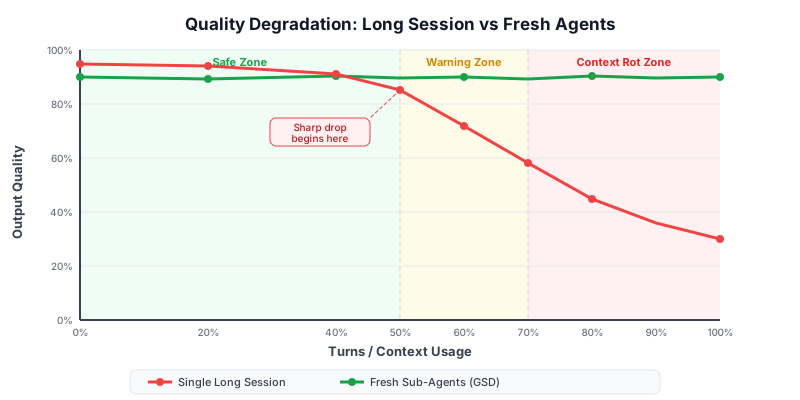
Part 6: Live Demo — Same Task, Two Approaches (15 min)
The Task
Task: Add rate limiting to the /api/v2/auth/login endpoint. Max 5 attempts per IP per minute. Return 429 with a Retry-After header.
Approach 1: One Long Session (The Degraded Path)
Session timeline:
Turn 1:  "Hey, can you help me add rate limiting to our login endpoint?"
         ← Claude asks: "What framework are you using? What's your project structure?"

Turn 2:  "We use FastAPI. Here's the folder structure..." [pastes 200 lines]
         ← Claude generates code using a Redis library not in your project

Turn 3:  "Actually we use aioredis not redis-py"
         ← Claude regenerates

Turn 4:  "Also our config is loaded from a Config class, not env vars directly"
         ← Claude regenerates again

Turn 5:  "The middleware goes in a different place actually, let me show you..."
         [pastes more files]

Turn 6:  Claude produces mostly correct code but misses the Retry-After header

Turn 7:  "You forgot the Retry-After header"
         ← Claude adds it but introduces a variable name collision

Turn 8:  "There's an error: NameError: name 'redis_client' is not defined"
         ← Claude fixes it but now the test it wrote is broken

...

Turn 18: The code finally works but it's a patchwork of 8 rounds of corrections.
         The test coverage is incomplete. The middleware is in the wrong place.
         Claude has "forgotten" the early constraints about the Config class.
Output quality: Functional but brittle. Took 18 turns. Missing edge cases. Wrong architecture patterns for this project.
Approach 2: GSD-Style with Fresh Sub-Agent (The Clean Path)
Before the session: CLAUDE.md exists with project structure, conventions, and current sprint scope.
The session:
Turn 1 (entire task description — filled from feature template):

"I need to add rate limiting to our login endpoint.

TASK: Rate limit /api/v2/auth/login
CONSTRAINT: Max 5 attempts per IP per minute
RESPONSE: 429 with Retry-After header when exceeded
BACKEND: slowapi middleware + Redis (already in stack, see CLAUDE.md)
FILES:
  - Modify: api/routes/auth.py (add decorator)
  - Modify: main.py (register Limiter)
  - Create: tests/unit/api/test_rate_limiting.py
OUT OF SCOPE: Other endpoints, global rate limit config
DONE WHEN: All acceptance criteria pass, tests green, no linting errors"

Turn 2:  Claude produces complete, correct implementation in one shot.
         - Correct library (slowapi) — from CLAUDE.md
         - Correct config pattern — from CLAUDE.md
         - Correct test structure — from CLAUDE.md conventions
         - Retry-After header included
         - Edge cases covered (IPv6, behind proxy)

Turn 3:  Minor tweak to test assertion format
         ← Done. PR ready.
Output quality: Correct, complete, idiomatic to the project. Took 3 turns.
Side-by-Side Comparison
| Metric | Approach 1 (Long Session) | Approach 2 (Fresh + Template) |
|---|---|---|
| Turns to completion | 18 | 3 |
| Context re-explanation | 5+ turns | 0 turns (CLAUDE.md) |
| Architectural errors | 3 | 0 |
| Missing requirements | 2 (header, edge cases) | 0 |
| Test coverage | ~60% | ~90% |
| Code matches project conventions | Partially | Yes |
| Developer frustration level | High | Low |
Token Usage Comparison
Approach 1 (18-turn session):
  Input tokens:   ~24,000  (re-explaining context + corrections)
  Output tokens:  ~12,000  (7 regenerations of the same function)
  Total:          ~36,000 tokens

Approach 2 (3-turn session):
  Input tokens:   ~4,500   (CLAUDE.md + template)
  Output tokens:  ~3,500   (one correct generation + small tweak)
  Total:          ~8,000 tokens

Savings: 78% fewer tokens. 4.5x fewer turns. Better output.
The investment in CLAUDE.md and templates pays back on every single task.
Part 7: Hands-On Lab (10 min)
Exercise: Create Your Project's CLAUDE.md
Step 1: Pick a real project you are currently working on (or create a demo project).
Step 2: Create CLAUDE.md in the project root using this starter:
# CLAUDE.md — [Your Project Name]
# Last updated: [today's date]

## Project Overview
**Name:** [project name]
**Type:** [web app / CLI / library / service / etc.]
**Users:** [who uses it]
**Stack:** [language / framework / database / etc.]
**Stage:** [prototype / development / staging / production]

**Why it exists:**
[1-2 sentences on the core problem it solves]

## Architecture

### Structure
[paste your directory tree here — tree -L 2 or equivalent]
### Data Flow
[Describe how a typical request flows through the system in 3-5 bullet points]

### Key Dependencies
- [dependency] — [why it's used]
- [dependency] — [why it's used]

## Conventions

### Code Style
- [formatter / linter in use]
- [any naming conventions]
- [anything Claude should always / never do]

### Testing
- [test framework]
- [where tests live]
- [how to run: `make test` / `pytest` / `npm test`]

### Git
- [branch naming convention]
- [commit message format]

## Current Task Scope
**Sprint / Focus:** [current focus area]

Active tasks:
- [ ] [task 1]
- [ ] [task 2]

Do NOT modify this sprint:
- [area 1]
- [area 2]

## Critical Guard Rails
- Do NOT modify: [list]
- Always ask before: [list]

## Local Dev Setup
```bash
[commands to get running locally]
**Step 3:** Start a new Claude Code session in your project directory.

```bash
cd your-project
claude
Step 4: In the new session, ask:
"What do you know about this project?"
Claude should be able to describe your project architecture, conventions, and current focus accurately — from CLAUDE.md alone, without any explanation from you.
Step 5: Verify your context strategy works:
"What should you NOT modify in the current sprint?"
If Claude answers correctly from CLAUDE.md, your context engineering is working.
Checkpoint: Share your CLAUDE.md with a teammate. Can they understand the project from it in 5 minutes? If yes, Claude will too.
Checkpoint
Answer these questions to verify your understanding:
-
Why does spawning fresh sub-agents per task produce higher quality output than one long session?
-
What is the purpose of CLAUDE.md and when is it loaded by Claude Code?
-
Name three files in the "external brain" pattern and what each one stores.
-
What is the "session budget" concept and when should you invoke the
/compactcommand or start a fresh session? -
You have a new teammate joining the project. You give them your CLAUDE.md. They say: "This is better documentation than anything else in the repo." What does that tell you about the quality of your CLAUDE.md?
-
A colleague insists on doing all their project work in one multi-day Claude session because "it already knows the context." What is wrong with this approach and how would you explain it to them?
Key Takeaways
Strategy 1 — Fresh Context Isolation: Each task gets its own clean 200K-token window. Sub-agents don't degrade. The GSD /gsd:execute command implements this pattern automatically.
Strategy 2 — Context Engineering: CLAUDE.md is project memory that loads before the conversation starts. It costs ~1,500 tokens and saves hundreds of tokens of re-explanation per session. Write it like documentation for a new contractor, not a note to yourself.
Strategy 3 — File-Based Memory: Decisions, architecture notes, and sprint state belong in files — not in conversation history. decisions.md, architecture.md, and current-sprint.md are your external brain. GSD's PLAN.md and STATE.md implement this formally.
Strategy 4 — Scope Discipline: One task per session. Stay within a 30-turn session budget. Use /compact to clear noise while continuing. Use the "reset + handoff file" pattern when a session goes off the rails.
Strategy 5 — Template-Based Prompting: Standardize your context delivery with task templates (bug-fix, feature, code-review). Templates raise the quality floor for your whole team and eliminate the context information that AI tools need most.
The core principle underlying all five strategies: Context is a resource. Manage it deliberately. The developers who get consistent, high-quality output from AI tools are the ones who treat context management as a first-class engineering practice — not an afterthought.
Next Lesson
Lesson 11: Orchestration Patterns — When to Use Multiple Agents
We'll go deeper into how orchestrators coordinate sub-agents: fan-out patterns, sequential pipelines, parallel execution with result merging, and how GSD implements each of these in production workflows.
AI-Powered Development (Dev Track) | Module 5: Memory, Context, and Context Rot