 JustLearn
Lesson 3: Normal User vs Pro User — The Knowledge Gap
Course: AI-Powered Development (PM Track) | Duration: 2 hours | Level: Beginner
Overview
Two project managers walk into the same AI tool. One leaves with a polished, structured deliverable. The other gets a generic, bloated draft they'll spend an hour fixing.
Same tool. Same model. Completely different results.
This lesson explains why — and makes sure you're always the first PM, not the second.
What you'll learn:
- Why specificity is the single biggest factor in AI output quality
- The 6 limitations every PM must know before trusting AI output
- 5 pro techniques that immediately improve any prompt
- How to apply pro prompting to your most common PM tasks
- A reusable checklist for every prompt you write from now on
Part 1: The Same Tool, Wildly Different Results
Duration: 20 minutes
The Setup
Imagine you need a project proposal for a new mobile app. You open Claude or ChatGPT and type something in. What you type determines everything.
Here is what two PMs typed — and what they each received.
Normal User Prompt
Write me a project proposal for the new mobile app
What comes back:
A 500-word generic document. It mentions "goals," "timeline," and "resources" with placeholder language. It could apply to any app ever built. You'll spend 45 minutes replacing the vague parts with actual content. The AI gave you a skeleton — not a proposal.
Pro User Prompt
You are a senior technical PM at a B2B software company. Write a project proposal for a React Native mobile app targeting iOS and Android. The app is a field service management tool used by enterprise clients (plumbers, HVAC technicians, electrical contractors).
Include these sections with clear headers:
- Executive Summary (3 sentences max)
- Scope — In-Scope features (bulleted list) and Out-of-Scope (bulleted list, at least 5 items)
- Timeline with milestones (table format: milestone | target date | owner)
- Tech stack with rationale (why React Native, why this backend, why this database)
- Risk Matrix — 3 high-risk items, 3 medium-risk items (table format: risk | likelihood | impact | mitigation)
- Resource Requirements — headcount by role and estimated cost range
Format as a professional business document. Maximum 3 pages. Write for an audience of non-technical executives who will approve the budget. Avoid jargon without explanation.
What comes back:
A structured, professional proposal with all six sections populated with relevant, specific content. The risk matrix uses real field service app risks (offline sync failures, field worker adoption, integration with legacy dispatch systems). The out-of-scope list explicitly excludes IoT hardware, customer-facing portal, and payment processing — saving you from scope creep conversations later. The executive summary leads with business value, not technical specs.
You review, adjust two numbers, and send it. Total time: 12 minutes.
Why the Difference?
LLMs are completion machines. They generate the most statistically plausible continuation of whatever you gave them.
When you give them vague input, they complete it vaguely. When you give them structured, specific input — with role, audience, format, constraints, and examples — they complete it with that same specificity.
The principle: The quality of your output is a direct reflection of the quality of your input.
This is not a limitation. It is a lever. Once you understand it, you have more control over AI output than most people who use these tools daily.
Side-by-Side Comparison
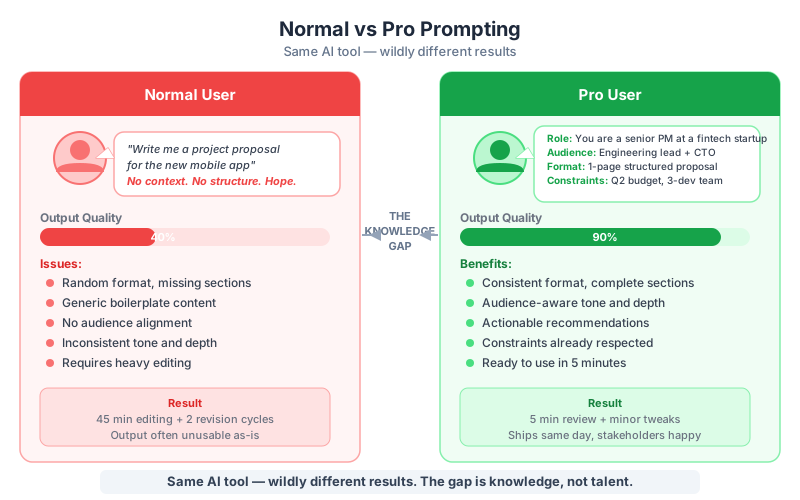
| Dimension | Normal Prompt Output | Pro Prompt Output |
|---|---|---|
| Relevance | Generic | Industry-specific |
| Structure | Loose headings | Defined sections with content |
| Actionability | Needs heavy editing | Ready to review and send |
| Audience fit | Unknown | Written for non-technical execs |
| Scope clarity | None | Explicit in-scope and out-of-scope |
| Risk awareness | Not addressed | Concrete risk matrix |
| Time to usable draft | 45+ minutes editing | 12 minutes review |
Part 2: Current LLM Limitations PMs MUST Know
Duration: 25 minutes
Knowing how to get better output is only half the skill. The other half is knowing when to distrust the output you receive.
AI tools are powerful, but they have specific, documented failure modes. As a PM, your job is to ship reliable work. That means knowing these six limitations before you use AI output in any decision, document, or communication.
Limitation 1: Hallucination
What it is: The AI generates plausible-sounding but factually wrong information — with complete confidence.
PM scenario: You ask Claude: "What percentage of B2B SaaS companies use mobile-first onboarding?"
The AI responds: "According to a 2024 Gartner report, 67% of B2B SaaS companies have adopted mobile-first onboarding strategies, up from 41% in 2022."
That statistic is invented. The report may not exist. The numbers are fabricated to sound credible.
Why this is dangerous: If you include that stat in a board presentation, you've cited a non-existent source. If someone checks, the damage to your credibility is real.
Workaround:
- Never trust any specific statistic, citation, or reference from an AI without independently verifying it
- Use AI to draft arguments and structure — not to source facts
- When you need real data, provide it yourself: "Here is our Q3 retention data: [paste data]. Summarize the key trends."
Limitation 2: Sycophancy
What it is: The AI agrees with you — even when you're wrong. It validates bad assumptions rather than challenging them.
PM scenario: You tell the AI: "Our team can build this feature in a week, right? It's a simple CRUD operation."
A sycophantic response: "Yes, that sounds very achievable! A week is a reasonable timeline for a basic CRUD feature, especially with a skilled team."
The feature actually requires database schema changes, API contract updates, and three-service coordination. It will take three weeks. The AI didn't know your codebase and didn't push back.
Why this is dangerous: You get false validation. You commit to a timeline without reality-checking it.
Workaround:
- Explicitly ask for pushback: "Challenge this plan. What are the strongest arguments against it? What am I missing?"
- Ask for devil's advocate mode: "You are a skeptical CTO who is going to poke holes in this proposal. What are your three biggest concerns?"
- Never use AI to confirm a decision you've already made. Use it to stress-test before you make it.
Limitation 3: Context Window Limits
What it is: AI has a finite memory within a conversation. In very long sessions (50+ messages), the model can "forget" what was said earlier and contradict itself.
PM scenario: You start a session defining your product constraints ("no third-party integrations in V1"). Forty messages later, the AI suggests integrating Salesforce because it would "align well with your stated V1 goals."
Why this is dangerous: In long AI-assisted work sessions, you may not notice when the AI starts contradicting earlier constraints. Bad output builds on bad output.
Workaround:
- Keep sessions short and focused. One session = one task
- At the start of each session, paste your constraints as a context block: "Before we begin, here are the constraints that apply to this project: [list]"
- Use a "project context file" (covered in Lesson 5) instead of relying on conversation history
- If a session runs long, start fresh and re-paste your context
Limitation 4: Knowledge Cutoff
What it is: AI models have a training cutoff date. They do not know about events, tools, pricing, regulations, or market conditions that emerged after that cutoff.
PM scenario: You ask the AI to compare two project management tools, and it gives you feature comparisons that are 18 months out of date. One tool has since been acquired and deprecated.
Why this is dangerous: Decisions based on stale information lead to wrong vendor choices, missed compliance requirements, and outdated competitive analysis.
Workaround:
- Always tell the AI what you know about the current state: "As of Q1 2026, [tool] has added [feature]. With that in mind, compare..."
- Use AI tools that include web search (Perplexity, ChatGPT with search, Gemini with search) for time-sensitive research
- Never ask AI for current pricing, current regulations, or recent market events without providing the current data yourself
Limitation 5: Reasoning Gaps
What it is: AI is surprisingly bad at precise logical or mathematical reasoning. It can make arithmetic errors, miss edge cases in logic, and confuse steps in multi-step calculations.
PM scenario: You ask the AI to calculate the total estimated cost of a sprint based on eight task estimates it just generated. It adds them incorrectly.
Why this is dangerous: PMs who trust AI-generated numbers without checking them can commit to wrong budgets and timelines.
Workaround:
- Use AI for drafting structure and language, not for calculation
- Always verify any numbers the AI produces, especially sums, percentages, and compound estimates
- Do math in a spreadsheet. Use AI to write the narrative around the numbers.
Limitation 6: Inconsistency
What it is: AI models are probabilistic. Ask the same question twice and you may get different — sometimes contradictory — answers.
PM scenario: You use AI to draft team communication guidelines on Monday. On Thursday, a team member asks the same AI a clarifying question. It contradicts the Monday guidance.
Why this is dangerous: If your team treats AI output as a policy source, inconsistency creates confusion and erodes trust.
Workaround:
- Treat AI output as a first draft, not a source of truth
- Codify important decisions in human-reviewed documents, not in AI chat history
- When using AI for templated or repeatable outputs, write a strict prompt that specifies the exact format — this reduces variability
Limitations Summary Table
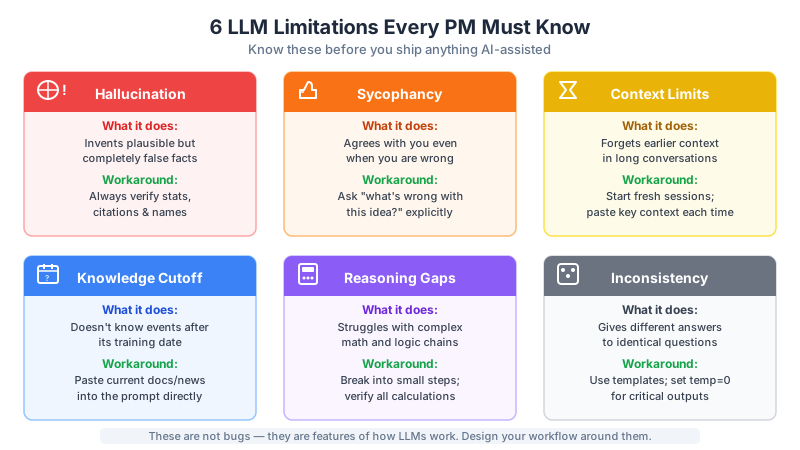
| Limitation | What Happens | PM Risk | Workaround |
|---|---|---|---|
| Hallucination | AI invents plausible but false facts (statistics, citations) | Embarrassment, bad decisions based on invented data | Verify every specific claim independently |
| Sycophancy | AI validates your assumptions even when they're wrong | False confidence, missed risks | Explicitly ask AI to challenge and critique |
| Context window limits | AI forgets earlier constraints in long sessions | Contradictory output, constraint violations | Keep sessions short; re-paste context each session |
| Knowledge cutoff | AI doesn't know recent events, tools, or prices | Stale analysis, outdated recommendations | Provide current data yourself; use search-enabled tools |
| Reasoning gaps | AI makes math and logic errors | Wrong budgets, bad estimates | Do calculations in spreadsheets; verify all numbers |
| Inconsistency | Same question produces different answers | Team confusion, unreliable output | Use strict format prompts; document decisions in reviewed files |
Part 3: Pro User Techniques
Duration: 30 minutes
Now the offensive skills. These five techniques are the difference between "AI is useful sometimes" and "AI saves me hours every week."
Technique 1: Be Specific About Role, Audience, Format, and Length
The four dimensions that most reliably improve output quality:
- Role: Who should the AI be? A senior PM? A skeptical CFO? A junior developer?
- Audience: Who will read this? Technical engineers? Non-technical executives? A customer?
- Format: Bullet list? Table? Numbered steps? Prose paragraphs? Section headers?
- Length: One paragraph? Three pages? Five bullet points maximum?
Example A — Sprint Retrospective Summary
Normal:
Summarize our sprint retrospective
Pro:
You are an experienced Agile PM. Summarize the following sprint retrospective notes for a non-technical stakeholder audience (product leadership, not engineers). Format as: (1) What went well — 3 bullet points, (2) What needs improvement — 3 bullet points, (3) Action items — numbered list with owner name and due date. Keep the total summary under 300 words. [paste notes here]
Example B — Stakeholder Risk Email
Normal:
Write an email about the project risk
Pro:
You are a senior PM writing to a VP of Product who has limited time and zero tolerance for vague updates. Write an email alerting them to a scope creep risk in the current sprint. The email should: (1) state the risk in the first sentence, (2) explain impact in 2-3 sentences, (3) propose two options with tradeoffs, (4) ask for a decision by Friday. Tone: professional and direct, not alarmist. Maximum 200 words.
Example C — Vendor Comparison
Normal:
Compare these two project management tools
Pro:
You are a PM evaluating tools for a 15-person engineering team. Compare Jira and Linear across these specific dimensions: ease of onboarding, API/integration capabilities, sprint management features, cost for 15 seats, and mobile app quality. Format as a comparison table with one row per dimension. After the table, write a two-sentence recommendation for a team that prioritizes developer experience over enterprise features.
Technique 2: Provide Examples of Good Output (Few-Shot Prompting)
When you show the AI what "good" looks like, it calibrates to that standard. This is called "few-shot prompting" — giving the model one or more examples before your actual request.
Why it works: The model learns your style, format preferences, and quality bar from the example — not just from your description.
PM application — User Story format:
Here is an example of a well-written user story from our team:
"As a field technician, I want to see my assigned jobs for today on the home screen when I open the app, so that I don't have to navigate through menus to start my shift." Acceptance criteria:
- Jobs displayed in chronological order by scheduled start time
- Shows job address, client name, and job type
- Updates automatically if dispatch reassigns jobs
Using this format and quality level, write user stories for the following feature: [describe feature]
PM application — Meeting agenda:
Here is an example of a meeting agenda I was happy with:
[paste previous agenda]
Write a similar agenda for our upcoming sprint planning session. Attendees: [list]. Duration: 90 minutes. Goals: [list goals].
The AI now understands your preferred agenda structure, level of detail, and formatting without you having to re-explain it.
Technique 3: Include Constraints — "Do NOT..."
Negative constraints are as powerful as positive ones. They prevent the AI from going in directions you've already ruled out.
Why this matters for PMs: AI will fill in gaps with plausible content. If you haven't told it what to exclude, it will invent content you then have to remove.
Common negative constraints for PM use:
- "Do NOT include implementation details. This is a business document."
- "Do NOT use jargon or acronyms without defining them first."
- "Do NOT add new features beyond what is listed. Scope is fixed."
- "Do NOT speculate about timelines. Use 'TBD' for any dates not provided."
- "Do NOT write more than 250 words. Brevity is required."
- "Do NOT recommend tools we haven't mentioned. Assume the tech stack is decided."
Before (no negative constraints):
Write a product requirements document for our mobile app
After (with negative constraints):
Write a PRD for a B2B field service mobile app. Do NOT include technical architecture or stack decisions — that is the engineering team's domain. Do NOT add features that aren't listed in the scope below. Do NOT include a competitive analysis section. Do NOT write more than 800 words. [paste scope]
Technique 4: Ask for Structured Output
Unstructured AI prose is harder to review, harder to share, and harder to act on. Structured output — tables, numbered lists, headers — makes AI deliverables immediately useful.
Always specify the structure:
- "Format as a table with columns: [col1 | col2 | col3]"
- "Use numbered steps, not prose paragraphs"
- "Use these exact section headers: [list headers]"
- "Output as bullet points only, no narrative text"
Why this matters: Consistent structure also means consistent quality. When the AI always produces a table with the same columns, you can compare outputs over time and build templates around them.
Example — Risk Register:
Normal:
List the risks for this project
Structured:
List the top 8 risks for this project as a table with these columns: Risk Description | Category (technical/resource/scope/external) | Likelihood (High/Medium/Low) | Impact (High/Medium/Low) | Mitigation Strategy | Owner role. Sort by combined likelihood and impact, highest first.
Technique 5: Review and Iterate — The 3-Draft Method
Never accept the first draft. This is the discipline that separates pro users from everyone else.
The 3-Draft Method:
Draft 1 — Generate: Run your pro prompt. Read the entire output critically. Don't edit yet — annotate what's missing, wrong, or off-tone.
Draft 2 — Critique: Ask the AI to critique its own output. Prompt: "Review what you just wrote. What are the three weakest sections? What did you assume without evidence? What would a skeptical reader challenge?"
Draft 3 — Refine: Give the AI your annotated feedback plus its self-critique. Prompt: "Rewrite the [specific section] to address these issues: [list]. Keep everything else the same."
Why this works: The AI often identifies its own gaps accurately. By combining your review with its self-critique, you get a more thorough revision than either alone.
Time estimate: Draft 1 = 3 minutes. Critique = 2 minutes. Refine = 3 minutes. Total: 8 minutes for a substantially better deliverable.
Part 4: Common PM Tasks Enhanced by Pro Prompting
Duration: 15 minutes
Here are the five most common PM writing tasks — with normal and pro prompt versions for each.
Task 1: Writing a PRD
Normal:
Write a PRD for our new feature
Pro:
You are a senior PM at a B2B SaaS company. Write a Product Requirements Document for the following feature: [feature description]. Structure the PRD with these sections: (1) Problem Statement — what user pain is this solving and why now, (2) Goals and Success Metrics — 3 measurable outcomes, (3) User Stories — 5 stories in "As a [user], I want [action], so that [outcome]" format, (4) Out of Scope — explicit list of 5+ things this feature will NOT include, (5) Open Questions — 3 questions that need answers before development begins. Audience: engineering team leads. Do NOT include implementation details or UI mockup descriptions. Maximum 600 words.
Task 2: Creating a Sprint Plan
Normal:
Create a sprint plan for next week
Pro:
You are an Agile PM planning a 2-week sprint for a 6-person team (2 frontend engineers, 2 backend engineers, 1 QA, 1 designer). Here are the ungroomed backlog items: [paste list]. Organize these into a sprint plan. Include: (1) sprint goal (one sentence), (2) committed stories in priority order with estimated points, (3) items explicitly deferred to the next sprint with reason, (4) team capacity notes if any items seem risky. Format as a table: Story | Points | Assignee Role | Notes. Total point budget: 42 points.
Task 3: Drafting a Stakeholder Email
Normal:
Write an email to stakeholders about the delay
Pro:
You are a PM writing to a group of senior business stakeholders (non-technical) who are expecting a feature to launch this Friday. The launch is being delayed by 10 days due to a critical security vulnerability discovered in QA. Write an email that: (1) leads with the decision (delay confirmed), (2) explains the reason in one sentence without technical jargon, (3) states the new launch date, (4) reassures them that quality standards drove the decision, (5) offers a 15-minute call if they have questions. Tone: calm, professional, accountable. Do NOT be apologetic more than once. Do NOT include technical details of the vulnerability. Maximum 150 words.
Task 4: Risk Assessment
Normal:
List the risks for this project
Pro:
You are a senior PM conducting a pre-mortem risk assessment for a new mobile app launch targeting enterprise clients. The launch is 8 weeks away. Identify 10 risks across these categories: technical, adoption/change management, integration, timeline, and resource. For each risk, write: (1) description of the risk event, (2) likelihood: High/Medium/Low, (3) impact: High/Medium/Low, (4) early warning sign to watch for, (5) mitigation action. Format as a table. Prioritize the top 3 risks at the end of the table with a brief explanation of why they are the highest priority.
Task 5: Meeting Summary
Normal:
Summarize this meeting
Pro:
You are a PM writing a meeting summary for stakeholders who did not attend. Here are the raw meeting notes: [paste notes]. Write a structured summary with these sections: (1) Decision Made — bullet list of confirmed decisions, (2) Action Items — table with: Action | Owner | Due Date, (3) Open Issues — items discussed but not resolved, (4) Next Steps — what happens next and when. Keep the total summary under 300 words. Use plain language — some readers are non-technical. [paste notes]
Part 5: Hands-On — Rewrite 5 Normal Prompts into Pro Versions
Duration: 20 minutes
The Exercise
Below are 5 "normal" prompts. Your task:
- Rewrite each as a "pro" prompt using the techniques from Part 3
- Run both versions in Claude or ChatGPT
- Score each output on a 1-5 scale for: relevance, structure, actionability, and accuracy
- Note which technique made the biggest difference for each prompt
Prompt 1:
Write a user story for the login feature
Your pro version: _______________________
Prompt 2:
Summarize the Q2 roadmap for my team
Your pro version: _______________________
Prompt 3:
Help me prepare for the kickoff meeting
Your pro version: _______________________
Prompt 4:
Write a definition of done for our engineering team
Your pro version: _______________________
Prompt 5:
Create a project status update
Your pro version: _______________________
Scoring Rubric
| Score | What It Means |
|---|---|
| 5 | Ready to use with minor edits |
| 4 | Good structure, needs one section reworked |
| 3 | Partially useful, significant editing required |
| 2 | Wrong direction, major rewrite needed |
| 1 | Not usable |
Discussion Questions
- Which technique produced the biggest quality jump for you?
- Which normal prompt produced the worst result, and why?
- Which pro technique felt most natural to use?
- What would you add to your pro prompts by default from now on?
Part 6: The Pro Prompting Checklist
Duration: 10 minutes
Print this. Keep it next to your screen. Run through it before every significant AI prompt.
Pre-Prompt Checklist
Before you send any AI prompt for PM work, ask yourself:
- Role defined? Have I told the AI who it should be? ("You are a senior PM..." / "You are a skeptical CFO...")
- Audience specified? Have I said who will read this output? ("Written for non-technical executives" / "For the engineering team")
- Format described? Have I specified the exact output structure? (table, numbered list, section headers, prose)
- Length constraint? Have I set a word or page limit? ("Maximum 300 words" / "No more than one page")
- Examples provided? Have I shown the AI what "good" looks like? (past document, sample story, previous email)
- Negative constraints? Have I said what NOT to include? ("Do NOT add features beyond the scope listed")
- Output structure defined? Have I specified exact column names, section headers, or list items?
Post-Output Checklist
After receiving AI output, before using it:
- Verify any statistics or citations — look them up independently
- Check for hallucinated facts — anything specific that sounds surprising may be invented
- Review against your constraints — did the AI stay within scope and format?
- Apply the 3-draft method — is this first draft, or have you critiqued and refined?
- Check for sycophancy — did the AI challenge you, or just agree with you?
- Confirm dates and numbers — verify all figures independently before including in any document
Your Default Pro Prompt Template
Copy this and adapt it for any PM task:
You are a [ROLE] at a [COMPANY TYPE].

[TASK DESCRIPTION]

Required sections:
1. [SECTION 1]
2. [SECTION 2]
3. [SECTION 3]

Format: [TABLE / BULLETS / NUMBERED / PROSE]
Length: Maximum [WORD/PAGE LIMIT]
Audience: [WHO WILL READ THIS]

Constraints:
- Do NOT [EXCLUSION 1]
- Do NOT [EXCLUSION 2]

[PASTE RELEVANT CONTEXT OR DATA HERE]
Key Takeaways
-
Specificity is the lever. The quality of AI output is a direct function of the quality of your input. Vague prompts produce generic output. Structured prompts produce structured, useful output.
-
Know the six failure modes. Hallucination, sycophancy, context limits, knowledge cutoff, reasoning gaps, and inconsistency are predictable. A pro user accounts for them by design.
-
Role + Audience + Format + Length is the foundation of every good PM prompt. Get these four right and you're already ahead of most AI users.
-
Negative constraints matter as much as positive ones. Telling the AI what NOT to do is just as powerful as telling it what to do.
-
Never accept the first draft. The 3-draft method (Generate → Critique → Refine) consistently produces better output than accepting whatever comes back first.
-
Templates compound. Once you write a great prompt for a PRD, a sprint plan, or a stakeholder email, you can reuse and refine it. Your prompting library becomes a durable asset.
Checkpoint
Session B3 Checkpoint: Every participant produces a measurably better result using pro techniques.
Verification Task
Take one document you produced with AI in the past month (or one you need to produce this week). Run it through the full pro prompting workflow:
- Apply the pre-prompt checklist to your prompt
- Generate Draft 1
- Ask AI to critique its own output
- Generate Draft 3 using the critique
- Score Draft 1 and Draft 3 on the 1-5 rubric
Success criterion: Draft 3 scores at least 2 points higher than Draft 1 on your rubric. If it does, you've internalized the core skill of this session.
Further Practice
To deepen the skills from this session:
- Build your prompt library: Create a shared document with your best prompts for recurring tasks. Add to it after every session where a prompt worked well.
- Run the limitations test: For each of the six limitations, intentionally trigger it once in a low-stakes setting so you can recognize it when it appears in real work.
- Teach one technique: Explain the "Role + Audience + Format + Length" technique to a colleague. Teaching it cements it.
Next Lesson: B4 — AI Is a Tool, Not a Decision-Maker: Avoiding Waste and Context Rot
In Lesson 4 we cover what happens when teams over-rely on AI — the anti-patterns that slow projects down, and the PM's role in directing AI strategically rather than delegating to it blindly.