 JustLearn
Lesson 4: AI Is a Tool, Not a Decision-Maker
Course: AI-Powered Development (PM Track) | Duration: 2 hours | Level: Beginner
Learning Objectives
By the end of this lesson, participants will be able to:
- Identify the five most dangerous anti-patterns when teams delegate too much to AI
- Explain what "context rot" is and why it reliably derails AI-assisted projects
- Apply the PM's DO/DON'T framework to their own team's AI workflow
- Define concrete quality gates for AI-generated work
- Write a short "3 Rules for AI Use" policy for their team
Prerequisites
- Lesson 1: Understanding ML, AI, and LLMs
- Lesson 2: Document Intelligence
- Lesson 3: Normal vs. Pro AI Usage
- No technical background required. This lesson is written entirely in business language.
Lesson Outline
Part 1: The Trap — Delegating Everything to AI (20 min)
The Core Problem
There is a seductive lie at the center of AI hype: "Just tell the AI what you want, and it will build it."
This is not how AI works. AI is a powerful tool. It is not a colleague, not a strategist, not a decision-maker. When product managers treat AI as a decision-maker, predictable and costly failures follow.
This section maps out the five most common failure modes, the anti-patterns that cost teams time, money, and credibility.
The Anti-Patterns Table
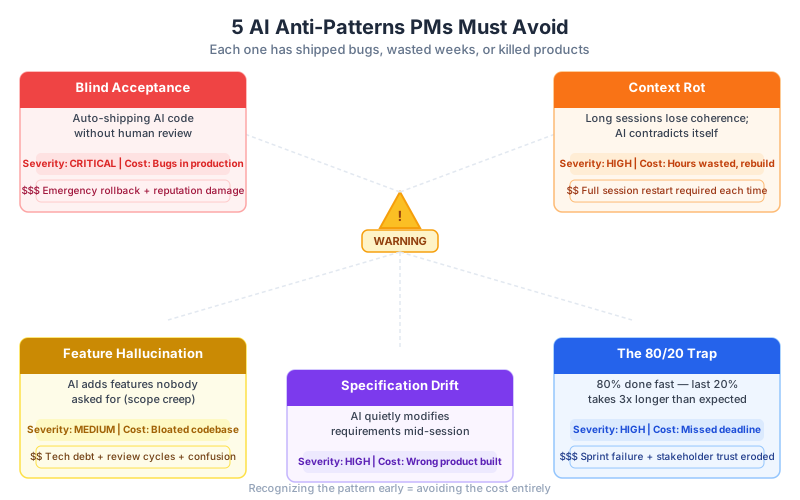
| Anti-Pattern | What It Looks Like | Real Business Cost |
|---|---|---|
| Blind Acceptance | Dev accepts AI output without review and merges it directly | Bugs in production, security vulnerabilities, customer-facing failures |
| Context Rot | AI session goes on for hours or days; output becomes inconsistent and contradictory | Hours wasted, team rebuilds features from scratch, sprint collapses |
| Feature Hallucination | AI "invents" functionality that was never specified | Wasted dev time, bloated codebase, technical debt accumulates |
| Specification Drift | Requirements evolve through conversation with AI instead of a written spec | Final product does not match what the stakeholder wanted |
| The 80/20 Trap | AI rapidly completes 80% of a feature, then progress halts | False sense of progress, deadline missed, morale crash at the finish line |
Anti-Pattern Deep Dives
1. Blind Acceptance — "It looked right, so we shipped it"
A fintech startup hired a junior developer and gave them GitHub Copilot to build a user authentication flow. The developer accepted AI suggestions without reading them carefully. The AI-generated code contained a well-known vulnerability: it stored user passwords in plain text in the application log.
The error was not caught in code review because there was no code review policy for AI-generated code. It reached production. Three months later, an audit flagged the vulnerability. The cost: two weeks of emergency remediation, a security audit, and a delayed product launch.
The PM's mistake was assuming that because the code "worked" in testing, it was safe. AI-generated code passes functional tests but can still contain logic errors, security flaws, and compliance violations that only a human expert will catch.
2. Context Rot — "The AI forgot what we were building"
A SaaS product team used a single AI chat session to design and implement their onboarding flow. On Day 1, the AI produced excellent, coherent work. By Day 3, the AI was generating code that contradicted its Day 1 decisions: variable names changed, the data model shifted, and error handling was inconsistent.
The team spent two weeks debugging issues that turned out to be internal contradictions introduced by the AI itself. The senior developer's verdict: "We would have been faster building it the old way." Context rot is covered in detail in Part 2.
3. Feature Hallucination — "It built things we never asked for"
A product team asked their AI coding assistant to "build the reporting module." The AI produced a reporting module with eight sub-features, including a custom scheduling engine and a PDF export pipeline. The team had only asked for a simple table with filters.
Three weeks of developer time went into features that users never requested and the product roadmap never included. When the PM reviewed the sprint output, 60% of the work had to be discarded. The root cause: the PM gave an open-ended prompt with no constraints, and the AI filled the ambiguity with invented scope.
4. Specification Drift — "Requirements grew through the conversation"
A retail company used an AI assistant to refine their checkout flow requirements. Over two weeks of back-and-forth, the requirements document evolved through dialogue with the AI. The original spec called for a three-step checkout. The final spec — never reviewed by a human business analyst — called for a six-step checkout with loyalty points integration, gift wrapping options, and a recommendation engine.
The stakeholder had approved the original three-step design. Nobody had approved the drift. Development was 70% complete before anyone noticed. The fix cost six weeks of rework.
5. The 80/20 Trap — "We were so close, and then everything stopped"
A logistics company celebrated after two days of AI-assisted development. The developer reported that the core feature was "basically done — about 80% complete." The PM communicated this optimistically to the executive sponsor.
What happened next is a pattern so common it has a name: the last 20% took six weeks. The remaining work was everything AI is bad at: edge cases, error handling, integration with legacy systems, and performance under real load. AI had produced a prototype that looked impressive in a demo but could not handle real-world conditions. The executive sponsor lost confidence in both the team and the project.
Key Principle
AI accelerates the easy parts and hides the hard parts. A PM's job is to ensure the hard parts are not hidden.
Part 2: Context Rot Explained for PMs (25 min)
What Is Context Rot?
Every AI session has a context window — the amount of text the AI can "hold in mind" at once. Think of it as working memory. When you start a fresh conversation with an AI assistant, its working memory is empty and focused. As the conversation grows — as you add requirements, ask follow-up questions, paste in code, and iterate — the context window fills up.
When the context window fills, the AI does not crash. It does not warn you. It simply begins to forget earlier details, make assumptions to fill gaps, and produce output that is subtly inconsistent with what it produced earlier.
This is context rot: the gradual degradation of AI coherence over a long session.
The "72-Hour Developer" Analogy
Imagine hiring a brilliant developer who has one unusual condition: after 72 hours of continuous work, they begin to forget the early decisions they made. They remember the general goal, but forget the specific constraints. They start rewriting things they already built. They make architectural decisions that contradict ones from the first day.
You would not keep that developer working on the same task for two weeks without a break and a reset. But teams do exactly this with AI: they run single sessions for days, adding more and more context, and wonder why the output becomes inconsistent.
The fix for the 72-hour developer is the same as the fix for context rot: structured breaks, written handoffs, and fresh starts with a clear brief.
How Context Rot Affects Project Timelines
Teams experiencing context rot follow a recognizable timeline:
PROJECT TIMELINE WITH CONTEXT ROT

Day 1-2:  [####################] "80% done!" (Vibe coding phase)
          AI is coherent, productive, impressive output
          Team is excited, PM reports strong progress

Day 3-5:  [####              ] Slowdown begins
          Small inconsistencies appear
          Developers notice but don't flag it yet

Day 6-10: [##                ] Context rot aftermath
          AI output contradicts Day 1 decisions
          Developers spend more time debugging than building
          PM wonders why velocity dropped

Day 11-20:[#                 ] Rebuild phase
          Team abandons AI-generated code and rebuilds manually
          Morale is low, deadline is missed

Net result: 3 weeks spent on work that could have taken 1 week
            with proper AI session management
AI Session Quality Over Time
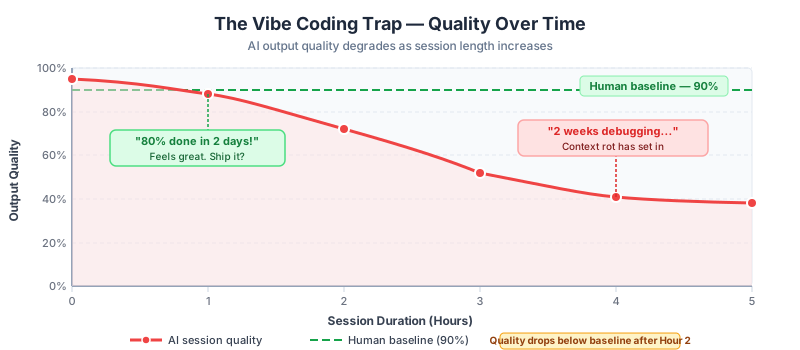
Code Quality / Coherence
(single AI session, no resets)

High  |  *
      |    *  *
      |         *  *
      |               *
Med   |                  *
      |                     *  *
      |                           *
Low   |                              *  *  *
      |
      +-------------------------------------------> Time
       Hour 1         Hour 8         Hour 24+

Key: Quality peaks early and degrades steadily
     unless the session is reset with a fresh, structured brief
Signs Your Dev Team Is Experiencing Context Rot
As a PM, watch for these signals in sprint reviews and daily standups:
In sprint reviews:
- "We had to redo the [X] module because it wasn't consistent with [Y]"
- Velocity slows sharply after a fast start
- Developers struggle to explain why a feature is built the way it is
- The demo works but the developer looks nervous about edge cases
- Technical debt items multiply suddenly mid-sprint
In code reviews:
- Variable naming is inconsistent across files created in the same sprint
- Error handling is present in some places and entirely absent in others
- Functions do similar things but are implemented differently
- Comments reference requirements that do not match the current spec
- The architecture shifts mid-feature without explanation
In conversation:
- "The AI kept changing its mind"
- "We had to start a new chat because it stopped making sense"
- "The AI built it, but nobody is quite sure how it works"
- "It was easier to just rewrite it than figure out what the AI did"
What PMs Can Do About Context Rot
Context rot is a manageable engineering workflow problem, not an inherent flaw in AI. The solutions are organizational:
- Require session boundaries. Each AI session should address one clearly bounded task. No multi-day sessions.
- Require written briefs before each session. The developer should write down what they are asking AI to do before they start.
- Require output reviews at session end. What was produced? Does it match the brief? Is it consistent with prior work?
- Limit session length. A useful rule of thumb: if an AI session is longer than 2-3 hours, it should be split.
- Require context summaries. Before starting a new session on the same feature, the developer should provide AI with a written summary of decisions made so far.
Part 3: The PM's Role — Strategic AI Direction (25 min)
The Core Principle
A product manager does not need to understand AI technically. But they must understand how to direct AI-assisted teams. The PM's job is not to use AI directly — it is to set the conditions under which their team uses AI well.
This means defining scope, requiring checkpoints, managing costs, and enforcing quality. The following DO/DON'T framework gives PMs a concrete starting point.
The PM's AI Direction Framework
| Action | DO or DON'T | Explanation |
|---|---|---|
| Define scope before AI touches code | DO | See below |
| Require human review checkpoints | DO | See below |
| Set token/cost budgets per task | DO | See below |
| Break work into small, verifiable chunks | DO | See below |
| Track AI-generated vs. human-reviewed code | DO | See below |
| Use spec-driven frameworks | DO | See below |
| Let AI "explore" without clear requirements | DON'T | See below |
| Auto-merge AI-generated PRs | DON'T | See below |
| Let agents run without resource limits | DON'T | See below |
| Give "build the whole feature" prompts | DON'T | See below |
The DOs — Explained
DO: Define scope BEFORE AI touches code
What it means: Before a developer opens an AI assistant to work on a feature, the feature requirements must already be written down. The AI session scope should be defined by a human, not discovered through conversation with AI.
Example in practice: Instead of having a developer chat with AI to figure out what the checkout flow should do, the PM writes a one-page requirements brief first. The developer then uses AI to implement what the brief specifies. If something is unclear, the developer asks the PM, not the AI.
Why it matters: When AI is used to discover requirements, you get specification drift. When AI is given clear requirements to implement, you get a tool doing what it is good at: structured execution.
DO: Require human review checkpoints
What it means: AI-generated work must pass through a human expert at defined intervals. These checkpoints should be written into the sprint process, not left to developer discretion.
Example in practice: Your team's definition of "done" for any AI-assisted task requires: (1) developer review, (2) a second developer code review, and (3) a PM acceptance check against the requirements brief. No AI-generated feature ships without all three.
Why it matters: AI errors compound. A small inconsistency in Hour 2 of a session becomes a structural problem by Hour 8. Regular checkpoints catch errors before they multiply.
DO: Set token/cost budgets per task
What it means: AI API usage has a direct financial cost. Each task assigned to AI should have an estimated token budget. If a task is consuming significantly more tokens than estimated, that is a signal that either the task scope is too large or context rot is occurring.
Example in practice: Your team uses an AI API that costs per token. The PM works with the tech lead to set a rough token budget for each user story (e.g., "the search feature should cost no more than X tokens to implement"). Actual costs are tracked and compared to estimates in sprint reviews.
Why it matters: Unlimited AI use is not just expensive — it is a symptom of poor task definition. Tasks with clear scope are completed in predictable token budgets. Runaway costs signal ambiguity or drift.
DO: Break work into small, verifiable chunks
What it means: AI performs best on small, well-defined tasks. User stories should be broken down to tasks that can be completed in a single, bounded AI session and verified against a specific acceptance criterion.
Example in practice: Instead of the user story "Build the user profile module," break it into: "Build the profile display page," "Build the profile edit form," "Build the profile photo upload," and "Build the profile delete confirmation." Each is a separate task with its own requirements brief and review checkpoint.
Why it matters: Large tasks increase context rot risk, make review harder, and produce outputs that are difficult to test. Small tasks are easier to verify, easier to review, and easier to redo if something goes wrong.
DO: Track AI-generated vs. human-reviewed code
What it means: Your team should maintain a record of which parts of the codebase were produced by AI and which have been reviewed and approved by a human expert. This is your AI audit trail.
Example in practice: Your team uses a tagging convention in pull requests: [AI-generated] for code produced by AI that has not yet been reviewed, and [AI-reviewed] for code that a human has verified. The PM can see at a glance how much of any feature is still in unreviewed AI-generated status.
Why it matters: Without tracking, you have no idea how much of your codebase is unreviewed AI output. This is a hidden liability. Tracking makes the liability visible so it can be managed.
DO: Use spec-driven frameworks
What it means: Require developers to provide AI with structured, standardized input — a spec — rather than conversational prompts. Spec-driven frameworks (sometimes called "structured prompting" or "prompt templates") reduce hallucination, reduce context rot, and produce more consistent output.
Example in practice: Your team has a standard "AI task brief" template. Before using AI on any task, the developer fills in: task goal, inputs available, outputs expected, constraints (e.g., must use existing data model), and out-of-scope items. The AI is given this brief, not a freeform request. This is covered in depth in Lesson 6.
Why it matters: Conversational prompts invite the AI to interpret ambiguity. Structured briefs eliminate ambiguity before the session starts.
The DON'Ts — Explained
DON'T: Let AI "explore" without clear requirements
What it looks like: "Hey AI, here's our app — what should the dashboard show? Just explore and build something." The developer uses AI to discover what to build, not just how to build it.
Why it is dangerous: AI will produce something. It might look impressive. But it will not be what your stakeholders actually need, because AI does not know your users, your business constraints, or your product strategy. Requirement discovery is a human job. When AI does it, you get feature hallucination and specification drift.
DON'T: Auto-merge AI-generated PRs
What it looks like: The team sets up automation so that if an AI agent's PR passes automated tests, it is automatically merged to the main branch.
Why it is dangerous: Automated tests catch some bugs. They do not catch security vulnerabilities, logic errors that pass tests but fail in production, compliance violations, or architectural decisions that will create technical debt. Every AI-generated PR needs a human reviewer. Always.
DON'T: Let agents run without resource limits
What it looks like: An AI coding agent is given a task and allowed to run until it completes, with no time limit, no cost limit, and no check-in requirement.
Why it is dangerous: AI agents working without limits will expand scope, consume budget, and produce work that drifts further and further from the original requirement. In documented cases, unmonitored agents have generated thousands of lines of code, incurred significant API costs, and produced output that was entirely discarded. Always set a maximum runtime, cost ceiling, and mandatory human check-in point.
DON'T: Give "build the whole feature" prompts
What it looks like: "Build the entire onboarding flow for our SaaS app." One prompt, one large output, one big review at the end.
Why it is dangerous: This maximizes context rot risk, produces output that is impossible to review thoroughly, and creates a situation where errors at the beginning of the session have propagated through every subsequent decision. Large prompts also invite feature hallucination: the AI will interpret "the entire onboarding flow" using its own assumptions, not yours.
Part 4: Building AI Quality Gates (20 min)
What Is an AI Quality Gate?
A quality gate is a checkpoint that work must pass before it moves to the next stage. Quality gates for AI-generated work serve the same purpose as quality gates for any other work: they catch problems before they become expensive.
The difference is that AI-generated work has specific failure modes — the anti-patterns from Part 1 — that traditional quality processes were not designed to catch. AI quality gates must be designed with those failure modes in mind.
Gate 1: Code Review Requirements for AI-Generated Code
Minimum standard: Every line of AI-generated code must be read and understood by a human developer before merging.
This sounds obvious. In practice, teams under deadline pressure frequently skim AI-generated code or rely solely on automated test results. Establish this as a non-negotiable policy.
What reviewers must check:
- Does the code do what the requirements brief specified? (Not what the developer hoped — what was written down.)
- Are there security vulnerabilities? (Input validation, authentication, data exposure, dependency risks)
- Does the code introduce technical debt that will slow the team down later?
- Is the code consistent with the existing architecture and conventions?
- Are there edge cases the AI did not handle?
Practical tip for PMs: Include AI code review in your definition of "done." A task is not done until the review is complete and documented. Track this in your project management tool.
Gate 2: Testing Requirements — What Must Be Tested
AI-generated code must meet the same testing standards as human-written code — and in practice, should often be tested more thoroughly because AI errors can be subtle.
Required for every AI-generated feature:
| Test Type | What It Checks | Why AI Specifically Needs It |
|---|---|---|
| Unit tests | Individual functions work correctly | AI often writes functions that work in the happy path but fail on edge cases |
| Integration tests | Components work together | AI-generated components can be internally consistent but fail when connected to real systems |
| Security tests | No known vulnerability patterns | AI learns from code on the internet, including insecure code |
| Acceptance tests | Feature meets business requirements | Verifies no feature hallucination or specification drift occurred |
| Regression tests | New code doesn't break existing features | AI changes can have unexpected downstream effects |
PM checkpoint question: "Has this feature been tested against the original requirements brief?" If the answer is "the developer tested what the AI built," that is a red flag.
Gate 3: Spec Compliance Checking
Before any AI-generated feature is accepted, it must be checked against the original requirements brief. This is a structural check, not a vibe check.
The spec compliance checklist:
- Does the feature do everything in the requirements brief?
- Does the feature do only what is in the requirements brief? (Check for hallucinated features)
- Do the UX flows match what was specified?
- Are all edge cases from the spec handled?
- Are there any features present that were explicitly marked as out of scope?
- Does the feature match what was demonstrated in stakeholder sign-off?
If any item is unchecked: The feature goes back to development. It does not ship.
Gate 4: Token/Cost Monitoring
AI API usage should be tracked at the task level. Build this into your project management process.
What to track:
- Estimated token budget per task (set before the sprint)
- Actual token consumption per task (reported at sprint review)
- Cost per completed feature (cumulative)
- Cost overruns (actual > 150% of estimate) flagged for review
Simple dashboard view:
SPRINT 14 — AI COST TRACKING

Feature              Estimated Tokens   Actual Tokens   Status
-------------------------------------------------------------
User Auth Module     50,000             48,000          OK
Search Feature       30,000             95,000          FLAG: 3x budget
Notification Flow    40,000             42,000          OK
Reporting Module     20,000             180,000         FLAG: 9x budget
-------------------------------------------------------------
Sprint Total         140,000            365,000         OVER: Review required
A task consuming 3x or more its estimated token budget is a signal: either the scope was wrong, context rot occurred, or the developer is using AI as a search engine rather than a focused tool.
Gate 5: AI Audit Trail
Your team should maintain a record of AI involvement in every part of the codebase. This is not about blame — it is about risk management.
What the audit trail records:
- Which features were built with AI assistance
- Which sessions were used (dates, tools, models)
- Which outputs were reviewed and by whom
- Which outputs were rejected and why
- Total AI cost per feature and per sprint
Why this matters:
- When a bug is found in production, the audit trail tells you whether it was in AI-generated code or human-written code — helping your team learn which processes need improvement
- When a security audit is required, you can show reviewers exactly what AI produced and what humans verified
- When stakeholders ask "how much of this was built by AI?", you have a factual answer
- It builds organizational knowledge about where AI adds value and where it creates risk
Part 5: Case Study — Vibe Coding Gone Wrong (15 min)
Background
A 12-person product team at a B2B software company was building a client reporting portal. The PM had seen demos of AI-assisted development and was excited to accelerate the timeline. The tech lead proposed using an AI coding agent to build the first version.
The decision: let the AI agent work with minimal constraints. No spec-driven briefs, no token budget, no session boundaries. "Let's see what it can do."
The Timeline
Day 1 — Excitement
The AI agent produced a working prototype of the reporting portal in eight hours. It included a data table, filtering, sorting, and a chart module. The tech lead showed the PM a demo. The PM sent a message to the executive sponsor: "We're ahead of schedule. Core feature is 80% done."
What was not visible: the AI had made significant architectural decisions on its own — decisions that were not in the requirements brief and not reviewed by a human.
Day 5 — First Warning Signs
The developer continued working with the AI to add features. The AI session was now five days old. Subtle inconsistencies had begun to appear: the filtering logic used different data formats in different parts of the module. Some error messages referenced variables that did not exist.
The developer flagged this in the daily standup: "There are some weird inconsistencies I'm working through." The PM noted it but did not escalate. Timeline pressure was high.
Day 10 — The Wall
The developer reported that progress had stopped. The AI was generating code that contradicted its earlier work. Fixing one inconsistency introduced two more. The tech lead reviewed the codebase and identified the core problem: the AI had used three different data models in the same module, and the entire architecture was internally inconsistent.
The tech lead's assessment: "We can't patch this. The foundation is wrong."
The PM sent a revised timeline to the executive sponsor. The original estimate of "2 weeks total" was now "at least 4 more weeks."
Day 20 — The Rebuild
The team made the decision to discard the AI-generated code and rebuild the module from scratch — this time with a human-written spec and proper review checkpoints.
The rebuild took two weeks and produced a codebase that was stable, consistent, and maintainable.
Final count:
- Total elapsed time: 5 weeks
- Time lost to context rot and rework: 3 weeks
- Original human estimate without AI: 3 weeks
- Net result: AI made the project take longer
What Went Wrong — Root Causes
| Stage | What Went Wrong | Warning Sign That Was Missed |
|---|---|---|
| Day 1 | AI made architectural decisions without a spec | "80% done" after Day 1 should have been a flag, not a celebration |
| Day 1-5 | Session ran for 5 days without reset or review | No session boundary policy |
| Day 5 | Inconsistencies flagged but not escalated | PM treated it as a normal development hiccup |
| Day 10 | No audit trail made diagnosis slow | Could not identify when the architectural decision was made |
| Day 10 | No spec to check against | Could not define "correct" because requirements were never written down |
What They Would Do Differently
The tech lead documented the lessons:
- "We would write the requirements brief before touching AI. One page, specific, with explicit out-of-scope items."
- "We would set a session boundary of half a day maximum. New brief, new session, every time."
- "We would require a code review checkpoint after every session, not at the end of the sprint."
- "We would track token costs. The token spike on Day 3 would have told us something was wrong."
- "The PM would own the spec. If it's not written down and approved, the developer doesn't start the session."
The Broader Pattern
This case is not unusual. The pattern — fast early progress followed by a slow, painful rework phase — appears across AI-assisted projects that lack governance. The cause is always some combination of the five anti-patterns from Part 1.
The solution is always the same: AI is a tool. Tools require operators. Operators require processes. Processes require owners. In product development, the PM is the process owner.
Part 6: Hands-on — Write Your Team's AI Policy (15 min)
Why a Policy Matters
A policy is not bureaucracy. It is a decision made once so it does not have to be made again under pressure. When a developer is facing a deadline and asks "is it okay to skip the code review on this AI-generated PR?" the answer should already exist. It should be in the policy.
The best AI policies are short, specific, and written by the people who will follow them.
The "3 Rules for AI Use" Template
Use this template to draft your team's AI use policy. Keep each rule to 2-3 sentences: one sentence for the rule, one for the reason, and one for the consequence of breaking it.
============================================================
[TEAM NAME] AI USE POLICY
Version: ____     Date: ____     Owner: ____
============================================================

RULE 1: [Scope Rule]
Before any developer uses AI on a task, _________________.
This rule exists because _________________________________.
If this rule is not followed, __________________________.

RULE 2: [Review Rule]
Before any AI-generated work is merged or shipped, _______.
This rule exists because _________________________________.
If this rule is not followed, __________________________.

RULE 3: [Limit Rule]
AI sessions and AI agents must __________________________.
This rule exists because _________________________________.
If this rule is not followed, __________________________.

============================================================
APPROVED BY: ________________     DATE: __________________
============================================================
Example — Completed Policy
Here is an example of a completed policy from a hypothetical product team:
============================================================
ACME PRODUCT TEAM — AI USE POLICY
Version: 1.0     Date: April 2026     Owner: PM Lead
============================================================

RULE 1: Spec First
Before any developer uses AI on a task, a written
requirements brief must exist and have PM sign-off.
This rule exists because AI expands scope when requirements
are ambiguous, and undefined scope creates context rot.
If this rule is not followed, the output is not accepted
into the sprint and the developer restarts with a brief.

RULE 2: Human Review Before Merge
Before any AI-generated code is merged to main, it must
pass a review by a second developer who certifies they
have read and understood every line.
This rule exists because AI produces plausible-looking
code that can contain subtle security and logic errors.
If this rule is not followed, the PR is reverted and
the developer and reviewer complete a process review.

RULE 3: Session Limits
AI sessions may not exceed 3 hours without a reset.
AI agents must have a cost ceiling set before they run.
This rule exists because long sessions cause context rot
and unlimited agent runs incur unpredictable costs.
If this rule is not followed, the tech lead is notified
and the output is subject to mandatory full review.

============================================================
APPROVED BY: [PM Lead signature]     DATE: April 1, 2026
============================================================
Workshop Instructions
-
Individual work (8 minutes): Using the blank template above, write your team's 3 Rules for AI Use. Be specific to your actual team and product context. Avoid generic rules — write rules you would actually enforce.
-
Pair share (4 minutes): Share your policy with one other participant. Give each other one piece of feedback: one rule that is strong, and one rule that could be more specific.
-
Group discussion (3 minutes): Two or three volunteers share their policies. Discuss: What is the hardest rule to enforce? What makes a rule actually work in practice?
Key Takeaways
- AI is a tool, not a decision-maker. It executes well when given clear instructions. It fails unpredictably when given decision-making authority.
- The five anti-patterns — blind acceptance, context rot, feature hallucination, specification drift, and the 80/20 trap — are predictable and preventable.
- Context rot is the most insidious failure mode: it is invisible until significant damage has occurred, and it makes AI-assisted development slower than traditional development.
- The PM's job is to define scope before AI touches anything, require review checkpoints, manage costs, and track what AI has produced.
- Quality gates — code review, testing, spec compliance, cost monitoring, and audit trail — make AI risk visible and manageable.
- A short, specific AI use policy is the most practical first step a PM can take to improve their team's AI discipline.
Common Mistakes to Avoid
- "I trust my developer to use AI responsibly." Trust is not a process. Processes are what make trust scalable across a team. Give your developer a framework, not just trust.
- "If the tests pass, the code is fine." Automated tests catch functional errors. They do not catch security vulnerabilities, architectural inconsistencies, or compliance violations. Tests are necessary but not sufficient.
- "We're already behind, so we don't have time for review checkpoints." This is the reasoning that turns a two-week delay into a six-week delay. Review checkpoints are how you avoid the rebuild phase, not a luxury for when timelines are comfortable.
- "AI wrote it, so the developer doesn't need to understand it." Every line of code in your codebase is your team's responsibility. If a developer cannot explain what AI-generated code does, it should not be in your codebase.
- "We'll write the policy later." The best time to write an AI use policy is before your team starts using AI heavily. The second-best time is now.
Homework / Self-Study
-
Finalize your policy: Revise the 3 Rules for AI Use policy you drafted in the workshop. Have it reviewed by your tech lead or a developer on your team. Share it at your next team meeting.
-
Conduct a retrospective: If your team has already been using AI-assisted development, run a short retrospective. Ask: "Have we seen any of the five anti-patterns?" Even identifying one is valuable.
-
Read: Search for post-mortems or case studies on "AI-generated code in production failures" or "context window limitations LLM." Note the patterns that match what we covered in this lesson.
-
Prepare for Lesson 5: The next lesson covers context engineering — how to structure your prompts and sessions to get consistently good results from AI. The groundwork you laid in this lesson (spec-driven briefs, session boundaries) is the foundation for Lesson 5.
Checkpoint
Deliverable: A completed "3 Rules for AI Use" policy for your team.
Format: Use the template from Part 6. The policy must include:
- Three specific, enforceable rules
- A reason for each rule
- A stated consequence for each rule
- Your name as owner and today's date
Sharing: Post your policy in the course discussion channel before the next session. Participants who share their policy will receive feedback from the instructor and peer reviewers.
Evaluation criteria:
- Are the rules specific to your team context, or are they generic?
- Would a developer on your team know exactly what to do (and not do) based on this policy?
- Would a PM on your team know exactly what to check in a sprint review based on this policy?
- Is each rule actually enforceable, or is it aspirational?
Next Lesson Preview
In Lesson 5: Context Engineering for PMs, we will:
- Learn what "context" means in AI and why it is the most important input a PM controls
- Build a standard AI task brief template for your team
- Practice writing briefs that eliminate ambiguity before the AI session starts
- Understand how context engineering connects to the quality gates from this lesson
Bring your completed AI use policy — it will be the foundation for the context engineering framework you build in Lesson 5.
Back to Course Overview | Next Lesson: Context Engineering →