 JustLearn
Lesson 5: Context Engineering — Prompting at Project Scale
Course: AI-Powered Development (PM Track) | Duration: 2 hours | Level: Intermediate
Learning Objectives
By the end of this session, you will be able to:
- Explain the difference between prompt engineering and context engineering
- Describe the five-layer Context Engineering Stack and the PM's role in each layer
- Build a reusable context kit (Project Brief, Architecture Constraints, Current Sprint summary)
- Apply negative constraints to prevent AI drift on long-running projects
- Define a maintenance strategy for your context files
Why This Lesson Matters
AI tools are only as good as the information you feed them. A developer on your team who asks Claude "add user authentication to the API" will get a very different answer depending on whether Claude knows:
- You are using FastAPI, not Express
- Your team bans third-party auth libraries due to compliance constraints
- The sprint goal is to ship a read-only MVP, not a full auth system
As a PM, you do not write the code — but you set the information environment in which every AI interaction happens. Context engineering is the discipline of designing that environment deliberately.
Part 1: Beyond Prompt Engineering (15 min)
Prompt Engineering vs. Context Engineering
| Prompt Engineering | Context Engineering | |
|---|---|---|
| Scope | One message, one response | Every AI interaction across the project |
| Who does it | Anyone writing a prompt | Usually the PM or tech lead sets the foundation |
| Goal | Get one good output | Get consistently good outputs over weeks and months |
| Artifact | A single prompt | A set of structured files loaded into every session |
Prompt engineering is writing one excellent message to get one excellent response. It is a valuable skill, and Lesson 4 covers it in depth.
Context engineering is everything that surrounds that message: the project background, the constraints, the conventions, the decision history. It is the difference between briefing a contractor once and giving them a full company handbook before they start.
The Analogy That Sticks
Think of it this way:
- A prompt is a single email you send to a freelancer.
- Context engineering is the onboarding handbook, the coding standards doc, the Slack channel history, and the architecture diagram you give them on day one.
The freelancer with only the email will do their best but will make assumptions. The freelancer with the full handbook will produce work that fits your system.
AI is the same. The model has no memory of your project between sessions. Every time someone opens a new conversation, the AI starts from zero. Context engineering is how you give it instant project awareness — every time.
Why PMs Own This
Developers own their individual prompts. PMs own the information architecture that shapes every prompt on the project. If your team is getting inconsistent, off-target, or architecturally wrong AI outputs, the root cause is almost always a context problem, not a prompt problem.
Part 2: The Context Engineering Stack (25 min)
The Context Engineering Stack has five layers. Each layer builds on the one below it. Together they form the complete information environment for AI-assisted work on your project.
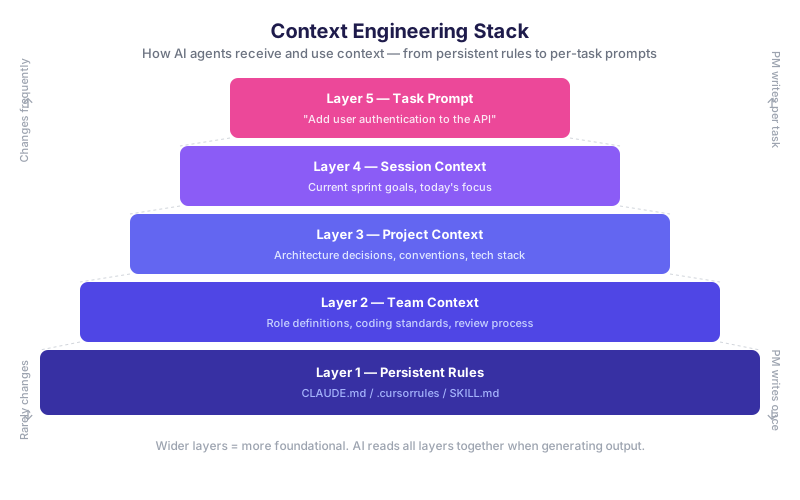
+----------------------------------------------------------+
|  LAYER 5: TASK PROMPT                                    |
|  "Add user authentication to the API"                    |
|  (What you type in the chat box right now)               |
+----------------------------------------------------------+
|  LAYER 4: SESSION CONTEXT                                |
|  Current sprint goals, today's focus, open blockers      |
|  (Pasted at the start of each working session)           |
+----------------------------------------------------------+
|  LAYER 3: PROJECT CONTEXT                                |
|  Architecture decisions, tech stack, naming conventions  |
|  (Loaded when starting any non-trivial task)             |
+----------------------------------------------------------+
|  LAYER 2: TEAM CONTEXT                                   |
|  Role definitions, coding standards, review process      |
|  (Stable across the project lifetime)                    |
+----------------------------------------------------------+
|  LAYER 1: PERSISTENT RULES                               |
|  CLAUDE.md / .cursorrules / SKILL.md                     |
|  (Loaded automatically by the AI tool on every session)  |
+----------------------------------------------------------+
Layer 1 — Persistent Rules
What it is: A file that your AI tool loads automatically at the start of every session. In Claude Code it is CLAUDE.md. In Cursor it is .cursorrules. Some teams maintain a SKILL.md for skill-based agents.
What goes in it:
- Non-negotiable coding standards ("Always use TypeScript strict mode")
- Tool and library restrictions ("Do not install new npm packages without team approval")
- Communication style ("Responses should be concise and use bullet points")
- Repository structure overview
PM's role: Define the rules. Work with the tech lead to write them. Make sure every team member's tool points to the file.
Example CLAUDE.md snippet:
# Project Rules

## Stack
- Backend: FastAPI (Python 3.11)
- Frontend: Next.js 14 (TypeScript, App Router)
- Database: PostgreSQL 15 via SQLAlchemy
- Auth: Supabase Auth only — do NOT implement custom JWT

## Non-negotiable constraints
- Do NOT create new database tables without a migration file
- Do NOT use synchronous database calls
- All API endpoints require authentication unless marked public
- Test coverage must remain above 80%

## Naming conventions
- API routes: kebab-case (/user-profile, not /userProfile)
- Python functions: snake_case
- React components: PascalCase
Layer 2 — Team Context
What it is: Stable information about how your team works, independent of any specific project feature.
What goes in it:
- Role definitions (who reviews what, who approves changes)
- Code review checklist
- Definition of Done
- Deployment process overview
- On-call and escalation path
PM's role: Write this layer. This is pure PM territory — it is the operational handbook for the project.
Example:
## Team Context

**Roles:**
- PM (You): Owns requirements, prioritization, context files
- Tech Lead (Ana): Approves architecture changes, reviews PRDs
- Backend Dev (Tom): Owns API, database migrations
- Frontend Dev (Priya): Owns UI components, design system compliance
- QA (James): Owns test plans, signs off on releases

**Review process:**
- All PRs require 1 approval from tech lead or a senior dev
- PRs touching the database schema require tech lead approval
- PRs to main require passing CI and QA sign-off
Layer 3 — Project Context
What it is: Architecture decisions, key constraints, and tech stack specifics for this particular project.
What goes in it:
- Architecture Decision Records (ADRs)
- Project brief (problem, users, scope)
- Third-party service integrations
- Performance requirements
- Security and compliance constraints
PM's role: Maintain this file as the project evolves. Every major technical decision that gets made in a meeting should land in this file within 24 hours.
Layer 4 — Session Context
What it is: The state of the project right now — this sprint, this week, today.
What goes in it:
- Current sprint goal
- In-progress work items
- Blockers
- Decisions made this week
- What is off-limits to touch right now
PM's role: Update this file weekly (or after standups). Paste it at the top of every significant AI session.
Layer 5 — Task Prompt
What it is: The specific instruction you or your developer types in the chat.
Why it is the top of the stack: By the time the AI reads the task prompt, it has already absorbed four layers of context. This means the task prompt itself can be short and focused — it does not need to re-explain the whole project every time.
Before context engineering:
"Add user authentication to the API. We use FastAPI and PostgreSQL. We had a decision a few weeks ago to use Supabase for auth, not custom JWT. The current sprint is about the read-only MVP so don't add write endpoints yet. Also we need tests."
After context engineering (all that background is already loaded):
"Add the /me endpoint to return the authenticated user's profile. Read-only. Tests required."
Part 3: Pro Tips for Large-Scope Projects (30 min)
Tip 1: The "Project Brief" File
A 1-2 page document that gives any AI (or new team member) instant project awareness. Load it at the start of every significant AI session.
Why it works: The AI has no persistent memory. The Project Brief is your substitute for that memory. It takes 60 seconds to paste and saves you from re-explaining the project every time.
TEMPLATE: Project Brief
# Project Brief: [Project Name]

**Last updated:** [YYYY-MM-DD]
**PM:** [Your name]
**Tech Lead:** [Name]

---

## What Are We Building?

[2-3 sentences. What is the product? What problem does it solve?]

Example:
A B2B SaaS dashboard that lets retail operations managers track inventory
levels across multiple warehouse locations in real time. The core problem
is that current reporting is done in Excel with a 24-hour delay.

---

## Who Are the Users?

| User Type | Description | Primary Need |
|---|---|---|
| [Role 1] | [Who they are] | [What they need most] |
| [Role 2] | [Who they are] | [What they need most] |

Example:
| Ops Manager | Manages 3-10 warehouses, non-technical | Real-time stock visibility |
| Warehouse Staff | On-floor, uses mobile | Fast stock update entry |
| Finance Director | Monthly reviewer | Export to Excel for reporting |

---

## Tech Stack

| Layer | Technology | Notes |
|---|---|---|
| Backend | [e.g., FastAPI, Python 3.11] | [Any important notes] |
| Frontend | [e.g., Next.js 14, TypeScript] | [App Router, not Pages Router] |
| Database | [e.g., PostgreSQL 15] | [Hosted on Supabase] |
| Auth | [e.g., Supabase Auth] | [Do NOT implement custom JWT] |
| Hosting | [e.g., Vercel + Railway] | [Prod + Staging environments] |
| CI/CD | [e.g., GitHub Actions] | [Tests must pass before merge] |

---

## Scope and Constraints

**In scope for current version:**
- [Feature 1]
- [Feature 2]
- [Feature 3]

**Explicitly out of scope:**
- [Non-feature 1 — and why]
- [Non-feature 2 — and why]

**Hard constraints:**
- [Constraint 1, e.g., "Must be GDPR compliant — no PII in logs"]
- [Constraint 2, e.g., "Must load in under 2 seconds on 4G mobile"]
- [Constraint 3, e.g., "Budget: no new paid third-party services without approval"]

---

## Key Decisions Made (Summary)

| Decision | Choice | Reason | Date |
|---|---|---|---|
| [Decision topic] | [What was chosen] | [Why] | [Date] |

Example:
| Auth provider | Supabase Auth | Reduces custom code, free tier sufficient | 2026-01-15 |
| State management | React Query only | Redux is overkill for current data needs | 2026-02-01 |

---

## What Success Looks Like (v1)

- [Measurable outcome 1]
- [Measurable outcome 2]
- [Launch date / milestone]
Tip 2: Architecture Decision Records (ADRs)
An ADR is a short, structured document recording a single architectural decision. It answers: what did we decide, why, and what did we reject?
Why this matters for AI: When an AI does not know a decision was made, it will suggest its own best practice — which may directly contradict your decision. An ADR loaded into context prevents the AI from suggesting Redux when you chose React Query, or recommending a microservices split when you deliberately chose a monolith.
Common AI drift problems that ADRs prevent:
- Suggesting a new auth library when Supabase Auth was chosen
- Proposing a Redis cache when the team decided to defer caching to v2
- Adding a new database table for a feature that should use an existing one
- Switching from REST to GraphQL because "it's more efficient"
TEMPLATE: Architecture Decision Record
# ADR-[NUMBER]: [Short title]

**Date:** [YYYY-MM-DD]
**Status:** [Accepted | Deprecated | Superseded by ADR-XXX]
**Deciders:** [Names of people involved in the decision]

---

## Context

[What is the situation that required a decision? What forces are at play?]

Example:
We need user authentication for the API. Options include building custom
JWT handling, using a third-party library (Auth0, Clerk), or using
Supabase Auth (already in our stack for the database).

---

## Decision

[What was decided, stated clearly.]

Example:
We will use Supabase Auth for all user authentication. No custom JWT
implementation. No additional auth libraries.

---

## Reasons

- [Reason 1]
- [Reason 2]
- [Reason 3]

Example:
- Supabase Auth is already in the stack — no new dependency
- Handles email/password and OAuth out of the box
- Free tier supports our expected user volume for 12+ months
- Reduces custom security code, lowering audit surface

---

## Rejected Alternatives

| Alternative | Why Rejected |
|---|---|
| Custom JWT | Too much custom security code to maintain |
| Auth0 | Paid tier required above 7,500 MAU; not needed yet |
| Clerk | Additional vendor dependency with no clear advantage |

---

## Consequences

**Positive:**
- Faster implementation
- Less custom code to test and audit

**Negative / Trade-offs:**
- Tied to Supabase ecosystem for auth
- Migration away from Supabase would require auth rewrite

---

## AI Instruction

When working on this project, ALWAYS use Supabase Auth for authentication.
Do NOT suggest or implement custom JWT, Auth0, Clerk, or any other auth
provider. If you see code that bypasses Supabase Auth, flag it.
Tip 3: The "Current Sprint" File
A living document that gives AI tools instant awareness of right now. Update it after each sprint planning session and after major standups.
Why it works: The AI does not know what is in progress, what is blocked, or what decisions were made yesterday. The Current Sprint file fills that gap in 10 lines.
TEMPLATE: Current Sprint
# Current Sprint — [Sprint Name / Number]

**Sprint dates:** [Start] to [End]
**Sprint goal:** [One sentence: what does success look like at the end of this sprint?]
**Last updated:** [YYYY-MM-DD]

---

## In Progress

- [ ] [Task 1] — Owner: [Name] — Status: [On track / At risk]
- [ ] [Task 2] — Owner: [Name] — Status: [On track / At risk]
- [ ] [Task 3] — Owner: [Name] — Status: [On track / At risk]

## Blocked

- [Task X] — Blocked by: [Reason] — Waiting on: [Person/decision]

## Completed This Sprint

- [x] [Task A]
- [x] [Task B]

## Decisions Made This Sprint

- [Decision 1 — brief summary]
- [Decision 2 — brief summary]

## Off-Limits This Sprint (Do Not Touch)

- [Area 1] — Reason: [Why it is frozen]
- [Area 2] — Reason: [Why it is frozen]

## Next Sprint Preview (tentative)

- [Upcoming item 1]
- [Upcoming item 2]
Tip 4: Negative Constraints Are Crucial
Most context engineering focuses on telling AI what to do. Negative constraints — explicit "do NOT" instructions — are equally important and often overlooked.
Why negative constraints matter:
AI models are trained on vast amounts of code and best-practice content. When they do not know your constraints, they will apply general best practices, which may directly contradict your team's deliberate choices. Negative constraints are your defense against AI drift.
The pattern:
Do NOT [action]. Reason: [brief explanation].
The reason matters. Without it, developers may override the constraint thinking it was an oversight. With it, the constraint is self-documenting.
Common negative constraints by category:
Architecture:
Do NOT introduce microservices. We are deliberately monolith-first for v1.
Do NOT add GraphQL. We use REST only. A GraphQL layer is planned for v2.
Do NOT create new database tables without a migration file and tech lead approval.
Do NOT add caching layers (Redis, Memcached). Deferred to v2.
Libraries and dependencies:
Do NOT install new npm packages without team approval. Check package.json first.
Do NOT use Redux or Zustand. We use React Query + local state only.
Do NOT use any UI component library except our internal design system.
Do NOT use moment.js. Use date-fns only.
Security and compliance:
Do NOT log PII (names, emails, phone numbers). GDPR requirement.
Do NOT store passwords in plaintext or reversible encryption.
Do NOT expose internal user IDs in API responses. Use public UUIDs only.
Do NOT write API endpoints without authentication unless explicitly marked public.
Scope:
Do NOT add features not in the current sprint. Flag as a future idea instead.
Do NOT refactor files unrelated to the current task.
Do NOT change the database schema without a corresponding ADR.
Format recommendation: Keep all negative constraints in one section of your CLAUDE.md or Project Brief. Make them scannable — one per line, uppercase "Do NOT" at the start.
Tip 5: Template Files for Recurring Tasks
AI tools are excellent at filling in structured templates. When AI has a template to follow, it produces consistent, complete, well-formatted output. When it has to improvise the structure, output quality varies.
Create templates for everything your team produces repeatedly:
- PRD (Product Requirements Document)
- Tech Spec
- Sprint Review summary
- Bug report
- Release notes
- Stakeholder update email
How to use them: Store the template in your context kit. When asking AI for help, say: "Using the PRD template below, write a PRD for [feature]." The AI fills the template rather than inventing a structure.
Example: PRD template prompt
Using the template below, write a PRD for the inventory export feature.

Context:
- Users are Finance Directors
- They need to export current inventory data to Excel for monthly reporting
- This is a v1 feature, so keep it simple: one-click export, CSV format

---
TEMPLATE:

# PRD: [Feature Name]

**Author:** | **Date:** | **Status:** Draft / Review / Approved
**Sprint:** | **Priority:** P1 / P2 / P3

## Problem Statement
[What user problem are we solving? 2-3 sentences.]

## Users Affected
[Who uses this? How often?]

## Proposed Solution
[What are we building? Keep it implementation-neutral.]

## User Stories
- As a [role], I want to [action] so that [outcome].

## Acceptance Criteria
- [ ] [Criterion 1]
- [ ] [Criterion 2]
- [ ] [Criterion 3]

## Out of Scope
- [Non-feature 1]

## Open Questions
- [Question 1 — owner — due date]

## Dependencies
- [Dependency 1]
Part 4: Context Engineering for Different Roles (15 min)
Every role on a project needs slightly different context to do their AI-assisted work effectively. The PM sets the master context kit; each role then adds a thin layer of role-specific context.
Context Kit by Role
PM Context Kit What the PM needs AI to know:
- Full project brief (problem, users, scope)
- Stakeholder map (who approves what)
- Current sprint state and priorities
- Business constraints (budget, compliance, launch date)
- Template files for PRDs, sprint reviews, stakeholder updates
Typical PM AI tasks: writing PRDs, drafting stakeholder updates, generating sprint review summaries, analyzing feedback themes, creating user stories.
Developer Context Kit What developers need AI to know:
- Full tech stack (specific versions)
- Architecture decisions and ADRs
- Negative constraints (what not to do)
- Coding standards and conventions
- Current task and its acceptance criteria
- Related files and functions in the codebase
Typical developer AI tasks: implementing features, writing tests, debugging, code review, documentation.
QA Context Kit What QA needs AI to know:
- Feature being tested and its acceptance criteria
- Known edge cases and risk areas
- Test environments and data setup
- Regression areas (what must not break)
- Bug report template
Typical QA AI tasks: generating test plans, writing test cases, creating bug reports, drafting release notes.
Keeping Context Files Aligned
The master context files live in the repository root or a /context directory. All roles pull from the same source. The PM owns updates to the Project Brief and ADR index. The tech lead owns updates to CLAUDE.md. No one should maintain separate, diverging copies.
Recommended file structure:
/project-root
  CLAUDE.md                  # Layer 1: Persistent rules (auto-loaded)
  /context
    project-brief.md         # Layer 3: Project context
    adrs/
      ADR-001-auth.md
      ADR-002-state.md
      ADR-003-database.md
    team-context.md          # Layer 2: Team context
    current-sprint.md        # Layer 4: Session context (updated weekly)
    templates/
      prd-template.md
      tech-spec-template.md
      sprint-review-template.md
      bug-report-template.md
Part 5: Hands-on — Create Your Context Engineering Kit (25 min)
Exercise Overview
You will build a minimal context kit for a real or realistic project you are working on. By the end of this exercise, you will have three reusable files that you can paste into any AI session for instant project awareness.
Time budget: 25 minutes total
Exercise 1: Project Brief (10 minutes)
Using the template from Part 3, write a Project Brief for your project. Fill in every section. Use "TBD" for things you do not know yet — that is useful information for the AI too.
Required sections (minimum):
- What are we building? (2-3 sentences)
- Who are the users? (1-2 user types)
- Tech stack (even if partial)
- Scope: 3 things in scope, 2 things explicitly out of scope
- 2-3 hard constraints
Starter prompt if you are stuck:
"I am a PM working on [brief description]. Help me fill out this Project Brief template based on what I tell you."
Exercise 2: Architecture Constraints (8 minutes)
Write 10 bullet points of constraints for your project. Aim for a mix of:
- Tech stack decisions ("We use X, not Y")
- Negative constraints ("Do NOT do Z")
- Scope boundaries ("This project does not include...")
- Process constraints ("All changes require...")
Example output:
Architecture Constraints — [Project Name]

1. Backend: FastAPI (Python 3.11). Do NOT use Django or Flask.
2. Database: PostgreSQL only. Do NOT add MongoDB or any NoSQL store.
3. Auth: Supabase Auth. Do NOT implement custom JWT.
4. State (frontend): React Query + local state. Do NOT use Redux or Zustand.
5. UI: Internal design system components only. Do NOT use MUI, Chakra, or Tailwind directly.
6. Hosting: Vercel (frontend) + Railway (backend). Do NOT introduce new hosting platforms.
7. New npm packages require tech lead approval before installation.
8. Do NOT create database tables without a migration file.
9. Do NOT log PII. GDPR applies to all environments including staging.
10. Performance target: API responses under 200ms at p95 for read endpoints.
Exercise 3: Current Sprint Summary (7 minutes)
Using the Current Sprint template from Part 3, fill in the current state of your sprint. If you do not have an active sprint, use a recent or hypothetical one.
Required fields (minimum):
- Sprint goal (one sentence)
- 3-5 in-progress items with owners
- 1-2 off-limits areas
- Any decisions made this sprint
Test Your Kit
Once you have all three files, test them:
- Open Claude, ChatGPT, or your AI tool of choice
- Paste all three files at the top of a new conversation
- Ask a realistic project question, for example:
- "What is the fastest way to implement [feature] given our constraints?"
- "Write a user story for [feature] in our PRD format"
- "What are the risks of changing [component] this sprint?"
- Compare the response to what you would get without the context
What to look for:
- Does the AI respect your tech stack?
- Does it avoid things you marked as off-limits?
- Does it sound like it understands your project?
Part 6: Maintenance Strategy (10 min)
A context kit that is out of date is worse than no context kit. Stale context misleads the AI and can cause it to suggest things that are no longer true about your project.
Update Frequency by File
| File | Update Frequency | Trigger |
|---|---|---|
| CLAUDE.md | Rarely (monthly or less) | New persistent rule, tool change, major convention change |
| team-context.md | Rarely (per quarter or when team changes) | Team member joins/leaves, process change |
| project-brief.md | Per milestone | Scope change, major architectural pivot, new stakeholder requirement |
| ADRs | Per decision | Any significant architectural decision is made |
| current-sprint.md | Weekly | Sprint planning, sprint review |
Who Owns Each File
| File | Owner | Reviewer |
|---|---|---|
| CLAUDE.md | Tech Lead | PM signs off |
| team-context.md | PM | Tech Lead reviews |
| project-brief.md | PM | Stakeholder approval for major changes |
| ADRs | Tech Lead | PM reads and acknowledges |
| current-sprint.md | PM | Updated in sprint planning with team |
Version Control for Context Files
All context files should live in the project repository. This gives you:
- History: You can see when a constraint was added and why (via commit messages)
- Collaboration: PRs for context changes get reviewed like code changes
- Consistency: Everyone on the team works from the same version
- Recovery: If a context file gets corrupted or accidentally emptied, git restores it
Commit message convention for context changes:
context(project-brief): update scope to exclude mobile app for v1
context(adrs): add ADR-004 for caching strategy decision
context(claude-md): add negative constraint for Redis
context(sprint): update sprint 8 status after planning
Practical rule: Any time a significant decision is made in a meeting, the PM's next action before closing their laptop is a one-line update to the relevant context file and a commit. This habit is the entire maintenance strategy.
Summary
Context engineering is how PMs ensure every AI interaction on their project produces useful, consistent, architecturally-correct results — across the whole team, for the whole project lifecycle.
The five-layer stack:
- Persistent Rules (CLAUDE.md) — auto-loaded, rarely changed
- Team Context — how the team works
- Project Context — what we are building and why
- Session Context — what is happening right now
- Task Prompt — the specific request
The five pro tips:
- Project Brief — instant project awareness in 1-2 pages
- ADRs — prevent AI from relitigating decided questions
- Current Sprint file — give AI a live view of the project state
- Negative constraints — prevent drift with explicit "Do NOT" rules
- Template files — consistent output structure every time
Your context kit (what you built today):
- Project Brief
- Architecture Constraints (10 bullet points)
- Current Sprint Summary
Checkpoint
Session B5 is complete when:
- Every participant has a Project Brief for their project (real or sample)
- Every participant has a list of at least 10 architecture/scope constraints
- Every participant has a Current Sprint summary
- Every participant has tested their kit by pasting it into an AI session and asking a project question
- Every participant can describe the five-layer Context Engineering Stack from memory
The output of this session is a reusable context kit — a set of files you paste at the top of any AI session to give it instant, accurate project awareness. Keep it in your repository. Update it weekly. It is the most valuable PM artifact you will create in this course.
Additional Resources
CLAUDE.mddocumentation: docs.anthropic.com/claude/docs/claude-md- Architecture Decision Records (Nygard format): adr.github.io
- Next lesson: Lesson 6 — Templates and Structure: Getting Consistent AI Output at Scale
Lesson 5 of 10 | AI-Powered Development (PM Track) | Last updated: 2026-04-01