 JustLearn
Lesson 6: Templates and Expected Structure
Course: AI-Powered Development (PM Track) | Duration: 2 hours | Level: Intermediate
Learning Objectives
By the end of this session, you will be able to:
- Explain why AI models produce higher-quality outputs when given a structural template to fill versus open-ended instructions
- Build a complete library of copy-paste-ready templates for the most common PM deliverables
- Apply the "Expected Output Structure" technique to constrain AI output format and improve reliability
- Manage, version, and share a team template library
- Evaluate AI output quality by comparing templated versus un-templated prompts side by side
Why This Lesson Matters
Most PMs who are disappointed with AI outputs have the same invisible problem: they asked the AI to produce a document without telling it what that document should look like.
"Write a risk assessment for the payment gateway migration" is an instruction. It tells the AI what to do. It does not tell the AI what format to produce, which fields matter to your organization, how detailed each section should be, or what decisions the reader needs to make after reading it.
Templates solve this. When you give an AI a template to fill, you do two powerful things simultaneously:
- You offload the creative formatting problem to yourself (once, when you build the template) instead of hoping the AI invents a format that matches your team's standards.
- You constrain the AI's output space — and constrained output space consistently produces higher-quality content.
This lesson is about building that template library and learning the techniques to use it.
Part 1: Why Templates Work (15 min)
The Fundamental Problem with Open-Ended Requests
When you ask an AI to "write a risk assessment," the model faces two challenges at once:
- What to say — the actual analysis of the risks
- How to say it — the format, sections, depth, and structure
Solving both simultaneously degrades quality on both dimensions. The model splits its "attention" between content and form. The result is often a plausible-looking document that does not match your team's standards, misses the fields your stakeholders actually need, and requires significant rewriting before it is usable.
Before/After: Risk Assessment
Prompt without a template:
"Write a risk assessment for our plan to migrate the payment gateway from Stripe to Adyen."
Sample AI output (no template):
Risk Assessment: Payment Gateway Migration
This migration presents several risks including technical complexity, data integrity concerns, and potential downtime. The team should carefully consider the following:
- Integration risks — Adyen's API differs from Stripe's and will require developer effort.
- Timeline risks — the migration could take longer than expected.
- Business risks — downtime during migration could affect revenue.
- Compliance risks — PCI-DSS requirements must be met.
It is recommended that a thorough testing plan be developed before proceeding.
This output is generic. It reads like a summary a junior intern might write. It contains no owners, no severity ratings, no mitigation plans, and no specific data. It would not be useful in a steering committee meeting.
Prompt with a template:
"Fill in the following risk assessment template for our plan to migrate the payment gateway from Stripe to Adyen. The migration window is Q3 2026. Our team is 6 engineers, 1 QA, and 1 PM. We process approximately $2.4M/month in transactions. Our compliance team requires PCI-DSS Level 1 certification before go-live."
code## Risk Assessment: [Project Name] **Project:** ___ **Date:** ___ **Owner:** ___ **Review Date:** ___ ### Risk Register | Risk ID | Risk Description | Likelihood (H/M/L) | Impact (H/M/L) | Risk Score | Mitigation Plan | Owner | Status | |---------|-----------------|-------------------|----------------|-----------|-----------------|-------|--------| | R-01 | | | | | | | | | R-02 | | | | | | | | ### Top 3 Risks — Detailed Analysis **Risk:** ___ **Scenario:** If [trigger], then [consequence]. **Mitigation:** ___ **Contingency (if mitigation fails):** ___ **Owner:** ___ ### Go/No-Go Criteria - [ ] ___ - [ ] ___ ### Sign-off Required From - [ ] Engineering Lead - [ ] Security/Compliance - [ ] Finance
Sample AI output (with template):
Risk Assessment: Payment Gateway Migration (Stripe to Adyen)
Project: Payment Gateway Migration — Stripe to Adyen Date: April 1, 2026 Owner: Product Manager Review Date: June 15, 2026 (4 weeks before migration window)
Risk Register
Risk ID Risk Description Likelihood Impact Risk Score Mitigation Plan Owner Status R-01 API incompatibility causes checkout failure M H HIGH Full API mapping completed in spike week; parallel run for 2 weeks before cutover Engineering Lead Open R-02 PCI-DSS re-certification delayed past go-live L H HIGH Begin certification process 10 weeks before migration; block go-live gate on cert Compliance Officer Open R-03 Adyen settlement timing differs from Stripe, causing cash flow gap M M MEDIUM Finance team models 7-day settlement delay scenario; treasury buffer confirmed Finance Director Open R-04 Rollback window insufficient during peak traffic M H HIGH Migration scheduled for Sunday 02:00–06:00; auto-rollback script tested in staging Engineering Lead Open R-05 Webhook format differences break downstream order processing H M HIGH Inventory and fulfillment systems mapped to Adyen webhook schema before cutover Backend Engineer Open Top 3 Risks — Detailed Analysis
Risk: R-01 — API incompatibility Scenario: If undiscovered API differences surface during cutover, then checkout flow fails for active users, resulting in direct revenue loss of approximately $6,700/hour ($2.4M monthly divided by 30 divided by 12). Mitigation: Conduct a 2-week parallel run where both gateways process transactions; validate 100% match rate before cutting Stripe traffic to zero. Contingency: Instant rollback to Stripe via feature flag; Stripe contract kept active through Q3 at no additional cost. Owner: Engineering Lead
Risk: R-02 — PCI-DSS certification delay Scenario: If Adyen's compliance questionnaire or on-site audit takes longer than projected, then we cannot legally process cards on Adyen and the migration must be postponed. Mitigation: Engage QSA (Qualified Security Assessor) in Week 1 of Q2; complete SAQ D by Week 6; build 4-week buffer before migration window. Contingency: Delay migration to Q4; communicate to stakeholders by July 1 if certification is not confirmed by June 15. Owner: Compliance Officer
Risk: R-04 — Insufficient rollback window Scenario: If issues surface after the 4-hour maintenance window closes and rollback is not complete, then customers experience degraded checkout during Monday morning peak. Mitigation: Rollback script tested in staging; decision checkpoint at T+2 hours — if any error rate >0.1%, automatic rollback triggers. Contingency: Emergency Stripe reactivation via DNS change (estimated 8 minutes); customer support briefed on messaging template. Owner: Engineering Lead and On-call SRE
Go/No-Go Criteria
- PCI-DSS Level 1 certification confirmed in writing from QSA
- Parallel run error rate <0.01% for 5 consecutive business days
- Rollback script successfully tested in production-mirror environment
- Finance confirms treasury buffer for 7-day settlement delay
- Customer support team briefed and runbook approved
Sign-off Required From
- Engineering Lead
- Security/Compliance
- Finance
The difference is stark. The second output is ready to present to a steering committee. The first would need to be rebuilt from scratch.
Why Constraints Improve Quality
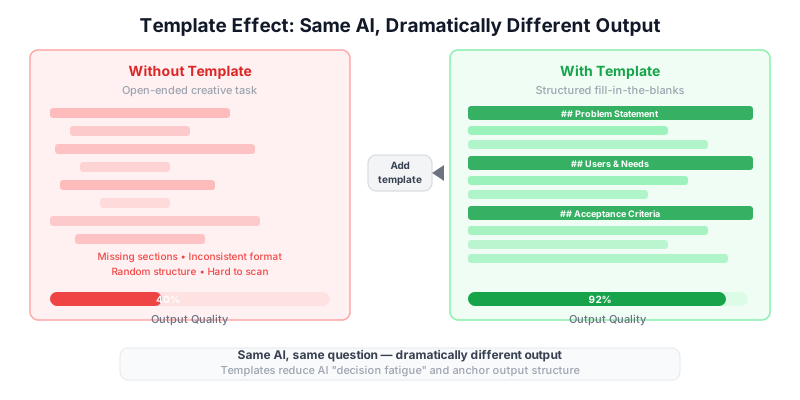
This seems counterintuitive. You might expect that giving the AI more freedom would produce better results. The opposite is true, for two reasons:
Reason 1: The AI is no longer guessing what you want. When you provide a template, the AI's entire effort goes into populating the fields with high-quality analysis. It is not spending cycles deciding whether to use a table or bullet points, how many sections to include, or whether to add a sign-off section.
Reason 2: Structure forces completeness. An empty field in a template is a signal to fill it. Open-ended output has no mechanism to notice when something is missing. Templates prevent the AI from skipping hard fields by taking the easy path of writing vague prose instead.
Part 2: Template Types Your Team Should Create (30 min)
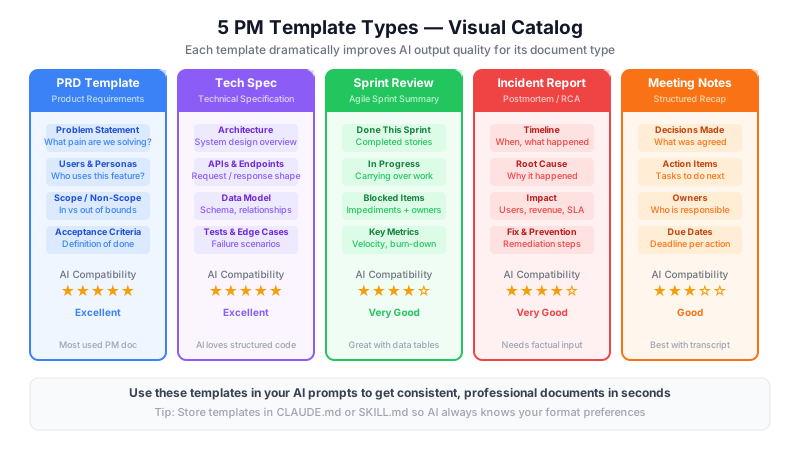
The following five templates are the highest-leverage artifacts a PM can standardize. Each is presented as an empty template followed by a complete filled-in example.
Template 1: Product Requirements Document (PRD)
Empty Template
# PRD: [Feature Name]

**Author:** ___
**Status:** Draft / In Review / Approved
**Version:** 1.0
**Last Updated:** ___
**Stakeholders:** ___

---

## 1. Problem Statement

### What problem are we solving?
[1–3 sentences describing the user pain or business gap.]

### Who has this problem?
**Primary users:** ___
**Secondary users:** ___
**Estimated affected users:** ___

### Why now?
[What makes this the right time to solve this problem?]

---

## 2. Goals and Non-Goals

### Goals (what success looks like)
- [ ] ___
- [ ] ___

### Non-Goals (explicitly out of scope)
- ___
- ___

---

## 3. User Stories

| ID | As a... | I want to... | So that... | Priority |
|----|---------|-------------|------------|----------|
| US-01 | | | | Must Have |
| US-02 | | | | Should Have |
| US-03 | | | | Nice to Have |

---

## 4. Acceptance Criteria

### US-01: [Story Title]
- [ ] Given [context], when [action], then [outcome].
- [ ] Given [context], when [action], then [outcome].

### US-02: [Story Title]
- [ ] Given [context], when [action], then [outcome].

---

## 5. Scope

### In Scope
- ___

### Out of Scope
- ___

---

## 6. Dependencies

| Dependency | Type | Team/System | Status | Risk if Delayed |
|------------|------|-------------|--------|-----------------|
| | API | | Confirmed | |
| | Design | | Pending | |

---

## 7. Success Metrics

| Metric | Current Baseline | Target | Measurement Method | Timeline |
|--------|-----------------|--------|-------------------|----------|
| | | | | |

---

## 8. Open Questions

| # | Question | Owner | Due Date | Status |
|---|----------|-------|----------|--------|
| 1 | | | | Open |

---

## 9. Appendix / References

- ___
Filled-In Example
# PRD: Saved Payment Methods at Checkout

**Author:** Sarah Chen, Product Manager
**Status:** In Review
**Version:** 1.2
**Last Updated:** April 1, 2026
**Stakeholders:** Engineering (Backend, Frontend), Design, Legal, Finance, Customer Support

---

## 1. Problem Statement

### What problem are we solving?
Returning customers must re-enter their full payment details on every purchase, creating friction that contributes to cart abandonment. Our checkout completion rate of 61% is 12 points below the industry benchmark of 73% for our segment.

### Who has this problem?
**Primary users:** Registered customers who have made at least one prior purchase (approximately 340,000 accounts)
**Secondary users:** Guest users who complete account registration at checkout
**Estimated affected users:** 340,000 existing registered users; approximately 15,000 new registrations per month

### Why now?
Q3 customer survey results (n=1,200) identified checkout friction as the #1 reason for abandonment. Competitor analysis shows all three primary competitors launched saved payment methods in the last 18 months. Engineering has completed the Adyen migration, which provides the tokenization infrastructure this feature requires at no additional compliance cost.

---

## 2. Goals and Non-Goals

### Goals (what success looks like)
- [ ] Customers can save up to 3 payment methods to their account profile
- [ ] Checkout flow completes in 2 taps or clicks or fewer for users with a saved default method
- [ ] Checkout completion rate increases from 61% to 68% or higher within 90 days of launch
- [ ] Zero increase in fraud rate (measured month-over-month)

### Non-Goals (explicitly out of scope)
- Saving payment methods for guest (non-logged-in) users — deferred to Q4
- Support for PayPal, Apple Pay, or Google Pay tokenization — separate initiative
- Bulk payment management (e.g., deleting all methods at once)
- Business or team accounts with shared payment pools

---

## 3. User Stories

| ID | As a... | I want to... | So that... | Priority |
|----|---------|-------------|------------|----------|
| US-01 | returning customer | save my credit card after a successful purchase | I don't have to re-enter it next time | Must Have |
| US-02 | returning customer | set one card as my default payment method | my checkout experience is one click | Must Have |
| US-03 | returning customer | delete a saved payment method from my account | I can keep my account up to date when cards expire | Must Have |
| US-04 | returning customer | see the last 4 digits and card type for saved methods | I can choose the right card without exposing full details | Must Have |
| US-05 | returning customer | add a new card during checkout without replacing saved methods | I can use a different card for one-off purchases | Should Have |

---

## 4. Acceptance Criteria

### US-01: Save card after purchase
- [ ] Given a logged-in user completes a successful purchase, when the order confirmation page loads, then a "Save this card for future use" checkbox is displayed (default: unchecked).
- [ ] Given the user checks the box and confirms, then the payment method is tokenized via Adyen and stored against the user account.
- [ ] Given the user already has 3 saved methods, then the save option is not displayed and an informational message reads: "You have reached the maximum of 3 saved payment methods. Remove one to save a new card."

### US-02: Default payment method
- [ ] Given a user has at least one saved payment method, when they reach the payment step in checkout, then their default method is pre-selected with a "Change" option visible.
- [ ] Given the user clicks "Change," then a list of their saved methods is displayed with the option to use a different saved card or enter a new one.

### US-03: Delete saved method
- [ ] Given a user navigates to Account > Payment Methods, when they click "Remove" on a saved card, then a confirmation dialog appears.
- [ ] Given the user confirms removal, then the card is deleted from display within 2 seconds and removed from the Adyen token vault within 24 hours.
- [ ] Given the deleted card was the user's default, then no default is set automatically and the user is prompted to set a new default.

---

## 5. Scope

### In Scope
- Tokenized storage of Visa, Mastercard, and American Express cards via Adyen
- Account Profile > Payment Methods management page
- Checkout flow integration for saved method selection
- Save-card prompt on order confirmation page

### Out of Scope
- Debit card differentiation from credit card (treated identically)
- International card support beyond current Adyen regions (US, CA, UK, AU)
- Payment method sharing between accounts
- Saving cards for subscription or recurring billing (separate billing system)

---

## 6. Dependencies

| Dependency | Type | Team/System | Status | Risk if Delayed |
|------------|------|-------------|--------|-----------------|
| Adyen tokenization API | Technical | Payments Engineering | Confirmed — live since March 2026 | None |
| Account Profile redesign (Q2) | Design | Design Team | In progress | Delays Payment Methods page layout |
| Legal review of stored payment data language | Legal | Legal/Privacy | Pending — due April 15 | Blocks copy for consent checkbox |
| PCI-DSS scope confirmation | Compliance | Security | Confirmed — token vault out of scope | None |

---

## 7. Success Metrics

| Metric | Current Baseline | Target | Measurement Method | Timeline |
|--------|-----------------|--------|-------------------|----------|
| Checkout completion rate | 61% | 68% or higher | Analytics (session funnel) | 90 days post-launch |
| Saved method adoption | 0% | 35% or more of eligible users | Account profile data | 60 days post-launch |
| Checkout time (registered users) | 4.2 min avg | 2.5 min avg or less | Session recording (Hotjar) | 30 days post-launch |
| Fraud rate (card-not-present) | 0.08% | 0.08% or lower (no increase) | Adyen fraud dashboard | Monthly |

---

## 8. Open Questions

| # | Question | Owner | Due Date | Status |
|---|----------|-------|----------|--------|
| 1 | Does saving a card require explicit re-consent under GDPR for EU expansion in Q4? | Legal | April 15 | Open |
| 2 | Should we support 4 saved methods instead of 3? Benchmarking shows competitors allow 5. | PM | April 8 | Open |
| 3 | What is the token expiry policy when a user has not logged in for 12 or more months? | Engineering | April 10 | Open |

---

## 9. Appendix / References

- Q3 2025 Customer Survey Results (internal link)
- Adyen Tokenization API Docs
- Competitor Analysis: Checkout UX Benchmarking (April 2026)
- PCI-DSS Scope Confirmation Memo — Security Team, March 2026
Template 2: Technical Spec Template
Empty Template
# Technical Spec: [Feature Name]

**Author:** ___
**Engineering Lead:** ___
**PM Owner:** ___
**Status:** Draft / In Review / Approved
**Version:** ___
**Target Sprint:** ___

---

## 1. Overview

### Summary
[2–3 sentences: what this spec covers and why.]

### PRD Reference
[Link or reference to the PRD this spec implements.]

---

## 2. Architecture

### System Diagram
[ASCII diagram or link to Miro/Figma architecture diagram]

### Components Affected
| Component | Change Type | Notes |
|-----------|------------|-------|
| | New / Modified / Unchanged | |

### Data Flow
1. ___
2. ___

---

## 3. API Contracts

### Endpoint: [METHOD] /path

**Request:**
```json
{
  "field": "type — description"
}
Response (200 OK):
{
  "field": "type — description"
}
Error Responses:
| Status | Code | Message | When |
|---|---|---|---|
| 400 | VALIDATION_ERROR | ||
| 401 | UNAUTHORIZED | ||
| 404 | NOT_FOUND |
4. Data Model
New / Modified Tables
Table: [table_name]
| Column | Type | Nullable | Default | Description |
|---|---|---|---|---|
| id | UUID | No | gen_random_uuid() | Primary key |
Migration Strategy
5. Edge Cases and Error Handling
| Scenario | Expected Behavior | Implemented By |
|---|---|---|
6. Security Considerations
7. Performance Requirements
| Operation | SLA Target | Measurement |
|---|---|---|
| p95 < 200ms |
8. Testing Requirements
| Test Type | Coverage Target | Notes |
|---|---|---|
| Unit | >80% | |
| Integration | Key happy paths | |
| Load | 2x expected peak |
9. Rollout Plan
- Feature flag:
feature_[name] - Canary rollout: 5% → 25% → 100%
- Rollback trigger: error rate >1% for 5 min
10. Open Technical Questions
| # | Question | Owner | Due |
|---|---|---|---|
| 1 |
#### Filled-In Example (Saved Payment Methods)

```markdown
# Technical Spec: Saved Payment Methods

**Author:** Marcus Webb, Senior Backend Engineer
**Engineering Lead:** Marcus Webb
**PM Owner:** Sarah Chen
**Status:** In Review
**Version:** 1.1
**Target Sprint:** Sprint 47 (April 14–28, 2026)

---

## 1. Overview

### Summary
This spec covers the backend and frontend implementation of saved payment methods using Adyen's tokenization vault. Users can store up to 3 tokenized cards, set a default, and use saved methods at checkout without re-entering card details.

### PRD Reference
PRD: Saved Payment Methods at Checkout, v1.2 (April 1, 2026)

---

## 2. Architecture

### System Diagram
User Browser | v [Frontend: Checkout Flow / Account Profile] | v [API Gateway] | +---> [Payment Service] <---> [Adyen Tokenization Vault] | | | v +---> [User Service DB: payment_methods table]
### Components Affected
| Component | Change Type | Notes |
|-----------|------------|-------|
| Checkout Frontend | Modified | Add saved method selection step |
| Account Profile Frontend | Modified | Add Payment Methods management page |
| Payment Service (API) | Modified | 4 new endpoints |
| User Service DB | Modified | New payment_methods table |
| Adyen Integration Layer | Modified | Add tokenization store/retrieve/delete calls |

### Data Flow
1. User completes checkout with a new card and checks "Save for future use"
2. Frontend sends card details directly to Adyen (no card data touches our servers — PCI scope maintained)
3. Adyen returns a `recurringDetailReference` token
4. Frontend sends the token and card metadata (last4, brand, expiry) to our Payment Service
5. Payment Service stores token and metadata in `payment_methods` table, linked to `user_id`
6. On subsequent checkout, frontend calls GET /users/{id}/payment-methods, displays saved cards
7. User selects saved card — checkout sends `recurringDetailReference` to Adyen

---

## 3. API Contracts

### Endpoint: GET /v1/users/{userId}/payment-methods

**Request Headers:**
`Authorization: Bearer <jwt>`

**Response (200 OK):**
```json
{
  "paymentMethods": [
    {
      "id": "pm_01HXYZ",
      "brand": "visa",
      "last4": "4242",
      "expiryMonth": "09",
      "expiryYear": "2028",
      "isDefault": true,
      "createdAt": "2026-03-15T10:22:00Z"
    }
  ],
  "count": 1,
  "maxAllowed": 3
}
Error Responses:
| Status | Code | Message | When |
|---|---|---|---|
| 401 | UNAUTHORIZED | Valid session required | No or invalid JWT |
| 404 | USER_NOT_FOUND | User does not exist | userId not in database |
Endpoint: POST /v1/users/{userId}/payment-methods
Request:
{
  "adyenToken": "8415968893916991",
  "brand": "visa",
  "last4": "4242",
  "expiryMonth": "09",
  "expiryYear": "2028",
  "setAsDefault": true
}
Response (201 Created):
{
  "id": "pm_01HXYZ",
  "brand": "visa",
  "last4": "4242",
  "isDefault": true,
  "createdAt": "2026-04-01T14:00:00Z"
}
Error Responses:
| Status | Code | Message | When |
|---|---|---|---|
| 400 | VALIDATION_ERROR | Invalid expiry format | expiryMonth not 01–12 |
| 400 | MAX_METHODS_REACHED | Maximum 3 saved methods allowed | User already has 3 |
| 401 | UNAUTHORIZED | No valid JWT | |
| 422 | INVALID_TOKEN | Adyen token validation failed | Adyen rejects the token |
Endpoint: DELETE /v1/users/{userId}/payment-methods/{methodId}
Response (204 No Content): Success, no body.
Error Responses:
| Status | Code | Message | When |
|---|---|---|---|
| 403 | FORBIDDEN | Cannot delete another user's payment method | userId mismatch |
| 404 | NOT_FOUND | Payment method not found | methodId does not exist |
4. Data Model
New Table: payment_methods
| Column | Type | Nullable | Default | Description |
|---|---|---|---|---|
| id | VARCHAR(20) | No | generated | Internal ID (pm_ prefix) |
| user_id | UUID | No | — | FK to users.id |
| adyen_token | VARCHAR(64) | No | — | Adyen recurringDetailReference (encrypted at rest) |
| brand | VARCHAR(20) | No | — | "visa", "mastercard", "amex" |
| last4 | CHAR(4) | No | — | Last 4 digits for display |
| expiry_month | CHAR(2) | No | — | "01" through "12" |
| expiry_year | CHAR(4) | No | — | "2026" through "2099" |
| is_default | BOOLEAN | No | false | Only one true per user_id |
| created_at | TIMESTAMPTZ | No | NOW() | Creation timestamp |
| deleted_at | TIMESTAMPTZ | Yes | NULL | Soft delete timestamp |
Constraint: UNIQUE (user_id, adyen_token) — prevents duplicate saves. Index: (user_id, deleted_at) — for fast per-user lookups excluding deleted records.
Migration Strategy
New table only — no changes to existing tables. Migration is non-destructive and can be run with zero downtime.
5. Edge Cases and Error Handling
| Scenario | Expected Behavior | Implemented By |
|---|---|---|
| User saves same card twice | 422 DUPLICATE_METHOD with message "This card is already saved." | Backend validation |
| User deletes their default method | Remove default flag; do not auto-promote another card | Backend logic |
| Adyen token expires (12-month inactivity) | Adyen webhook triggers RECURRING_DETAIL_DISABLED; our listener marks method as deleted | Webhook handler |
| User deletes account | Cascade delete all payment_methods; send delete request to Adyen vault for each token | Account deletion service |
| Card expires (past expiry_year/month) | Display card with "Expired" badge; visible but cannot be selected at checkout | Frontend |
| 3-method limit reached, user tries to add at checkout | Redirect to Account > Payment Methods with message "Remove a saved card before adding a new one." | Frontend and Backend |
6. Security Considerations
- Adyen tokens (not raw card numbers) stored in our database — we remain out of PCI card data scope
- adyen_token column encrypted at rest using AES-256 via database-level transparent encryption
- All endpoints require valid JWT; userId in path must match JWT subject (enforced in middleware)
- Rate limit: POST endpoint limited to 5 requests per minute per user to prevent token flooding
- Audit log entry created on every save and delete action (user_id, action, timestamp, IP)
7. Performance Requirements
| Operation | SLA Target | Measurement |
|---|---|---|
| GET payment methods | p95 < 80ms | APM (Datadog) |
| POST save method | p95 < 200ms (includes Adyen validation call) | APM |
| DELETE method | p95 < 100ms | APM |
| Checkout load with saved methods | p95 < 150ms additional vs. current | Synthetic monitor |
8. Testing Requirements
| Test Type | Coverage Target | Notes |
|---|---|---|
| Unit (Payment Service) | >85% | All edge cases in section 5 must have unit tests |
| Integration (Adyen sandbox) | All happy paths and duplicate/expired token scenarios | Use Adyen test environment |
| Contract (API) | All endpoints, all error codes | Pact contract tests |
| Load | 500 concurrent checkout flows with saved methods | k6 load test against staging |
| Security | OWASP Top 10 checklist | Pen test by Security team before launch |
9. Rollout Plan
- Feature flag:
feature_saved_payment_methods(default: off) - Phase 1 — Internal testing: flag on for engineering and PM accounts (Week 1)
- Phase 2 — Canary: 5% of registered users (Week 2); monitor error rate and fraud rate
- Phase 3 — Expand: 25% to 100% over 5 days if metrics are within SLA
- Rollback trigger: API error rate >0.5% for 10 consecutive minutes — auto-disable flag
10. Open Technical Questions
| # | Question | Owner | Due |
|---|---|---|---|
| 1 | Should we proactively purge Adyen tokens for methods deleted more than 90 days ago, or rely on Adyen's 12-month inactivity policy? | Marcus Webb | April 8 |
| 2 | Do we need a separate endpoint to update expiry date when a card is reissued, or is this handled by Adyen's updater service? | Adyen integration team | April 10 |
---

### Template 3: Sprint Review Template

#### Empty Template

```markdown
# Sprint [N] Review

**Team:** ___
**Sprint Dates:** ___ to ___
**Facilitator:** ___
**Attendees:** ___

---

## Sprint Goal

> [One sentence: what was this sprint trying to achieve?]

**Goal achieved?** Yes / Partially / No

---

## Completed Work

| Story ID | Story Title | Story Points | Notes |
|----------|-------------|-------------|-------|
| | | | |

**Total Points Completed:** ___
**Sprint Velocity:** ___

---

## In Progress (Carried to Next Sprint)

| Story ID | Story Title | % Complete | Carry-Over Reason | Owner |
|----------|-------------|-----------|-------------------|-------|
| | | | | |

---

## Blocked / Removed

| Story ID | Story Title | Block Reason | Action Taken |
|----------|-------------|-------------|--------------|
| | | | |

---

## Key Metrics

| Metric | Sprint Goal | Actual | Delta |
|--------|------------|--------|-------|
| Planned Points | | | |
| Completed Points | | | |
| Velocity | | | |
| Bugs Found in Sprint | | | |
| Bugs Resolved in Sprint | | | |

---

## Demo Notes

| Feature Demoed | Feedback Received | Follow-up Action |
|----------------|------------------|------------------|
| | | |

---

## Retrospective Highlights

**What went well:**
- ___

**What could improve:**
- ___

**Action items from retro:**

| Action | Owner | Due |
|--------|-------|-----|
| | | |

---

## Next Sprint Preview

**Proposed Sprint Goal:** ___

**Candidate Stories (top 5):**
1. ___
2. ___
Filled-In Example
# Sprint 46 Review

**Team:** Checkout Squad
**Sprint Dates:** March 31 to April 11, 2026
**Facilitator:** Sarah Chen (PM)
**Attendees:** Marcus Webb, Priya Nair, Tom Delacroix, Ji-Young Kim (QA), Sarah Chen, Diana Osei (Design)

---

## Sprint Goal

> Complete the backend API for saved payment methods (all 4 endpoints) and the Account Profile payment management page, unblocking the checkout integration work planned for Sprint 47.

**Goal achieved?** Partially — backend complete, frontend page 80% complete (styling review pending).

---

## Completed Work

| Story ID | Story Title | Story Points | Notes |
|----------|-------------|-------------|-------|
| CHK-201 | GET /payment-methods endpoint | 3 | All tests passing, deployed to staging |
| CHK-202 | POST /payment-methods endpoint | 5 | Includes Adyen sandbox integration |
| CHK-203 | DELETE /payment-methods endpoint | 3 | Soft-delete logic confirmed with Legal |
| CHK-204 | PATCH /payment-methods/{id}/set-default | 2 | |
| CHK-208 | payment_methods DB migration | 2 | Ran in staging; zero downtime confirmed |
| CHK-210 | Unit tests — Payment Service | 3 | 87% coverage achieved |
| CHK-211 | Account Profile: Payment Methods page (core) | 5 | Pending design sign-off on card icons |

**Total Points Completed:** 23
**Sprint Velocity:** 23 (team average last 4 sprints: 26)

---

## In Progress (Carried to Next Sprint)

| Story ID | Story Title | % Complete | Carry-Over Reason | Owner |
|----------|-------------|-----------|-------------------|-------|
| CHK-212 | Account Profile: mobile responsive styling | 80% | Design review took longer than estimated — card brand icon set from Design delivered Friday EOD | Tom Delacroix |
| CHK-215 | Integration tests — Adyen sandbox edge cases | 40% | Sandbox environment was down Wednesday through Thursday; recovered Friday but not enough time to finish | Priya Nair |

---

## Blocked / Removed

| Story ID | Story Title | Block Reason | Action Taken |
|----------|-------------|-------------|--------------|
| CHK-220 | Checkout flow: saved method selection step | Waiting on Legal review of consent copy (due April 15) | Moved to Sprint 47 backlog; story point buffer added |
| CHK-225 | Load testing (k6) | k6 scripts require staging environment with Adyen sandbox connected | DevOps creating new staging env config; unblocked April 10 |

---

## Key Metrics

| Metric | Sprint Goal | Actual | Delta |
|--------|------------|--------|-------|
| Planned Points | 28 | 23 | -5 (Adyen sandbox outage and Design delay) |
| Completed Points | 28 | 23 | -5 |
| Velocity | 26 (rolling avg) | 23 | -3 |
| Bugs Found in Sprint | — | 4 | 3 minor (P3), 1 medium (P2) |
| Bugs Resolved in Sprint | — | 3 | P2 fixed same day; 1 P3 deferred |

---

## Demo Notes

| Feature Demoed | Feedback Received | Follow-up Action |
|----------------|------------------|------------------|
| Account Profile: Payment Methods page | Stakeholders liked the layout; Diana flagged card brand icons are too small on mobile | Tom to increase icon size in Sprint 47 |
| DELETE flow with confirmation modal | Marcus flagged the modal copy says "delete" but Legal wants "remove" — aligns with PRD language | Update modal copy in CHK-212 |
| GET /payment-methods API response | Engineering Lead asked if we should return cardType (credit vs. debit) — not in scope for MVP | Logged as backlog item CHK-280 for Q3 |

---

## Retrospective Highlights

**What went well:**
- Backend APIs shipped on time and ahead of integration test schedule
- Soft-delete architecture decision saved significant rework (Marcus flagged risk 3 weeks ago — good catch)
- Team communication during the Adyen outage was excellent — Priya escalated same day and the team re-planned within 2 hours

**What could improve:**
- Design sign-off was on the critical path but not scheduled until Day 9 of the sprint — should be Day 5 at latest
- We underestimated the Legal review dependency for CHK-220; this is the second sprint in a row Legal has been a late blocker

**Action items from retro:**

| Action | Owner | Due |
|--------|-------|-----|
| Add "Design sign-off checkpoint" to sprint planning template for all frontend stories | Sarah Chen | April 14 |
| Set up recurring 30-min Legal sync at start of each sprint to surface copy reviews early | Sarah Chen | April 15 |
| Document Adyen sandbox outage in runbook and add fallback mock service for future sprints | Marcus Webb | April 18 |

---

## Next Sprint Preview

**Proposed Sprint Goal:** Complete checkout flow integration for saved payment methods, finish all integration and load tests, and launch internal canary (engineering team only).

**Candidate Stories (top 5):**
1. CHK-220 — Checkout flow: saved method selection step (8 pts)
2. CHK-212 — Account Profile: mobile responsive styling (carry-over, 2 pts)
3. CHK-215 — Integration tests — Adyen sandbox edge cases (carry-over, 3 pts)
4. CHK-230 — Checkout flow: "Save this card" prompt on order confirmation (5 pts)
5. CHK-225 — Load testing — k6 suite against staging (3 pts)
Template 4: Incident Report Template
Empty Template
# Incident Report: [Short Title]

**Incident ID:** INC-____
**Severity:** P1 / P2 / P3
**Status:** Open / Resolved / Post-Mortem Complete
**Date/Time Detected:** ___
**Date/Time Resolved:** ___
**Total Duration:** ___
**Report Author:** ___
**Report Date:** ___

---

## Executive Summary

[2–4 sentences: what happened, who was affected, and what was done to resolve it. Written for non-technical leadership.]

---

## Timeline

| Time (UTC) | Event | Who |
|-----------|-------|-----|
| | Incident detected | |
| | On-call engineer paged | |
| | Initial diagnosis | |
| | Mitigation applied | |
| | Incident resolved | |
| | All-clear confirmed | |

---

## Root Cause Analysis

### Immediate Cause
[The direct technical trigger — what broke?]

### Contributing Factors
1. ___
2. ___

### Root Cause (the systemic "why")
[Why did the immediate cause go undetected or uncaught by existing safeguards?]

---

## Impact Assessment

| Impact Area | Details |
|-------------|---------|
| Users affected | |
| Revenue impact | |
| Data integrity | |
| SLA breach | Yes / No |
| External communications required | Yes / No |

---

## Resolution

### Immediate Fix Applied
___

### Verification Steps
- [ ] ___

---

## Prevention Plan

| Action | Owner | Priority | Due Date | Status |
|--------|-------|----------|----------|--------|
| | | P1/P2/P3 | | Open |

---

## Lessons Learned

**What worked:**
- ___

**What did not work:**
- ___

**Process changes:**
- ___
Filled-In Example
# Incident Report: Checkout Payment Failure — Adyen Token Validation Error

**Incident ID:** INC-2026-0412
**Severity:** P1
**Status:** Post-Mortem Complete
**Date/Time Detected:** April 12, 2026, 02:17 UTC
**Date/Time Resolved:** April 12, 2026, 03:44 UTC
**Total Duration:** 1 hour 27 minutes
**Report Author:** Marcus Webb, Engineering Lead
**Report Date:** April 14, 2026

---

## Executive Summary

On April 12, 2026 at approximately 02:17 UTC, the checkout payment system began rejecting all transactions that used a saved payment method. The failure was caused by a deployment of a new Adyen integration library version that changed the token format expected by the validation layer. Approximately 1,240 checkout attempts failed during the 87-minute outage window. The estimated revenue impact is $31,000 based on average order value. The issue was resolved by rolling back the library version. No customer payment data was compromised. A full prevention plan is in place.

---

## Timeline

| Time (UTC) | Event | Who |
|-----------|-------|-----|
| 01:55 | Automated deployment of Adyen SDK v3.2.1 completed (routine dependency update) | CI/CD System |
| 02:17 | Monitoring alert fires: checkout error rate for saved methods crosses 5% threshold | PagerDuty — On-call: Priya Nair |
| 02:22 | Priya acknowledges alert, begins investigation; error rate now 98% for saved methods | Priya Nair |
| 02:31 | Priya identifies error: TOKEN_FORMAT_INVALID in Adyen response logs; correlates with 01:55 deployment | Priya Nair |
| 02:38 | Marcus Webb paged as incident commander | Priya Nair |
| 02:45 | Decision made to roll back Adyen SDK to v3.1.4 rather than hotfix | Marcus Webb |
| 03:10 | Rollback deployment initiated | Marcus Webb |
| 03:29 | Rollback complete; error rate returns to 0.02% baseline | Marcus Webb |
| 03:44 | 15-minute observation window passes cleanly; incident declared resolved | Marcus Webb |
| 04:00 | Customer Support notified; templated response prepared for affected users | Sarah Chen |
| 08:30 | Post-mortem scheduled | Marcus Webb |

---

## Root Cause Analysis

### Immediate Cause
Adyen SDK v3.2.1 introduced a breaking change in how `recurringDetailReference` tokens are formatted in API requests. Our validation layer expected the v3.1.x format (16-char hyphenated string). The new version sends a base64-encoded string. Our validator rejected all base64-format tokens as invalid before they reached Adyen.

### Contributing Factors
1. The SDK upgrade was classified as a "minor" version bump and was included in an automated dependency update batch without manual review.
2. The Adyen sandbox environment used in integration tests was still running the v3.1.x mock API, so the format change was not caught in staging.
3. The deployment occurred at 01:55 UTC (off-peak) but the canary rollout was already at 100% for saved methods, so the entire saved-methods user base was affected immediately.

### Root Cause (the systemic "why")
Our dependency update process does not distinguish between SDK changes that affect payment token format (high-risk) and routine library updates (low-risk). All Adyen SDK updates should require a manual review step and a format compatibility test in the Adyen sandbox environment before merging.

---

## Impact Assessment

| Impact Area | Details |
|-------------|---------|
| Users affected | 1,240 checkout sessions failed (100% of users attempting saved-method checkout during window) |
| Revenue impact | Approximately $31,000 (1,240 sessions at $25 average order value) |
| Data integrity | No data loss or corruption; no payment data exposed |
| SLA breach | Yes — checkout availability SLA is 99.9% monthly; this outage consumed 0.12% of the monthly budget |
| External communications required | Yes — 1,240 affected users received email with apology and 10% discount code |

---

## Resolution

### Immediate Fix Applied
Rolled back Adyen SDK from v3.2.1 to v3.1.4. All saved payment method transactions resumed normal processing within 15 minutes of rollback completion.

### Verification Steps
- [x] Error rate returned to 0.02% baseline
- [x] 50 manual test transactions with saved methods completed successfully in production
- [x] Adyen dashboard confirmed no rejected tokens after 03:29 UTC
- [x] Customer Support queue monitored for 2 hours post-resolution — 12 tickets received, all responded to

---

## Prevention Plan

| Action | Owner | Priority | Due Date | Status |
|--------|-------|----------|----------|--------|
| Add Adyen SDK to "manual review required" list in dependency update policy | Marcus Webb | P1 | April 18 | Done |
| Create dedicated Adyen sandbox format compatibility test that runs on every SDK bump | Priya Nair | P1 | April 25 | In Progress |
| Update canary rollout policy: saved payment methods must hold at 5% for 30 min before advancing | Marcus Webb | P1 | April 18 | Done |
| Update Adyen sandbox mock to auto-track production API version | Platform team | P2 | May 2 | Open |
| Add token format validation to pre-deployment smoke test suite | Priya Nair | P2 | April 25 | Open |

---

## Lessons Learned

**What worked:**
- Monitoring alert fired quickly (22 minutes from deployment to page)
- On-call runbook guided Priya to the correct log source within 9 minutes of investigation start
- Rollback process was clean and well-rehearsed — rollback deployment took under 20 minutes

**What did not work:**
- Automated dependency updates should not include payment-critical libraries without a human review gate
- The Adyen sandbox was out of sync with production API version — this is the second time this has caused a test gap

**Process changes:**
- Adyen and all payment-adjacent libraries moved to "gated upgrade" status: requires Engineering Lead approval and format compatibility test before merging
- Monthly sandbox sync check added to Platform team's first-Friday checklist
Template 5: Meeting Notes Template
Empty Template
# Meeting Notes: [Meeting Title]

**Date:** ___
**Time:** ___
**Location / Link:** ___
**Facilitator:** ___
**Note-taker:** ___

**Attendees:**
- [ ] ___ (Role)
- [ ] ___ (Role)

**Absent:**
- ___ (sent apologies)

---

## Agenda

1. ___
2. ___
3. ___

---

## Decisions Made

| # | Decision | Rationale | Decision Maker | Date Effective |
|---|----------|-----------|---------------|----------------|
| D-01 | | | | |

---

## Discussion Notes

### Topic 1: ___
[Key points raised, options considered, conclusion reached]

### Topic 2: ___
[Key points raised, options considered, conclusion reached]

---

## Action Items

| # | Action | Owner | Due Date | Priority | Status |
|---|--------|-------|----------|----------|--------|
| A-01 | | | | High/Med/Low | Open |

---

## Parking Lot (items to address in a future meeting)

- ___

---

## Next Meeting

**Date:** ___
**Proposed Agenda:**
1. ___
Filled-In Example
# Meeting Notes: Saved Payment Methods — Sprint 47 Kickoff and Legal Sign-Off

**Date:** April 14, 2026
**Time:** 10:00–10:50 AM PT
**Location / Link:** Google Meet (link in calendar invite)
**Facilitator:** Sarah Chen
**Note-taker:** Sarah Chen

**Attendees:**
- [x] Sarah Chen (PM, Checkout Squad)
- [x] Marcus Webb (Engineering Lead)
- [x] Priya Nair (Backend Engineer)
- [x] Tom Delacroix (Frontend Engineer)
- [x] Ji-Young Kim (QA Lead)
- [x] Rachel Torres (Legal / Privacy)
- [x] Diana Osei (Product Design)

**Absent:**
- David Park (VP Engineering) — sent apologies; asked for decision summary by EOD

---

## Agenda

1. Legal sign-off on consent copy for "Save this card" checkbox
2. Sprint 47 goals and priority alignment
3. Load testing plan and go/no-go criteria for internal canary
4. Open questions from Sprint 46 retro (Design sign-off process)

---

## Decisions Made

| # | Decision | Rationale | Decision Maker | Date Effective |
|---|----------|-----------|---------------|----------------|
| D-01 | Consent checkbox copy approved: "Save this card for faster checkout. You can remove saved cards anytime in Account Settings." | Rachel confirmed this satisfies GDPR Article 7 informed consent requirements; no separate opt-in modal needed. | Rachel Torres (Legal) | Immediate |
| D-02 | Sprint 47 goal: complete checkout flow integration, all integration and load tests, and internal canary launch | Aligns with Q2 target of public launch by May 5 | Sarah Chen (PM) and Marcus Webb | April 14 |
| D-03 | Go/no-go for public launch requires: error rate <0.1% for 48-hour canary and load test passing at 2x peak | Based on INC-2026-0412 learnings; erring on side of caution post-incident | Marcus Webb | April 14 |
| D-04 | Design sign-off checkpoint moved to Day 4 of each sprint (previously Day 9) | Retro action item; prevents frontend stories from blocking on design at end of sprint | Sarah Chen | Sprint 47 onward |

---

## Discussion Notes

### Topic 1: Legal Sign-Off on Consent Copy
Rachel reviewed the proposed copy ahead of the meeting. Her key points:
- The phrase "faster checkout" is acceptable marketing language and does not constitute a misleading claim under CCPA
- The checkbox must be unchecked by default — confirmed in PRD, Tom confirmed implementation matches
- We are not required to list our data retention period in the checkbox copy; it is sufficient in the Privacy Policy linked from the checkout footer
- GDPR note: for EU expansion in Q4 we will need a separate review, but the current copy is compliant for US, CA, UK, and AU (current Adyen regions)

**Conclusion:** Copy approved with one minor edit — change "your account" to "Account Settings" to match the exact nav label. Tom to update in the component.

### Topic 2: Sprint 47 Goals
Marcus walked through the carry-over stories (CHK-212 and CHK-215) and the new stories for checkout integration (CHK-220 and CHK-230). Team confirmed:
- CHK-212 (mobile styling) is blocked only on the card icon size fix — Tom estimates 2 hours. Will be done by end of Day 1.
- CHK-215 (Adyen sandbox integration tests) — Priya estimates 1 day now that sandbox is back up
- CHK-220 (checkout flow: saved method selection) — Marcus flagged this is the highest-risk story; needs a 2-day buffer in the plan
- Load testing (CHK-225) — Ji-Young has the k6 scripts ready; needs 4 hours of staging environment time. DevOps confirmed Wednesday 6 PM–10 PM slot.

Total estimated points: 28. Team capacity: 30. Plan is feasible.

### Topic 3: Go/No-Go Criteria
Post-INC-2026-0412, Marcus proposed stricter canary criteria than originally planned. The team agreed on:
- Internal canary (engineering team, 8 accounts): 24-hour observation, error rate target <0.1%
- 5% canary: 48-hour observation, error rate <0.1%, fraud rate unchanged
- Advance to 25% only after PM and Engineering Lead both sign off

Sarah noted that the public launch date of May 5 is still achievable if Sprint 47 completes on schedule and the 5% canary runs during the week of April 28.

### Topic 4: Design Sign-Off Process
Diana proposed a lightweight solution: for any frontend story, design sign-off should be listed as a sub-task in Jira with Diana assigned and a due date of Sprint Day 4. Engineering should not mark the story "In Review" until design is signed off. Sarah agreed to update the sprint planning template before Thursday's planning session.

---

## Action Items

| # | Action | Owner | Due Date | Priority | Status |
|---|--------|-------|----------|----------|--------|
| A-01 | Update consent checkbox copy: "your account" to "Account Settings" | Tom Delacroix | April 15 | High | Open |
| A-02 | Update sprint planning Jira template to include Design sign-off sub-task | Sarah Chen | April 16 | High | Open |
| A-03 | Confirm DevOps staging environment slot for k6 load test (Wednesday April 23, 6–10 PM) | Marcus Webb | April 15 | High | Open |
| A-04 | Send decision summary to David Park (VP Eng) | Sarah Chen | April 14 EOD | High | Open |
| A-05 | Document internal canary go/no-go checklist in Notion runbook | Marcus Webb | April 18 | Medium | Open |
| A-06 | Schedule EU consent copy review with Legal for Q4 EU expansion | Sarah Chen | April 30 | Low | Open |

---

## Parking Lot (items to address in a future meeting)

- Should we allow users to name their saved payment methods (e.g., "Work Card", "Personal Visa")? Customer Support requested this — defer to Q3 roadmap discussion.
- Debit vs. credit card differentiation in UI — raised by Marcus, no clear business requirement yet — flag for Q3 PRD.

---

## Next Meeting

**Date:** April 21, 2026 (Sprint 47 mid-sprint check-in)
**Proposed Agenda:**
1. CHK-220 progress check — is checkout integration on track?
2. Load test results (if completed by April 23 slot)
3. Canary launch readiness review
Part 3: The Expected Output Structure Technique (20 min)
What Is "Expected Output Structure"?
The Expected Output Structure technique goes one step beyond giving the AI a template. You tell the AI the exact structure, format, and even syntax of what you want it to produce — before it starts writing.
This technique is especially powerful when:
- You need output you can paste directly into a tool (JSON, YAML, CSV)
- You are generating content for a system that expects a specific format (Jira, Notion, Confluence)
- You need multiple outputs to be consistent across different runs or different people on your team
The Core Principle: Constraining Output Space Improves Quality
Imagine two instructions to a new hire:
Instruction A: "Summarize the stakeholder feedback from the customer interviews."
Instruction B: "Summarize the stakeholder feedback from the customer interviews. Your response must follow this exact format:
- One sentence per feedback theme
- Start each line with the theme name in brackets
- End with a 'Net Sentiment' line: Positive / Mixed / Negative
- Do not include any other text."
Instruction B produces a usable artifact. Instruction A produces a document you have to rewrite.
When you constrain the AI's output space, you remove the formatting decision from the model's workload and direct all of that capacity toward producing higher-quality content. The model is not choosing between prose, bullet points, headers, or tables — it is filling the container you defined.
Technique 1: JSON Output Structure
Use this when you want machine-readable output or output you will paste into a tool.
Prompt:
"Extract the action items from the following meeting notes. Return ONLY a valid JSON array. Each object must have exactly these fields: id (string, format 'A-XX'), action (string), owner (string, first and last name), dueDate (string, format 'YYYY-MM-DD'), priority ('high', 'medium', or 'low'). Do not include any explanatory text before or after the JSON.
[paste meeting notes here]"
AI Output:
[
  {
    "id": "A-01",
    "action": "Update consent checkbox copy: 'your account' to 'Account Settings'",
    "owner": "Tom Delacroix",
    "dueDate": "2026-04-15",
    "priority": "high"
  },
  {
    "id": "A-02",
    "action": "Update sprint planning Jira template to include Design sign-off sub-task",
    "owner": "Sarah Chen",
    "dueDate": "2026-04-16",
    "priority": "high"
  },
  {
    "id": "A-03",
    "action": "Confirm DevOps staging environment slot for k6 load test",
    "owner": "Marcus Webb",
    "dueDate": "2026-04-15",
    "priority": "high"
  }
]
This output can be pasted directly into a script, imported into a project management tool, or fed into the next AI prompt as structured data.
Technique 2: Markdown Table Output Structure
Use this when you want output formatted for Confluence, Notion, or GitHub.
Prompt:
"Analyze the following user research notes and extract all mentioned pain points. Format your output as a markdown table with exactly these columns: Pain Point (concise description, 15 words or fewer), Frequency (number of users who mentioned it, format 'N/12'), Severity (High / Medium / Low based on emotional intensity in the notes), Suggested Feature (one-sentence feature idea to address this pain point). Include a header row. Do not write anything outside the table.
[paste user research notes here]"
AI Output:
| Pain Point | Frequency | Severity | Suggested Feature |
|---|---|---|---|
| Re-entering card details on every purchase is tedious | 9/12 | High | Save payment methods to user account profile |
| Can't easily see which card will be charged at checkout | 7/12 | High | Display saved card summary (last 4, brand) in checkout summary panel |
| Confusion about whether card was actually saved after purchase | 5/12 | Medium | Add post-purchase confirmation toast: "Your card ending in 4242 has been saved." |
| No way to delete old or expired cards without contacting support | 4/12 | Medium | Self-service card management page in Account Settings |
| Guest checkout with saved methods requires creating an account | 3/12 | Low | Allow guest users to save card without full account registration |
Technique 3: Multi-Section Structured Output
Use this when you want a complete document but need to control every section precisely.
Prompt:
"Write a 1-week communication plan for announcing the saved payment methods feature to our customer base. Your response must follow this EXACT structure and nothing else:
Communication Plan: [Feature Name]
Audience Segments
[Bullet list of 3–4 audience segments with one sentence describing each]
Channel Strategy
[Markdown table with columns: Channel | Audience | Message Tone | Timing]
Message Hierarchy
Headline (10 words or fewer): ___ Supporting message (1 sentence): ___ Call to action: ___
Week-by-Week Timeline
[Numbered list, one item per day, Mon–Fri only]
Success Metrics
[Bullet list of 3 metrics with target numbers]"
Why This Works
When the AI sees a partially filled structure (with headings already defined and empty fields waiting), it recognizes it is filling in a form. This recognition pattern activates more precise, constrained generation compared to open-ended "write me a plan" prompts.
When Not to Use This Technique
Do not use rigid output structure when:
- You are exploring or brainstorming — structure too early kills creative range. Ask for a free-form brainstorm first, then use a template to structure the best ideas.
- You are asking the AI to reason through a problem — let the AI think out loud first, then ask it to format its conclusion. Forcing structure at the reasoning stage can suppress the reasoning.
- The content does not have a fixed shape — if the answer varies significantly based on context, a rigid template forces the AI to fabricate content to fill empty fields.
Part 4: Template Library Management (15 min)
Why Your Template Library Is a Strategic Asset
Every template you build is a one-time investment that pays dividends every time someone on your team uses it. A PM who builds 10 good templates gives every developer, designer, and stakeholder on their team a faster, more consistent, higher-quality AI experience — without writing a single line of code.
The risk is that templates become outdated, get duplicated, or live only in one person's head (or Notion page). This section is about managing that library.
Organization: The Three-Folder Rule
Keep your template library organized with three top-level categories:
1. Communication Templates Templates for outputs shared outside the team or with stakeholders.
- Meeting Notes
- Stakeholder Update
- Sprint Review Summary
- Release Announcement
- Incident Communication (customer-facing)
2. Planning Templates Templates for artifacts that guide future work.
- PRD
- Technical Spec
- Sprint Planning Agenda
- Roadmap Item Brief
- OKR Check-In
3. Analysis Templates Templates for structured thinking and evaluation.
- Risk Assessment
- Competitive Analysis
- User Research Summary
- Retrospective Summary
- Post-Mortem / Incident Report
Versioning: Keep It Simple
You do not need a complex versioning system. Follow these three rules:
- Put a version number and date in every template header. Example:
Template v2.1 | Last updated: April 2026 | Owner: PM Team. - When you update a template, do not delete the old one immediately. Keep the previous version for 30 days with a note: "Deprecated — use v2.1 above."
- Record why you changed it. One sentence in the template header is enough: "v2.1: Added 'External Communications Required' field to Impact Assessment section based on INC-2026-0412 learnings."
This lets the team trust the current template and understand its history without needing a full change management process.
Iteration: How Templates Get Better
Templates improve through use. Set a lightweight feedback loop:
- After every project, ask: "Did our templates produce what we needed, or did we end up rewriting sections?"
- When a section gets rewritten consistently, update the template. Rewrites are the signal that the template is wrong, not the user.
- When a new document type gets created from scratch twice in one quarter, that is a signal to create a template for it.
The 10-minute template rule: If someone on the team spends more than 10 minutes formatting or restructuring an AI output, a template should exist for that document type. Track these moments. They are your template backlog.
Sharing Across Teams
Templates only create value when people use them. Three practices that drive adoption:
Make them findable. One canonical location (a single Notion page, a shared Google Drive folder, a pinned Slack message). If your templates live in multiple places, people will not find them or will use outdated versions.
Make them named clearly. "PRD Template v2.1" is better than "Product Requirements." Include the use case and version in the name. People search for templates when they are about to start a document — the name should match how they think about the task.
Demo them in sprint kickoffs. Spend 3 minutes at the start of a sprint showing the team one template. Say: "For your technical spec this sprint, start with this template and paste it into your AI chat. Here is what you get." Live demos beat documentation every time.
Part 5: Live Demo — Same Task, Two Approaches (10 min)
This section demonstrates the quality gap between un-templated and templated AI use. Run this live with your AI tool of choice during the lesson.
The Task
"We need to document the decision to delay the mobile app launch from Q2 to Q3 due to App Store review delays for the new payment features."
Approach A: No Template
Prompt typed directly:
"Write up the decision to delay the mobile app launch from Q2 to Q3."
Likely AI output: A paragraph or two of narrative text describing the delay. Probably vague. No owner listed, no reversal criteria, no stakeholder impact documented. You would spend 15–20 minutes turning it into something presentable.
Approach B: With a Decision Log Template
Prompt:
"Fill in the following decision log template for this situation: We are delaying the mobile app launch from Q2 to Q3 because the new saved payment methods feature requires Apple App Store review, which takes 10–14 business days. The team discovered this dependency on April 1 when the iOS developer checked the App Store submission guidelines. The delay affects approximately 180,000 users who were on the Q2 early access waitlist. The decision was made by Sarah Chen (PM) in consultation with Marcus Webb (Engineering Lead) and Diana Osei (Design Lead).
code## Decision Log Entry **Decision ID:** DEC-____ **Date:** ___ **Decision:** ___ **Decision Maker(s):** ___ ### Context What situation or information prompted this decision? ### Options Considered | Option | Pros | Cons | Rejected Because | |--------|------|------|-----------------| ### Decision Rationale Why was this option chosen over the alternatives? ### Impact | Stakeholder Group | Impact | Mitigation | |------------------|--------|-----------| ### Reversal Criteria Under what circumstances would we revisit this decision? ### Communication Plan Who needs to know, by when, through what channel? ```"
AI output: A fully populated decision log with a complete options table, clear rationale, impact by stakeholder group (early access waitlist, internal marketing team, development team), reversal criteria, and a communication plan — ready to share with leadership.
What to Observe
Show the side-by-side outputs on screen. Ask the class: "Which one would you feel comfortable sending to your VP in the next 10 minutes?" The answer is always the template-driven output.
Then ask: "How long did it take to write the prompt for Approach B?" The answer: about 3 minutes to paste the template and add context. The 3-minute investment produces an output that would have taken 20 or more minutes to create from the Approach A output.
Part 6: Hands-On Exercise (30 min)
Instructions
This exercise has three steps. Work individually or in pairs. You will need access to an AI tool (Claude, ChatGPT, or Gemini).
Step 1: Pick Three Document Types (5 min)
Choose three document types from the list below that are relevant to your current project or role. If you cannot decide, use the first three.
- Competitive Analysis Summary
- Stakeholder Briefing for a Scope Change
- Feature Deprecation Notice
- User Interview Summary
- A/B Test Results Summary
- Escalation Request (to unblock a dependency)
- Quarterly Business Review (QBR) Slide Outline
Step 2: Build Your Templates (15 min)
For each of your three chosen document types, create a template. Your template must include:
- A header with: document title, author, date, status
- At least 4 content sections
- At least one table
- At least one checklist or numbered list
- Empty fields marked as
[fill in]or___or with placeholder text in brackets
Shortcut: You can ask the AI to help you build the template itself. Use this meta-prompt:
"I need a template for a [document type] written for a product manager. The template should have a header section, 4–6 content sections, at least one table, and at least one checklist. Every field should be blank (marked with placeholder text in brackets) so I can fill it in. Do not fill in any content — give me only the empty template. Format it in markdown."
Then review and adjust the template to match your team's specific needs.
Step 3: Test and Score (10 min)
For each template, run this test:
- Give the AI your template plus 3–5 sentences of context about a real or hypothetical scenario from your work.
- Ask the AI to fill in the template based on the context you provided.
- Score the output using the rubric below.
Scoring Rubric (total: 20 points per template)
| Dimension | 1 (Poor) | 3 (Acceptable) | 5 (Excellent) |
|---|---|---|---|
| Completeness | Many fields empty or skipped | Most fields filled, a few vague | All fields populated with specific content |
| Accuracy | Content contradicts your context | Content mostly reflects your context | Content accurately and fully reflects your context |
| Usability | Would need significant rewriting | Minor edits needed | Ready to share with minimal editing |
| Format fidelity | Output does not follow template structure | Output follows template loosely | Output follows template exactly |
Target: 16 or higher out of 20 per template. If you score below 16, identify which dimension was weakest and iterate on either the template structure or the context you provided.
Debrief Questions
Discuss with your pair or the group:
- Which template produced the highest-quality AI output? What made it work?
- Did any template cause the AI to skip a section or fill it with generic content? Why do you think that happened?
- What change to your prompt or template improved the score most significantly?
- Which of the five templates from Part 2 of this lesson would be most immediately useful in your current role?
Checkpoint
Before moving to Lesson 7, verify you can complete the following without referring to your notes:
- Explain in one sentence why templates improve AI output quality (hint: output space)
- Name the five template types covered in this lesson from memory
- Describe the difference between a "template prompt" and an "Expected Output Structure prompt"
- State the three-folder organization system for a template library
- Recall the four dimensions of the scoring rubric from the hands-on exercise
If you cannot complete any of these, review the relevant section before proceeding.
Key Takeaways
1. Templates shift effort from AI to you — and that is a good thing. When you define the structure, the AI can focus entirely on content quality. The formatting decision is made once, by you, when the template is built. Every subsequent use benefits from that investment.
2. Constrained output space reliably produces higher-quality content. This is not intuitive, but it is consistent. A well-designed template is not a cage — it is a focusing device. It prevents the AI from taking the easy path of vague prose and forces it to engage with every specific field.
3. Complete examples are more valuable than empty templates alone. A filled-in example shows the AI (and your teammates) exactly what "good" looks like. Include at least one filled-in example for every template in your library.
4. The Expected Output Structure technique extends templates into any format. You are not limited to markdown documents. You can constrain AI output into JSON, CSV, YAML, or any structured format — which makes the output directly usable in tools, scripts, and other workflows.
5. A template library is a team multiplier. Ten good templates used by a team of eight developers and designers creates consistency, reduces rework, and makes AI output quality independent of who is prompting. The PM who builds and maintains the template library becomes the person who makes the whole team's AI use better.
6. Templates improve through use. A template that gets rewritten every time it is used is a template that needs updating. Track the rewrites. They are your roadmap for template improvement.
Supplementary Materials
Quick Reference: Template Prompt Formula
[CONTEXT: 3–5 sentences about the situation]

Fill in the following [document type] template:

[PASTE TEMPLATE HERE]

Rules:
- Fill in every field. Do not leave any field blank.
- Use specific details from the context I provided above.
- Do not add sections that are not in the template.
- Do not remove sections from the template.
Quick Reference: Expected Output Structure Formula
[CONTEXT: what you want analyzed or generated]

Return your response in the following exact format:
[PASTE FORMAT SPECIFICATION]

Do not include any text outside this structure.
Template Quality Checklist
Before adding a template to your library, verify:
- Every section has a clear purpose (remove sections that are vague or rarely used)
- Placeholder text tells the AI what kind of content belongs in the field (not just
___, but[2–3 sentences describing the user pain]) - At least one filled-in example accompanies the empty template
- A header with version, date, and owner is included
- The template has been tested at least twice with real AI prompts
Next Lesson: Lesson 7 — Prompting to Chart: Turning Data into Visualizations with AI